When square pixels aren’t square
When I embed videos in web pages, I specify an aspect ratio. For example, if my video is 1920×1080 pixels, I’d write:
<video style="aspect-ratio: 1920 / 1080">If I also set a width or a height, the browser now knows exactly how much space this video will take up on the page – even if it hasn’t loaded the video file yet. When it initially renders the page, it can leave the right gap, so it doesn’t need to rearrange when the video eventually loads. (The technical term is “reducing cumulative layout shift”.)
That’s the idea, anyway.
I noticed that some of my videos weren’t fitting in their allocated boxes. When the video file loaded, it could be too small and get letterboxed, or be too big and force the page to rearrange to fit. Clearly there was a bug in my code for computing aspect ratios, but what?
Three aspect ratios, one video
I opened one of the problematic videos in QuickTime Player, and the resolution listed in the Movie Inspector was rather curious: Resolution: 1920×1080 (1350×1080).
The first resolution is what my code was reporting, but the second resolution is what I actually saw when I played the video. Why are there two?
The storage aspect ratio (SAR) of a video is the pixel resolution of a raw frame. If you extract a single frame as a still image, that’s the size of the image you’d get. This is the first resolution shown by QuickTime Player, and it’s what I was reading in my code.
I was missing a key value – the pixel aspect ratio (PAR). This describes the shape of each pixel, in particular the width-to-height ratio. It tells a video player how to stretch or squash the stored pixels when it displays them. This can sometimes cause square pixels in the stored image to appear as rectangles.
portrait pixels
square pixels
landscape pixels
This reminds me of EXIF orientation for still images – a transformation that the viewer applies to the stored data. If you don’t apply this transformation properly, your media will look wrong when you view it. I wasn’t accounting for the pixel aspect ratio in my code.
According to Google, the primary use case for non-square pixels is standard-definition televisions which predate digital video. However, I’ve encountered several videos with an unusual PAR that were made long into the era of digital video, when that seems unlikely to be a consideration. It’s especially common in vertical videos like YouTube Shorts, where the stored resolution is a square 1080×1080, and the aspect ratio makes it a portrait.
I wonder if it’s being introduced by a processing step somewhere? I don’t understand why, but I don’t have to – I’m only displaying videos, not producing them.
The display aspect ratio (DAR) is the size of the video as viewed – what happens when you apply the pixel aspect ratio to the stored frames. This is the second resolution shown by QuickTime Player, and it’s the aspect ratio I should be using to preallocate space in my video player.
These three values are linked by a simple formula:
DAR = SAR × PAR
The size of the viewed video is the stored resolution times the shape of each pixel.
The stored frame may not be what you see
One video with a non-unit pixel aspect ratio is my download of Mars EDL 2020 Remastered. This video by Simeon Schmauß tries to match what the human eye would have seen during the landing of NASA’s Perseverance rover in 2021.
We can get the width, height, and sample aspect ratio (which is another name for pixel aspect ratio) using ffprobe:
$ ffprobe -v error \
      -select_streams v:0 \
      -show_entries stream=width,height,sample_aspect_ratio \
      "Mars 2020 EDL Remastered [HHhyznZ2u4E].mp4"
[STREAM]
width=1920
height=1080
sample_aspect_ratio=45:64
[/STREAM]
Here 1920 is the stored width, and 45:64 is the pixel aspect ratio. We can multiply them together to get the display width: 1920×45 / 64 = 1350. This matches what I saw in QuickTime Player.
Let’s extract a single frame using ffmpeg, to get the stored pixels. This command saves the 5000th frame as a PNG image:
$ ffmpeg -i "Mars 2020 EDL Remastered [HHhyznZ2u4E].mp4" \
    -filter:v "select=eq(n\,5000)" \
    -frames:v 1 \
    frame.png
The image is 1920×1080 pixels, and it looks wrong: the circular parachute is visibly stretched.
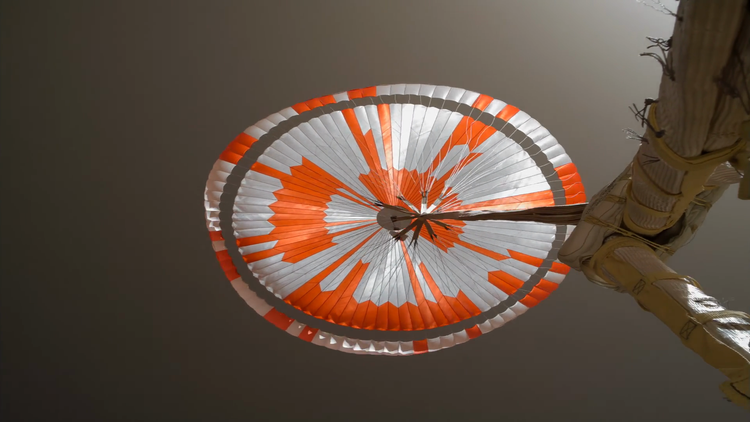
Suppose we take that same image, but now apply the pixel aspect ratio. This is what the image is meant to look like, and it’s not a small difference – now the parachute actually looks like a circle.
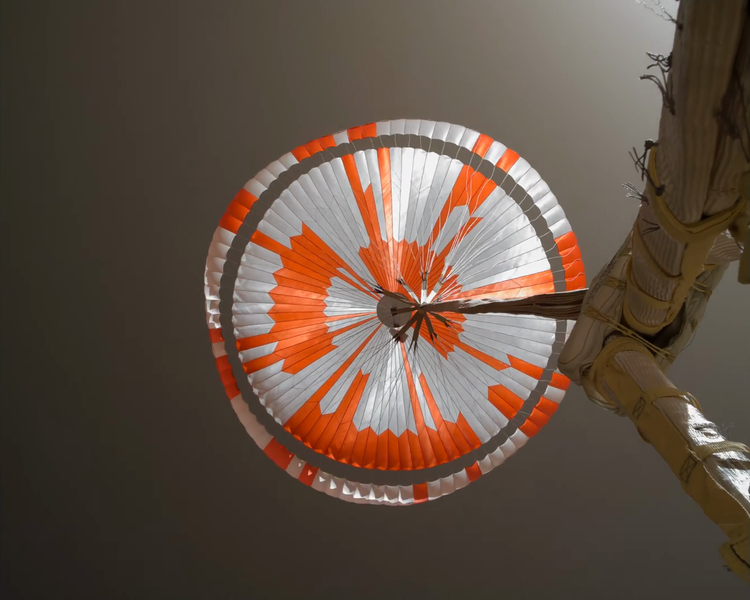
Seeing both versions side-by-side makes the problem obvious: the stored frame isn’t how the video is displayed. The video player in my browser will play it correctly using the pixel aspect ratio, but my layout code wasn’t doing that. I was telling the browser the wrong aspect ratio, and the browser had to update the page when it loaded the video file.
Getting the correct display dimensions in Python
This is my old function for getting the dimensions of a video file, which uses a Python wrapper around MediaInfo to extract the width and height fields. I now realise that this only gives me the storage aspect ratio, and may be misleading for some videos.
from pathlib import Path

from pymediainfo import MediaInfo


def get_storage_aspect_ratio(video_path: Path) -> tuple[int, int]:
    """
    Returns the storage aspect ratio of a video, as a width/height ratio.
    """
    media_info = MediaInfo.parse(video_path)

    try:
        video_track = next(
            tr
            for tr in media_info.tracks
            if tr.track_type == "Video"
        )
    except StopIteration:
        raise ValueError(f"No video track found in {video_path}")

    return video_track.width, video_track.height
I can’t find an easy way to extract the pixel aspect ratio using pymediainfo. It does expose a Track.aspect_ratio property, but that’s a string which has a rounded value – for example, 45:64 becomes 0.703. That’s close, but the rounding introduces a small inaccuracy. Since I can get the complete value from ffprobe, that’s what I’m doing in my revised function.
The new function is longer, but it’s more accurate:
from fractions import Fraction
import json
from pathlib import Path
import subprocess


def get_display_aspect_ratio(video_path: Path) -> tuple[int, int]:
    """
    Returns the display aspect ratio of a video, as a width/height fraction.
    """
    cmd = [
        "ffprobe",
        #
        # verbosity level = error
        "-v", "error",
        #
        # only get information about the first video stream
        "-select_streams", "v:0",
        #
        # only gather the entries I'm interested in
        "-show_entries", "stream=width,height,sample_aspect_ratio",
        #
        # print output in JSON, which is easier to parse
        "-print_format", "json",
        #
        # input file
        str(video_path)
    ]

    output = subprocess.check_output(cmd)
    ffprobe_resp = json.loads(output)

    # The output will be structured something like:
    #
    #   {
    #       "streams": [
    #           {
    #               "width": 1920,
    #               "height": 1080,
    #               "sample_aspect_ratio": "45:64"
    #           }
    #       ],
    #       …
    #   }
    #
    # If the video doesn't specify a pixel aspect ratio, then it won't
    # have a `sample_aspect_ratio` key.
    video_stream = ffprobe_resp["streams"][0]

    try:
        pixel_aspect_ratio = Fraction(
            video_stream["sample_aspect_ratio"].replace(":", "/")
        )
    except KeyError:
        pixel_aspect_ratio = 1

    width = round(video_stream["width"] * pixel_aspect_ratio)
    height = video_stream["height"]

    return width, height
This is calling the ffprobe command I showed above, plus -print_format json to print the data in JSON, which is easier for Python to parse.
I have to account for the case where a video doesn’t set a sample aspect ratio – in that case, the displayed video just uses square pixels.
Since the aspect ratio is expressed as a ratio of two integers, this felt like a good chance to try the fractions module. That avoids converting the ratio to a floating-point number, which potentially introduces inaccuracies. It doesn’t make a big difference, but in my video collection treating the aspect ratio as a float produces results that are 1 or 2 pixels different from QuickTime Player.
When I multiply the stored width and aspect ratio, I’m using the round() function to round the final width to the nearest integer. That’s more accurate than int(), which always rounds down.
Conclusion: use display aspect ratio
When you want to know how much space a video will take up on a web page, look at the display aspect ratio, not the stored pixel dimensions. Pixels can be squashed or stretched before display, and the stored width/height won’t tell you that.
Videos with non-square pixels are pretty rare, which is why I ignored this for so long. I’m glad I finally understand what’s going on.
After switching to ffprobe and using the display aspect ratio, my pre-allocated video boxes now match what the browser eventually renders – no more letterboxing, no more layout jumps.