Organising my cross-stitch patterns
I have a lot of digital cross-stitch patterns and until recently they were a mess. My “collection” was a series of several hundred PDFs, disorganised and spread across my disk.
Recently, I was looking for a pattern and it took me several minutes to find it. I had a brief moment of panic, thinking that I’d lost it, and the website this pattern came from is long since gone. Fortunately it did turn up, but it was clear I had to organise my pattern collection.
Some people would use apps like Pattern Keeper or Flosshaven, but I just created another static website on my media drive. This is what it looks like:
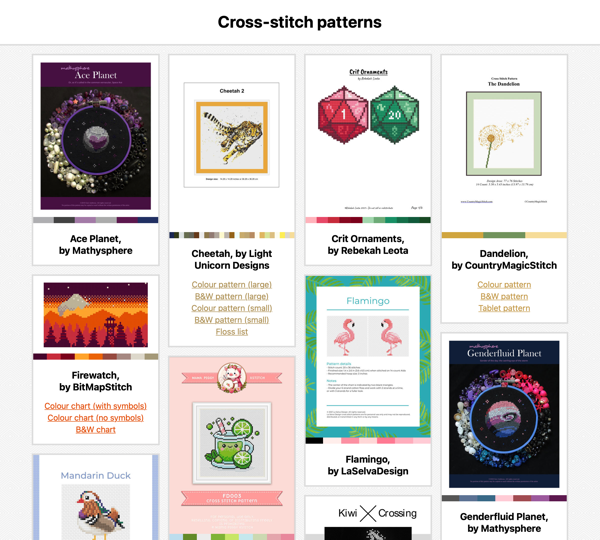
The patterns are arranged in a masonry layout with a preview thumbnail for each pattern, which is normally the first page of the PDF. If a pattern has multiple files – for example, different files for colour and black-and-white printing – there’s a list of links below the thumbnail. I can also add a source link to where I bought the pattern, if I want to find more patterns by the same author.
Internally, it’s structured like my other static websites. The metadata for the patterns is stored in a JavaScript file, and then I have an HTML page which renders that metadata in this visual design. My pattern collection doesn’t change very often, so I’m adding new files by hand.
There are no sorting or filtering options, because my collection is small enough that they’re unnecessary. I can scroll through the entire list in less than a minute and find whatever I need.
I’d like to start making my own clothes soon, and I expect to copy this design to store clothing patterns.
This collection now sits alongside my saved bookmarks, podcasts, TV shows, and more. I can keep all my patterns organised, and I won’t lose them in the depths of my hard drive.
Technical tricks
There are a couple of technical pieces I’m quite pleased with in this process:
Masonry layout. I love the cascading grid style of a masonry layout, and I think they’re great when you have variable-sized content – like my pattern cards. I’ve been using them for over a decade; screenshots of my early web apps show my experiments with David Desandro’s Masonry.js library.
Masonry layouts are now a native feature of CSS called “Grid Lanes”, which is simpler and more performant than the JavaScript approach. I’m excited to use these layouts in even more places.
Thumbnails of PDFs. Most digital postage patterns are shipped as PDFs, and I’m creating the thumbnail images with my create_thumbnail tool.
I had to extend my tool to support PDFs, which turned out to be straightforward with the pdf_oxide crate. I’d not come across Oxide before, but it’s a cross-language library for working with PDFs, and I can imagine using it in future.
A coloured stripe for the palette. In the metadata for each project, I have the complete list of DMC thread colours and the pattern dimensions. I have a lookup table that converts DMC thread colours to hex codes, and then I’m able to create a linear gradient in CSS to render a coloured stripe of the pattern colours.
Here’s an example from a pattern with four colours:
border-bottom: 12px solid transparent;
border-image:  linear-gradient(
  to right,
  #7a451f 0%,
  #7a451f 25%,
  #985e33 25%,
  #985e33 50%,
  #e4bb8e 50%,
  #e4bb8e 75%,
  #361f0e 75%,
  #361f0e 100%
) 1;
Building the HTML, CSS, and JavaScript was very quick – I have notes on how I build my media sites, and I’ve done it plenty of times before. I threw together the initial prototype in less than 15 minutes. The longer part was finding all the PDFs scattered across my disk – but now that’s done, and I know exactly where to find my patterns.