Gumdrop, a silly app for messing with my webcam
During the COVID lockdowns, I spent long evenings at home on my own, and I amused myself by dressing up in extravagant and glamorous clothing. One dark night, I realised I could use my home working setup to have some fun, with just a webcam and a monitor.
I turned off every light in my office, cranked up my monitor to max brightness, then I changed the colour on the screen to turn my room red or green or pink. Despite the terrible image quality, I enjoyed looking at myself in the webcam as my outfits took on a vivid new hue.
Here are three pictures with my current office lit up in different colours, each with a distinct vibe:

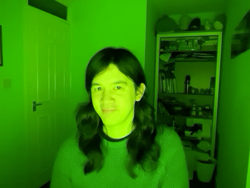

For a while I was using Keynote to change my screen colour, and Photo Booth to use the webcam. It worked, but juggling two apps was clunky, and a bunch of the screen was taken up with toolbars or UI that diluted the colour.
To make it easier, I built a tiny web app that helps me take these silly pictures. It’s mostly a solid colour background, with a small preview from the webcam, and buttons to take a picture or change the background colour. It’s a fun little toy, and it’s lived on my desktop ever since.
Here’s a screenshot:

If you want to play with it yourself, turn out the lights, crank up the screen brightness, and visit alexwlchan.net/fun-stuff/gumdrop.html. All the camera processing runs locally, so the webcam feed is completely private – your pictures are never sent to me or my server.
The picture quality on my webcam is atrocious, even more so in a poorly-lit room, but that’s all part of the fun. One thing I discovered is that I prefer this with my desktop webcam rather than my iPhone – the iPhone is a better camera, but it does more aggressive colour correction. That makes the pictures less goofy, which defeats the purpose!
I’m not going to explain how the code works – most of it comes from an MDN tutorial which explains how to use a webcam from an HTML page, so I’d recommend reading that.
I don’t play dress up as much as I used to, but on occasion I’ll still break it out and amuse myself by seeing what I look like in deep blue, or vivid green, or hot pink. It’s also how I took one of my favourite pictures of myself, a witchy vibe I’d love to capture more often:

Computers can be used for serious work, but they can do silly stuff as well.