get_live_text
Get text from an image using Apple’s built-in "Live Text" feature
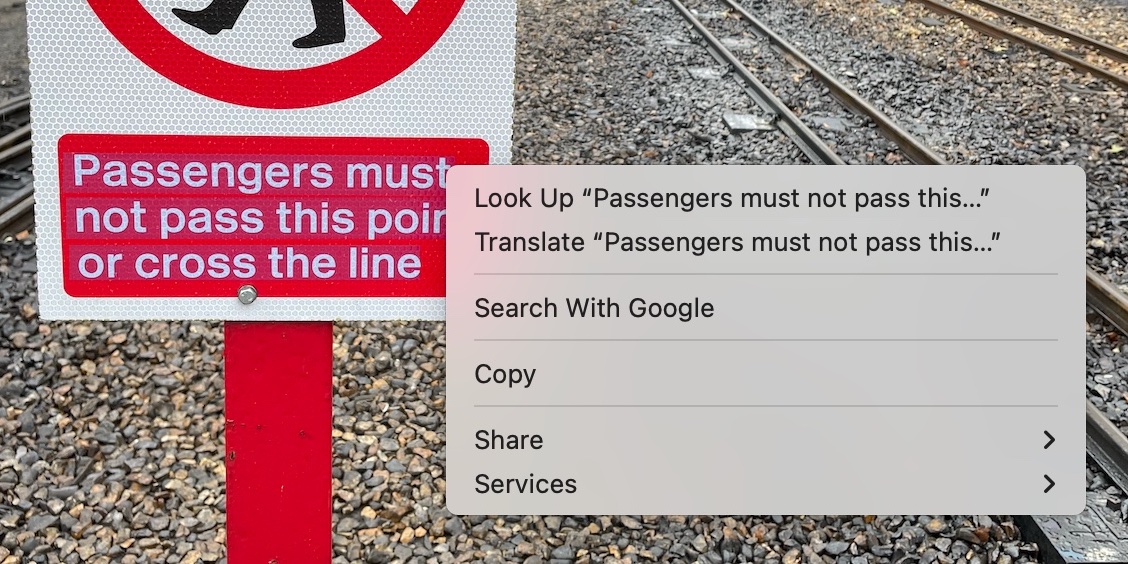
This tool uses Apple’s Live Text feature to get text from an image on the command line. This gives you a way to OCR images programatically without installing any extra software.
$ get_live_text "railway_sign.jpg"This is the same as if you’d copy/pasted the text from the image using the Preview app, but now you can do so programatically and in bulk.
Motivation
My priority is convenience, not absolute accuracy.
I’ve had issues installing third-party OCR tools in the past, whereas Live Text is built into macOS. It’s pretty quick for me to get this up and running on a new machine.
There may be other frameworks which provide more accurate transcription of text, but Live Text is good enough for my purposes. Currently I have two use cases for this script:
- Transcribing screenshots from my ebook reader, to add to my notes app. I go through and edit those transcripts, so I can fix any mistakes it’s made.
- Creating search indexes of scanned images, where a little bit of inaccuracy is fine, as long as it’s good enough for me to find the right image.
Installation
Install from source
Install the Xcode Command Line Tools
Download the
get_live_text.swiftscript from this repoCompile the script into a binary:
$ swiftc get_live_text.swiftCopy the compiled binary
get_live_textto somewhere in your PATH.
Install a compiled binary
- Find the latest GitHub release
- Download the zip file which is appropriate for your system (Intel =
x86_64, Apple Silion =aarch64) - Open the zip file, and add the
get_live_textapp to your PATH
The app is just a compiled version of the Swift script. It isn’t notarised, so when you run it, you may get a warning that this app is from an unidentified developer. You can get around this by right-clicking the app icon in Finder, and choosing Open from the shortcut menu.
Usage
Run the script passing one arguments: the path to the image you want to OCR.
$ get_live_text "railway_sign.jpg"