<?xml version="1.0" encoding="utf-8"?>
<feed xmlns="http://www.w3.org/2005/Atom" xml:lang="en">
  <updated>2026-04-27T13:01:21.258426+00:00</updated>
  
  <author>
    <name>Alex Chan</name>
    <email>alex@alexwlchan.net</email>
  </author>
  
  <link href="https://alexwlchan.net/atom.xml" rel="self" type="application/atom+xml" />
  <link href="https://alexwlchan.net/" rel="alternate" type="text/html" />
  <id>https://alexwlchan.net/</id>
  <title type="html">alexwlchan</title>
  <subtitle>Alex Chan’s personal website</subtitle>

<entry>
  <title type="html">HTTP GET requests with the Python standard library</title>
  <link
    href="https://alexwlchan.net/2026/python-http-with-the-stdlib/?ref=rss"
    rel="alternate"
    type="text/html"
    title="HTTP GET requests with the Python standard library"
  />
  <published>2026-04-24T16:14:03+02:00</published>
  <updated>2026-04-24T16:14:03+02:00</updated>

  <id>https://alexwlchan.net/2026/python-http-with-the-stdlib/</id>

  <content type="html" xml:base="https://alexwlchan.net/2026/python-http-with-the-stdlib/">
    <![CDATA[<p>If you’re doing HTTP in Python, you’re probably using one of three popular libraries: <a href="https://requests.readthedocs.io/en/latest/">requests</a>, <a href="https://github.com/encode/httpx">httpx</a>, or <a href="https://github.com/urllib3/urllib3">urllib3</a>; I’ve used each of them at different times.
These libraries are installed with pip, live outside the standard library, and provide more features than the built-in <a href="https://docs.python.org/3/library/urllib.request.html"><code>urllib.request</code> module</a> – indeed, the documentation for that module recommends using requests.</p>
<p>Recently I’ve been looking for a new HTTP library, because my previous choice seems abandoned.
I was using httpx, but the maintainer has closed issues on the GitHub repo, there’s only been one commit since January,  and the last release was over a year ago.
The easy choice would be switching to requests or urllib3, but I wondered: can I just use the standard library?</p>
<p>My usage is pretty basic – I have some manually-invoked scripts that make a handful of GET requests to public websites.
I don’t have long-running processes; I’m not making thousands of requests at once; I’m not using proxies or authentication.
There are plenty of features you can only get from third-party HTTP libraries – from connection pooling to HTTP/2 support – but I don’t need any of them.</p>
<p>I started experimenting, and what I realised is that I don’t miss the features, but I do miss the API.</p>
<p>Here’s how you make a basic GET request with httpx:</p>
<pre class="lng-python"><code><span class="kn">import</span> <span class="n">httpx</span>

<span class="n">resp</span> <span class="o">=</span> httpx<span class="o">.</span>get<span class="p">(</span>
    <span class="s2">"https://example.com"</span><span class="p">,</span>
    params<span class="o">=</span><span class="p">{</span><span class="s2">"name"</span><span class="p">:</span> <span class="s2">"pentagon"</span><span class="p">,</span> <span class="s2">"sides"</span><span class="p">:</span> <span class="s2">"5"</span><span class="p">},</span>
    headers<span class="o">=</span><span class="p">{</span><span class="s2">"User-Agent"</span><span class="p">:</span> <span class="s2">"Shape-Sorter/1.0"</span><span class="p">}</span>
<span class="p">)</span>
print<span class="p">(</span>resp<span class="o">.</span>content<span class="p">)</span></code></pre>
<p>Here’s the same request with <code>urllib.request</code>:</p>
<pre class="lng-python"><code><span class="kn">import</span> <span class="n">urllib</span><span class="p">.</span><span class="n">parse</span>
<span class="kn">import</span> <span class="n">urllib</span><span class="p">.</span><span class="n">request</span>

<span class="n">url</span> <span class="o">=</span> <span class="s2">"https://example.com"</span>
<span class="n">params</span> <span class="o">=</span> <span class="p">{</span><span class="s2">"name"</span><span class="p">:</span> <span class="s2">"pentagon"</span><span class="p">,</span> <span class="s2">"sides"</span><span class="p">:</span> <span class="s2">"5"</span><span class="p">}</span>
<span class="n">headers</span> <span class="o">=</span> <span class="p">{</span><span class="s2">"User-Agent"</span><span class="p">:</span> <span class="s2">"Shape-Sorter/1.0"</span><span class="p">}</span>

<span class="n">u</span> <span class="o">=</span> urllib<span class="o">.</span>parse<span class="o">.</span>urlsplit<span class="p">(</span>url<span class="p">)</span>
<span class="n">query</span> <span class="o">=</span> urllib<span class="o">.</span>parse<span class="o">.</span>urlencode<span class="p">(</span>params<span class="p">)</span>
url <span class="o">=</span> urllib<span class="o">.</span>parse<span class="o">.</span>urlunsplit<span class="p">(</span>
    <span class="p">(</span>u<span class="o">.</span>scheme<span class="p">,</span> u<span class="o">.</span>netloc<span class="p">,</span> u<span class="o">.</span>path<span class="p">,</span> query<span class="p">,</span> u<span class="o">.</span>fragment<span class="p">)</span>
<span class="p">)</span>

<span class="n">req</span> <span class="o">=</span> urllib<span class="o">.</span>request<span class="o">.</span>Request<span class="p">(</span>url<span class="p">,</span> headers<span class="o">=</span>headers<span class="p">)</span>

<span class="n">resp</span> <span class="o">=</span> urllib<span class="o">.</span>request<span class="o">.</span>urlopen<span class="p">(</span>req<span class="p">)</span>
print<span class="p">(</span>resp<span class="o">.</span>read<span class="p">())</span></code></pre>
<p>Verbose!
I’ve wrapped it in a helper function in <a href="https://alexwlchan.net/projects/chives/">chives</a>, my personal utility library.
Here’s the same request a third time:</p>
<pre class="lng-python"><code><span class="kn">from</span> <span class="n">chives</span><span class="p">.</span><span class="n">fetch</span> <span class="kn">import</span> <span class="n">fetch_url</span>

<span class="n">resp</span> <span class="o">=</span> fetch_url<span class="p">(</span>
    <span class="s2">"https://example.com"</span><span class="p">,</span>
    params<span class="o">=</span><span class="p">{</span><span class="s2">"name"</span><span class="p">:</span> <span class="s2">"pentagon"</span><span class="p">,</span> <span class="s2">"sides"</span><span class="p">:</span> <span class="s2">"5"</span><span class="p">},</span>
    headers<span class="o">=</span><span class="p">{</span><span class="s2">"User-Agent"</span><span class="p">:</span> <span class="s2">"Shape-Sorter/1.0"</span><span class="p">}</span>
<span class="p">)</span>
print<span class="p">(</span>resp<span class="p">)</span></code></pre>
<p>Much cleaner!</p>
<p>The code in chives does have one dependency – <a href="https://github.com/certifi/python-certifi">certfi</a>, a lightweight package that provides Mozilla’s collection of root certificates.</p>
<p>There are lots of good reasons to use a third-party HTTP library, but I can do everything I need with the standard library and my personal wrapper.
Let’s go through how it works.</p>

<nav aria-labelledby="toc-heading" class="table_of_contents">
<h3 id="toc-heading">Table of contents</h3>
<ul><li>
<a href="#building-the-code-urllib-request-request-code-object">Building the urllib.request.Request object</a></li><li>
<a href="#getting-a-web-page-or-an-api-endpoint">Getting a web page or an API endpoint</a></li><li>
<a href="#downloading-images-with-format-based-file-extensions">Downloading images with format-based file extensions</a></li><li>
<a href="#packaging-and-testing">Packaging and testing</a></li></ul>
</nav>
<h2 id="building-the-code-urllib-request-request-code-object">Building the <code>urllib.request.Request</code> object</h2>
<p>The first step is building the <a href="https://docs.python.org/3/library/urllib.request.html#urllib.request.Request"><code>Request</code> object</a>.
Other HTTP libraries provide helper functions or hide this step for simple requests (notice the basic <code>httpx.get</code> call doesn’t mention an <code>httpx.Request</code>), but for <code>urllib.request</code> we have to do it ourselves.
Here’s mine:</p>
<pre class="lng-python"><code><span class="kn">import</span> <span class="n">urllib</span><span class="p">.</span><span class="n">parse</span>
<span class="kn">import</span> <span class="n">urllib</span><span class="p">.</span><span class="n">request</span>


<span class="n">QueryParams</span> <span class="o">=</span> dict<span class="p">[</span>str<span class="p">,</span> str<span class="p">]</span> <span class="o">|</span> list<span class="p">[</span>tuple<span class="p">[</span>str<span class="p">,</span> str<span class="p">]]</span>
<span class="n">Headers</span> <span class="o">=</span> dict<span class="p">[</span>str<span class="p">,</span> str<span class="p">]</span>


<span class="k">def</span> <span class="n">build_request</span><span class="p">(</span>
    <span class="n">url</span><span class="p">:</span> str<span class="p">,</span>
    <span class="o">*</span><span class="p">,</span>
    <span class="n">params</span><span class="p">:</span> QueryParams <span class="o">|</span> <span class="kc">None</span> <span class="o">=</span> <span class="kc">None</span><span class="p">,</span>
    <span class="n">headers</span><span class="p">:</span> Headers <span class="o">|</span> <span class="kc">None</span> <span class="o">=</span> <span class="kc">None</span>
<span class="p">)</span> <span class="o">-&gt;</span> urllib<span class="o">.</span>request<span class="o">.</span>Request<span class="p">:</span>
    <span class="sd">"""</span>
<span class="sd">    Build a urllib Request, appending query parameters and attaching headers.</span>
<span class="sd">    """</span>
    <span class="k">if</span> params <span class="ow">is</span> <span class="ow">not</span> <span class="kc">None</span><span class="p">:</span>
        <span class="n">params_list</span> <span class="o">=</span> list<span class="p">(</span>params<span class="o">.</span>items<span class="p">())</span> <span class="k">if</span> isinstance<span class="p">(</span>params<span class="p">,</span> dict<span class="p">)</span> <span class="k">else</span> params

        <span class="n">u</span> <span class="o">=</span> urllib<span class="o">.</span>parse<span class="o">.</span>urlsplit<span class="p">(</span>url<span class="p">)</span>
        <span class="n">query</span> <span class="o">=</span> urllib<span class="o">.</span>parse<span class="o">.</span>parse_qsl<span class="p">(</span>u<span class="o">.</span>query<span class="p">)</span> <span class="o">+</span> params_list
        <span class="n">new_query</span> <span class="o">=</span> urllib<span class="o">.</span>parse<span class="o">.</span>urlencode<span class="p">(</span>query<span class="p">)</span>
        url <span class="o">=</span> urllib<span class="o">.</span>parse<span class="o">.</span>urlunsplit<span class="p">(</span>
            <span class="p">(</span>u<span class="o">.</span>scheme<span class="p">,</span> u<span class="o">.</span>netloc<span class="p">,</span> u<span class="o">.</span>path<span class="p">,</span> new_query<span class="p">,</span> u<span class="o">.</span>fragment<span class="p">)</span>
        <span class="p">)</span>

    <span class="n">req</span> <span class="o">=</span> urllib<span class="o">.</span>request<span class="o">.</span>Request<span class="p">(</span>url<span class="p">,</span> headers<span class="o">=</span>headers <span class="ow">or</span> <span class="p">{})</span>

    <span class="k">return</span> req</code></pre>
<p>I can pass <code>params</code> as a dict or as a list of <code>(key, value)</code> tuples; I start by converting it to the list form.
This means I can pass the same query parameter multiple times in a URL.
That’s admittedly unusual, but I use it on a couple of my websites so I wanted to support it here.</p>
<p>I’m using the <a href="https://docs.python.org/3/library/urllib.parse.html"><code>urllib.parse</code> module</a> to manipulate the URL and append the query parameters.
I parse the initial URL with <a href="https://docs.python.org/3/library/urllib.parse.html#urllib.parse.urlsplit"><code>urlsplit</code></a>, encode the query parameters, then reassemble the URL with <a href="https://docs.python.org/3/library/urllib.parse.html#urllib.parse.urlunsplit"><code>urlunsplit</code></a>.
This preserves any existing query parameters and fragments, and returns a complete URL I can pass to the <code>Request</code> object.</p>
<p>(If, like me, you’d reach for the <a href="https://docs.python.org/3/library/urllib.parse.html#urllib.parse.urlparse"><code>urlparse</code> function</a>, you’re showing your age – one thing I learnt during this project is that <a href="https://docs.python.org/3/library/urllib.parse.html#urllib.parse.urlparse"><code>urlparse</code></a> is now obsolete, and <a href="https://docs.python.org/3/library/urllib.parse.html#urllib.parse.urlsplit"><code>urlsplit</code></a> is the replacement.)</p>
<p>This function only handles GET requests, which is all I need for my scripts – but it wouldn’t be difficult to extend it to handle POST requests or form data if the need arises.</p>
<p>This is a pure function, so it’s easy to <a href="https://alexwlchan.net/projects/chives/files/tests/test_fetch.py#:~:text=build_request">test thoroughly</a>.</p>
<h2 id="getting-a-web-page-or-an-api-endpoint">Getting a web page or an API endpoint</h2>
<p>In most cases, I just care about getting the response body from the remote server, not the headers or URL – for example, if I’m fetching a web page or an API endpoint.
If I want something different in a single script, I’ll eschew my wrapper and use <code>urllib.request</code> directly.</p>
<p>Here’s my <code>fetch_url</code> wrapper:</p>
<pre class="lng-python"><code><span class="kn">import</span> <span class="n">certifi</span>
<span class="kn">import</span> <span class="n">ssl</span>


<span class="k">def</span> <span class="n">fetch_url</span><span class="p">(</span>
    <span class="n">url</span><span class="p">:</span> str<span class="p">,</span>
    <span class="o">*</span><span class="p">,</span>
    <span class="n">params</span><span class="p">:</span> QueryParams <span class="o">|</span> <span class="kc">None</span> <span class="o">=</span> <span class="kc">None</span><span class="p">,</span>
    <span class="n">headers</span><span class="p">:</span> Headers <span class="o">|</span> <span class="kc">None</span> <span class="o">=</span> <span class="kc">None</span>
<span class="p">)</span> <span class="o">-&gt;</span> bytes<span class="p">:</span>
    <span class="sd">"""</span>
<span class="sd">    Fetch the contents of a URL and return the body of the response.</span>
<span class="sd">    """</span>
    <span class="n">req</span> <span class="o">=</span> build_request<span class="p">(</span>url<span class="p">,</span> params<span class="o">=</span>params<span class="p">,</span> headers<span class="o">=</span>headers<span class="p">)</span>
    
    <span class="n">ssl_context</span> <span class="o">=</span> ssl<span class="o">.</span>create_default_context<span class="p">(</span>cafile<span class="o">=</span>certifi<span class="o">.</span>where<span class="p">())</span>

    <span class="k">with</span> urllib<span class="o">.</span>request<span class="o">.</span>urlopen<span class="p">(</span>req<span class="p">,</span> context<span class="o">=</span>ssl_context<span class="p">)</span> <span class="k">as</span> <span class="n">resp</span><span class="p">:</span>
        <span class="n">data</span><span class="p">:</span> bytes <span class="o">=</span> resp<span class="o">.</span>read<span class="p">()</span>

    <span class="k">return</span> data</code></pre>
<p>The key function is <a href="https://docs.python.org/3/library/urllib.request.html#urllib.request.urlopen"><code>urllib.request.urlopen</code></a>, which is what actually makes the HTTP request.
I’m passing it two parameters: a <code>Request</code> and an <a href="https://docs.python.org/3/library/ssl.html#ssl.SSLContext"><code>SSLContext</code></a>.</p>
<p>We build the <code>Request</code> using the <code>build_request</code> function.</p>
<p>The <code>SSLContext</code> tells <code>urllib.request</code> which HTTPS certificates it can trust, in this case by pointing to a “cafile” (Certificate Authority file) file provided by the <a href="https://github.com/certifi/python-certifi"><code>certifi</code> library</a>.
This file contains a list of trusted root certificates, and all valid HTTPS certificates should eventually point back to an entry in this list.</p>
<p>The <code>certifi</code> library is a lightweight wrapper around <a href="https://wiki.mozilla.org/CA/Included_Certificates">Mozilla’s list of trusted Root Certificates</a>.
It’s not in the standard library because it’s important to stay up to date with changes to the list, and you don’t want those changes coupled to Python version releases.
Although this exercise is about reducing dependencies, I’m okay with <code>certifi</code> because it’s tiny – you can read the whole thing in less than five minutes.
I know what it’s doing.</p>
<p>The <code>urlopen</code> function looks for a 200 OK status code, and throws an <a href="https://docs.python.org/3/library/urllib.error.html#urllib.error.HTTPError"><code>HTTPError</code></a> if it gets an error response from the server.
I considered wrapping that in another type, but for now I’m just catching <code>HTTPError</code>.</p>
<p>This function doesn’t set a timeout on HTTP requests.
That would be an issue in a lot of contexts, but I’m normally using this from a script I run manually.
If something gets stuck, I can stop the script and debug manually.</p>
<p>This function doesn’t support streaming responses; it reads the whole thing into memory at once.
That’s fine for web pages or API calls, but I wouldn’t use this to download large files or videos.</p>
<p>There’s a lot of stuff this function doesn’t do, but it works well in all of my scripts, it has a friendly API, and it only has one third-party dependency.</p>
<h2 id="downloading-images-with-format-based-file-extensions">Downloading images with format-based file extensions</h2>
<p>As I started using the <code>fetch_url</code> in my projects, I realised the one time I often care about response headers is when I’m downloading images.
I want the filename to have the appropriate filename extension – <code>.jpg</code> for JPEGs, <code>.png</code> for PNGs, and so on.
Sometimes I can guess the file format from the URL, but sometimes I need to inspect the <a href="https://developer.mozilla.org/en-US/docs/Web/HTTP/Reference/Headers/Content-Type"><code>Content-Type</code> header</a>.</p>
<p>I considered exposing the headers from <code>fetch_url</code>, but since I only need the headers for downloading images and that’s a pretty common operation, I decided to make a <code>download_image</code> helper instead.</p>
<p>First, I wrote a helper function that picks a filename extension based on the <code>Content-Type</code> header:</p>
<pre class="lng-python"><code><span class="k">def</span> <span class="n">choose_filename_extension</span><span class="p">(</span><span class="n">content_type</span><span class="p">:</span> str <span class="o">|</span> <span class="kc">None</span><span class="p">)</span> <span class="o">-&gt;</span> str<span class="p">:</span>
    <span class="sd">"""</span>
<span class="sd">    Choose a filename extension for an image downloaded with the given</span>
<span class="sd">    Content-Type header.</span>
<span class="sd">    """</span>
    <span class="k">if</span> content_type <span class="ow">is</span> <span class="kc">None</span><span class="p">:</span>
        <span class="k">raise</span> ValueError<span class="p">(</span>
            <span class="s2">"no Content-Type header, cannot determine image format"</span>
        <span class="p">)</span>

    <span class="n">content_type_mapping</span> <span class="o">=</span> <span class="p">{</span>
        <span class="s2">"image/jpeg"</span><span class="p">:</span> <span class="s2">"jpg"</span><span class="p">,</span>
        <span class="s2">"image/png"</span><span class="p">:</span> <span class="s2">"png"</span><span class="p">,</span>
        <span class="s2">"image/gif"</span><span class="p">:</span> <span class="s2">"gif"</span><span class="p">,</span>
        <span class="s2">"image/webp"</span><span class="p">:</span> <span class="s2">"webp"</span><span class="p">,</span>
    <span class="p">}</span>

    <span class="k">try</span><span class="p">:</span>
        <span class="k">return</span> content_type_mapping<span class="p">[</span>content_type<span class="p">]</span>
    <span class="k">except</span> KeyError<span class="p">:</span>
        <span class="k">raise</span> ValueError<span class="p">(</span><span class="sa">f</span><span class="s2">"unrecognised Content-Type header: </span><span class="si">{</span>content_type<span class="si">}</span><span class="s2">"</span><span class="p">)</span></code></pre>
<p>The mapping contains the four image formats I encounter in practice; it’s easy for me to add more if I try to download a newer format someday.</p>
<p>Then I wrote a function that takes an image URL and an “out prefix” (an initial guess at the path), downloads the image and choose a new file extension, and returns the final path:</p>
<pre class="lng-python"><code><span class="kn">from</span> <span class="n">pathlib</span> <span class="kn">import</span> <span class="n">Path</span>


<span class="k">def</span> <span class="n">download_image</span><span class="p">(</span>
    <span class="n">url</span><span class="p">:</span> str<span class="p">,</span>
    <span class="n">out_prefix</span><span class="p">:</span> Path<span class="p">,</span>
    <span class="o">*</span><span class="p">,</span>
    <span class="n">params</span><span class="p">:</span> QueryParams <span class="o">|</span> <span class="kc">None</span> <span class="o">=</span> <span class="kc">None</span><span class="p">,</span>
    <span class="n">headers</span><span class="p">:</span> Headers <span class="o">|</span> <span class="kc">None</span> <span class="o">=</span> <span class="kc">None</span><span class="p">,</span>
<span class="p">)</span> <span class="o">-&gt;</span> Path<span class="p">:</span>
    <span class="sd">"""</span>
<span class="sd">    Download an image from the given URL to the target path, and return</span>
<span class="sd">    the path of the downloaded file.</span>

<span class="sd">    Add the appropriate file extension, based on the image's Content-Type.</span>

<span class="sd">    Throws a FileExistsError if you try to overwrite an existing file.</span>
<span class="sd">    """</span>
    <span class="n">req</span> <span class="o">=</span> build_request<span class="p">(</span>url<span class="p">,</span> params<span class="o">=</span>params<span class="p">,</span> headers<span class="o">=</span>headers<span class="p">)</span>

    <span class="n">ssl_context</span> <span class="o">=</span> ssl<span class="o">.</span>create_default_context<span class="p">(</span>cafile<span class="o">=</span>certifi<span class="o">.</span>where<span class="p">())</span>

    <span class="k">with</span> urllib<span class="o">.</span>request<span class="o">.</span>urlopen<span class="p">(</span>req<span class="p">,</span> context<span class="o">=</span>ssl_context<span class="p">)</span> <span class="k">as</span> <span class="n">resp</span><span class="p">:</span>
        <span class="n">image_data</span><span class="p">:</span> bytes <span class="o">=</span> resp<span class="o">.</span>read<span class="p">()</span>

    <span class="n">image_format</span> <span class="o">=</span> choose_filename_extension<span class="p">(</span>content_type<span class="o">=</span>resp<span class="o">.</span>headers<span class="p">[</span><span class="s2">"content-type"</span><span class="p">])</span>

    <span class="n">out_path</span> <span class="o">=</span> out_prefix<span class="o">.</span>with_suffix<span class="p">(</span><span class="s2">"."</span> <span class="o">+</span> image_format<span class="p">)</span>
    out_path<span class="o">.</span>parent<span class="o">.</span>mkdir<span class="p">(</span>exist_ok<span class="o">=</span><span class="kc">True</span><span class="p">,</span> parents<span class="o">=</span><span class="kc">True</span><span class="p">)</span>
    <span class="k">with</span> open<span class="p">(</span>out_path<span class="p">,</span> <span class="s2">"xb"</span><span class="p">)</span> <span class="k">as</span> <span class="n">out_file</span><span class="p">:</span>
        out_file<span class="o">.</span>write<span class="p">(</span>image_data<span class="p">)</span>

    <span class="k">return</span> out_path</code></pre>
<p>The first half of this function is the same as <code>fetch_url</code>; the second half constructs the final path and writes the download image to disk.
I like this approach because it allows the caller to specify a meaningful directory and filename without worrying about the filename extension (which is important but not meaningful).</p>
<p>The function creates the output directory if it doesn’t exist, for convenience.
Nothing grinds my gears like getting a <code>FileNotFoundError</code> when trying to write to a file in a folder that doesn’t exist.
My text editor is smart enough to auto-create missing folders; I want my code to do the same.</p>
<p>I open the file in <a href="https://docs.python.org/3/library/functions.html#open"><code>xb</code> mode </a> to avoid overwriting existing files – if I try to write to an image I’ve already saved, I get a <code>FileExistsError</code>.
I find that a useful safety check, and I use exclusive creation mode in a lot of my scripts now.</p>
<h2 id="packaging-and-testing">Packaging and testing</h2>
<p>A few months ago, I created a personal utility library <code>chives</code> for dealing with <a href="https://alexwlchan.net/2024/static-websites/">tiny archives</a>, and that was a good place to keep this code.</p>
<p>The HTTP code is in <a href="https://alexwlchan.net/projects/chives/files/src/chives/fetch.py"><code>chives.fetch</code></a>, and the accompanying tests are in <a href="https://alexwlchan.net/projects/chives/files/tests/test_fetch.py"><code>test_fetch.py</code></a>.
I’m testing it using the <a href="https://alexwlchan.net/2025/testing-with-vcrpy/">vcrpy library</a>, which knows how to record responses from <code>urllib.request</code>.</p>
<p>I now use this code across all my personal scripts, and it’s been rock-solid.
There are lots of good reasons to use Python’s more advanced HTTP libraries,  but they’re for use cases I don’t have.</p>

    <p>[If the formatting of this post looks odd in your feed reader, <a href="https://alexwlchan.net/2026/python-http-with-the-stdlib/?ref=rss">visit the original article</a>]</p>
    ]]>
  </content>

    <category term="Python" />

    <summary type="html">For my local scripting, a lightweight wrapper around the Python standard library gets me a friendly API without the dependencies.</summary>
</entry><entry>
  <title type="html">Auditing my local Python packages</title>
  <link
    href="https://alexwlchan.net/2026/python-package-audit/?ref=rss"
    rel="alternate"
    type="text/html"
    title="Auditing my local Python packages"
  />
  <published>2026-04-10T18:00:35+01:00</published>
  <updated>2026-04-10T18:00:35+01:00</updated>

  <id>https://alexwlchan.net/2026/python-package-audit/</id>

  <content type="html" xml:base="https://alexwlchan.net/2026/python-package-audit/">
    <![CDATA[<p>Is it just me, or are chain attacks on the rise?
It feels like there are more and more incidents where a bad actor publishes a malicious version of a popular package, people install it on their machines, and they get compromised.
In March alone, such attacks included <a href="https://cloud.google.com/blog/topics/threat-intelligence/north-korea-threat-actor-targets-axios-npm-package">Axios npm package</a>, the <a href="https://www.stepsecurity.io/blog/trivy-compromised-a-second-time---malicious-v0-69-4-release">Trivy vulnerability scanner</a>, and the <a href="https://www.stepsecurity.io/blog/litellm-credential-stealer-hidden-in-pypi-wheel">LiteLLM Python package</a>.</p>
<p>So far I’ve been unaffected, because the attacks have only involved libraries or packages I don’t use – but it would be foolish to imagine that will always be the case.
I have a lot of local Python projects, and I’ve been thinking about how I’d react if a Python package I use was compromised.</p>
<p>The first step is detection: once I know a package version is malicious, how do I know if I’ve installed it?
Because I use virtual environments, this turns out to be a non-trivial question.</p>
<h2 id="what-are-virtual-environments">What are virtual environments?</h2>
<p><a href="https://packaging.python.org/en/latest/tutorials/installing-packages/#creating-virtual-environments">Virtual environments</a> (or “virtualenvs”) are a tool to create isolated Python environments, each with its own set of installed packages.
They allow you to have different dependencies for different projects.
For example, if two projects depend on different versions of the same package, you can create per-project virtualenvs, each with the appropriate version.</p>
<p>A virtualenv is stored in a folder that includes symlinks to the global Python interpreter and the packages you’ve installed in the virtualenv.
When you “activate” the virtualenv, commands like <code>pip install</code> install packages in the virtualenv folder rather than your global Python.</p>
<p>Here’s an example:</p>
<pre class="lng-console"><code><span class="gp">$</span><span class="w"> </span><span class="c1"># `python3` points to my global interpreter</span>
<span class="gp">$</span><span class="w"> </span>which<span class="w"> </span>python3
<span class="go">/Library/Frameworks/Python.framework/Versions/3.13/bin/python3</span>

<span class="gp">$</span><span class="w"> </span><span class="c1"># Create the virtualenv</span>
<span class="gp">$</span><span class="w"> </span>python3<span class="w"> </span>-m<span class="w"> </span>venv<span class="w"> </span>.venv

<span class="gp">$</span><span class="w"> </span><span class="c1"># Activate the virtualenv, so now `python3` and `pip` commands will</span>
<span class="gp">$</span><span class="w"> </span><span class="c1"># run inside the virtualenv</span>
<span class="gp">$</span><span class="w"> </span>source<span class="w"> </span>.venv/bin/activate

<span class="gp">$</span><span class="w"> </span><span class="c1"># `python3` now points to the symlink in the virtualenv</span>
<span class="gp">$</span><span class="w"> </span>which<span class="w"> </span>python3
<span class="go">/private/tmp/example/.venv/bin/python3</span>

<span class="gp">$</span><span class="w"> </span><span class="c1"># Pillow will be installed inside the `.venv` folder</span>
<span class="gp">$</span><span class="w"> </span>pip<span class="w"> </span>install<span class="w"> </span>Pillow</code></pre>
<p>I create a new virtualenv for every Python project, so I have a lot of different virtualenvs on my personal Mac.</p>
<p>To check if I’d installed version X of package Y, I’d have to check each of my virtualenvs.
Python itself doesn’t keep a running list of virtualenvs I’ve created, so I have to manage that list myself.</p>
<h2 id="getting-a-list-of-my-virtualenvs">Getting a list of my virtualenvs</h2>
<p>I’m very consistent about naming my virtualenvs: the folder is always named <code>.venv</code>.
(I actually have a <a href="https://alexwlchan.net/2023/fish-venv/#create-function">shell function</a> for creating virtualenvs, which enforces that convention.)</p>
<p>This means I can find all the virtualenvs in my home directory with a one-line command:</p>
<pre class="lng-console"><code><span class="gp">$</span><span class="w"> </span>find<span class="w"> </span>~<span class="w"> </span>-type<span class="w"> </span>d<span class="w"> </span>-name<span class="w"> </span>.venv
<span class="go">/Users/alexwlchan/repos/snippets/.venv</span>
<span class="go">/Users/alexwlchan/repos/alexwlchan.net/.venv</span>
<span class="go">/Users/alexwlchan/repos/colour-scheme/.venv</span>
<span class="go">…</span></code></pre>
<p>I can similarly search external drives and volumes where I have virtualenvs:</p>
<pre class="lng-console"><code><span class="gp">$</span><span class="w"> </span>find<span class="w"> </span>/Volumes/Media/<span class="w"> </span>-type<span class="w"> </span>d<span class="w"> </span>-name<span class="w"> </span>.venv
<span class="go">/Volumes/Media/Screenshots/.venv</span>
<span class="go">/Volumes/Media/Social Media/.venv</span>
<span class="go">/Volumes/Media/Bookmarks/.venv</span>
<span class="go">…</span></code></pre>
<p>These commands take about 30 seconds to run – just long enough to be annoying – so I’ve saved the results to a text file:</p>
<pre class="lng-console"><code><span class="gp">$</span><span class="w"> </span>find<span class="w"> </span>~<span class="w"> </span>-type<span class="w"> </span>d<span class="w"> </span>-name<span class="w"> </span>.venv<span class="w"> </span>&gt;&gt;<span class="w"> </span>~/.venv_registry
<span class="gp">$</span><span class="w"> </span>find<span class="w"> </span>/Volumes/Media/<span class="w"> </span>-type<span class="w"> </span>d<span class="w"> </span>-name<span class="w"> </span>.venv<span class="w"> </span>&gt;&gt;<span class="w"> </span>~/.venv_registry</code></pre>
<p>I’ve also modified my shell function that creates virtualenvs to update this file whenever I create a new virtualenv.
Now I have an up-to-date list of all my virtualenvs that I can use to search for vulnerable dependencies.</p>
<h2 id="what-about-python-packages-installed-outside-virtualenvs">What about Python packages installed outside virtualenvs?</h2>
<p>If you run <code>pip install</code> without activating a virtualenv, the packages will get installed in your global Python installation, and they wouldn’t be included in this list.
This is generally a bad idea, because you’re back to the problem of different projects using incompatible dependencies.</p>
<p>You can tell pip that it should <a href="https://docs.python-guide.org/dev/pip-virtualenv/#requiring-an-active-virtual-environment-for-pip">only use virtualenvs</a>, either with an environment variable or a config file.
Once you set up that config, pip will refuse to install packages outside a virtualenv.</p>
<p>Alternatively, if you use uv instead of pip, you can’t install packages outside a virtualenv unless you explicitly pass the <code>--system</code> flag to modify your system Python.</p>
<p>I set the <code>PIP_REQUIRE_VIRTUALENV=true</code> in my shell config file, and I use uv, so I don’t have any Python packages installed outside virtualenvs.</p>
<h2 id="searching-my-virtualenvs-for-package-versions">Searching my virtualenvs for package versions</h2>
<p>Now I have a text file with a list of all my virtualenvs, I can write scripts that run commands in each of them.</p>
<p>For example, here’s a bash script that runs <code>uv pip freeze</code> in every virtualenv to print a list of installed dependencies:</p>
<pre class="lng-bash"><code><span class="ch">#!/usr/bin/env bash</span>

set -o errexit
set -o nounset

<span class="k">while</span> read -r <span class="n">venv_dir</span><span class="p">;</span> <span class="k">do</span>
  <span class="k">if</span> ! test -d <span class="s2">"</span>$venv_dir<span class="s2">"</span><span class="p">;</span> <span class="k">then</span>
    echo <span class="s2">"does not exist: </span>$venv_dir<span class="s2">"</span> &gt;&amp;2
    continue
  <span class="k">fi</span>
  
  echo <span class="s2">"== </span>$venv_dir<span class="s2"> =="</span>
  uv pip freeze --python <span class="s2">"</span>$venv_dir<span class="s2">/bin/python"</span>
  echo <span class="s2">""</span>
<span class="k">done</span> &lt; ~/.venv_registry</code></pre>
<p>Within half a second, I have a complete list of every Python package installed in every virtualenv on my Mac.
I dump the output to a text file, and then I can look for compromised package versions – or reassure myself that I don’t have a package installed, not even as an indirect dependency.</p>
<p>I skip missing virtualenvs because they’re probably temporary environments I have yet to clean up from my registry, or virtualenvs on external drives that are currently unmounted.</p>
<p>I like that this script doesn’t run the Python interpreter itself, so I won’t make things worse if I’ve already installed a malicious package.
In particular, uv is a Rust tool that doesn’t run any Python code, it just knows how to understand Python installations.</p>
<p>For example, with the recent LiteLLM compromise, the attackers <a href="https://www.stepsecurity.io/blog/litellm-credential-stealer-hidden-in-pypi-wheel#the-entry-points-two-versions-two-injection-techniques">installed a <code>.pth</code> file</a> which would run as soon as you started Python, even if you didn’t import LiteLLM.
Even a basic <code>python --version</code> or <code>pip freeze</code> would compromise your machine.
I could easily modify this script to look for the malicious <code>.pth</code> file in all of my Python environments, without ever running Python.</p>
<h2 id="other-uses-for-a-virtualenv-registry">Other uses for a virtualenv registry</h2>
<p>I originally wrote this to detect compromised packages, but I found other uses:</p>
<ul>
<li><p>I can find outdated versions of packages, and make sure all my virtualenvs are up-to-date.</p>
</li>
<li><p>If I’m trying to stop using a package, I can find any places I’m stll using it and remove it.
For example, I’m trying to replace some third-party HTTP libraries with the standard library, and these scripts help me find where I’m still using the third-party libraries.</p>
</li>
<li><p>I can search all my Python code for places where I use specific functions or features, in a more efficient way than grepping my entire disk.
For example, I have a couple of personal utility libraries, and I can see which functions I’m still using and which can be deleted.
I do this by searching the parent directory of each <code>.venv</code> path, which is the root of each project.</p>
</li>
</ul>
<p>I hope none of the libraries I use are ever compromised, but if they are, I’ll be ready – and in the meantime, this is a useful tool to have around.</p>

    <p>[If the formatting of this post looks odd in your feed reader, <a href="https://alexwlchan.net/2026/python-package-audit/?ref=rss">visit the original article</a>]</p>
    ]]>
  </content>

    <category term="Python" />

    <summary type="html">Python's virtual environments mean I can have many versions of the same package scattered across my machine. I've started keeping a list of my environments so I can see exactly what's installed, and where.</summary>
</entry><entry>
  <title type="html">Quietly quantum-resistant blogging</title>
  <link
    href="https://alexwlchan.net/2026/post-quantum-blog/?ref=rss"
    rel="alternate"
    type="text/html"
    title="Quietly quantum-resistant blogging"
  />
  <published>2026-04-09T09:28:09+01:00</published>
  <updated>2026-04-09T09:28:09+01:00</updated>

  <id>https://alexwlchan.net/2026/post-quantum-blog/</id>

  <content type="html" xml:base="https://alexwlchan.net/2026/post-quantum-blog/">
    <![CDATA[<p>Among the other fun news recently, <a href="https://scottaaronson.blog/?p=9665">two papers were published</a> that suggest quantum computers capable of breaking classical public-key cryptography algorithms are much closer than previously believed.
What was thought to be years away might now be months.</p>
<p>I found <a href="https://words.filippo.io/crqc-timeline/">Filippo Valsorda’s post</a> especially helpful in understanding the scale of the risk.
We should assume that practical quantum computers are arriving imminently, and roll out quantum-resistant cryptography everywhere, lest we be caught unprepared and leave ourselves at risk.</p>
<p>Google have <a href="https://blog.google/innovation-and-ai/technology/safety-security/cryptography-migration-timeline/">set a 2029 deadline</a> for moving to quantum-resistant cryptography; Cloudflare <a href="https://blog.cloudflare.com/post-quantum-roadmap/">have done similar</a>.
(Similar internal discussions are happening at <a href="https://tailscale.com/">my workplace</a> but there aren’t any public announcements yet.)</p>
<p>Amidst all the concern, I was pleasantly surprised to discover that my website is already using quantum-resistant cryptography, and I didn’t even realise.</p>
<h2 id="what-s-the-threat">What’s the threat?</h2>
<p>All “classical” public-key cryptography relies on hard mathematical problems – operations that are easy to compute in one direction, but incredibly difficult to do in reverse.</p>
<p>For example, it’s easy to multiply two prime numbers together and compute the result, but working out those two prime numbers if you only have the result is impossibly hard.
Even for fairly small numbers, you could be working until the heat death of the universe and still not have an answer.</p>
<p>Quantum computers work differently to traditional computers, and a sufficiently powerful one can reverse these one-way computations.
That would break all of our existing cryptography.</p>
<p>This is the cryptography that underpins almost everything we do online – protecting banks, governments, militaries, and pretty much everyone else.
If somebody had a quantum computer that could crack it, all of that information would become readable to them.
It would be disastrous.</p>
<p>Small-scale quantum computers already exist in labs, but nothing powerful enough to break public key cryptography – for now.
Researchers have been trying to build bigger and better quantum computers, but they were a long way away from building anything this powerful.
They’d likely get there eventually, but that was expected to be a long time away – late 2030s at the earliest.</p>
<p>Other researchers have been developing new cryptographic algorithms that rely on different maths problems, which can’t be easily broken by quantum computers.
These new algorithms are the so-called “post-quantum cryptography (PQC)” or “quantum-resistant cryptography”.
They’ve gradually been formalised as standards, and are starting to be used by our devices.
For example, all the popular web browsers now support PQC for HTTPS certificates.</p>
<p>Previously, organisations like the NCSC or NIST recommended <a href="https://www.ncsc.gov.uk/guidance/pqc-migration-timelines">a 2035 deadline</a> for migrating to PQC.
The idea was to be fully migrated long before quantum computers became a practical threat.
That recommendation wasn’t just an abundance of caution – it’s to eliminate the risk of <a href="https://en.wikipedia.org/wiki/Harvest_now, _decrypt_later">Harvest Now, Decrypt Later (HNDL)</a> attacks, where an adversary records data encrypted with classical cryptography, and waits until they have a quantum computer that can unlock it.
The sooner we migrate to PQC, the more expensive and less valuable such an attack becomes.</p>
<p>Now, it appears we need more urgency.</p>
<p>The two recently published papers narrow the gap between the experimental machines we have today and a practical threat.
They describe efficiency improvements that would allow quantum computers to reverse these mathematical operations with far less computing power.
It’s become more plausible that somebody could build a “sufficiently powerful” machine within a few years.
It’s also becoming a smarter bet to throw lots of money at building one right now, where previously the odds of success were so low as to make that an unwise bet.</p>
<p>This is why Google, Cloudflare, and others are moving forward their deadlines for migrating to post-quantum cryptography.
The threat has gone from “late 2030s if we’re unlucky” to “early 2030s, maybe sooner”.</p>
<h2 id="what-about-this-blog">What about this blog?</h2>
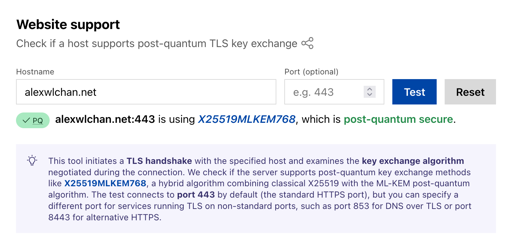
<p>While reading the recent news about this issue, I found Cloudflare’s <a href="https://radar.cloudflare.com/post-quantum">post-quantum encryption radar</a>, which tells you how many websites are protected using post-quantum cryptography.
My website isn’t hosted on Cloudflare but I decided to try it anyway, and I was surprised by the result.
I’m already protected!</p>
<picture>
<source sizes="(max-width:512px)100vw,512px" srcset="https://alexwlchan.net/images/2026/cf_radar_pqc_1x.png 512w, https://alexwlchan.net/images/2026/cf_radar_pqc_2x.png 1024w, https://alexwlchan.net/images/2026/cf_radar_pqc_3x.png 1536w" type="image/png"/><img alt="A form to check if a host supports post-quantum TLS key exchange. I’ve entered my site ‘alexwlchan.net’ and Cloudflare reports that ‘alexwlchan.net:443 is using X25519MLKEM768, which is post-quantum secure’." class="screenshot" src="https://alexwlchan.net/images/2026/cf_radar_pqc_1x.png" width="512"/>
</picture>
<p>I never set up post-quantum cryptography for this site, but it’s enabled anyway, because I’m using <a href="https://caddyserver.com">Caddy</a> as my web server, and Caddy’s <a href="https://caddyserver.com/docs/caddyfile/directives/tls">default TLS settings</a> include PQC support.
At some point I updated to a new version of Caddy, I got these new defaults, and my site started quietly serving traffic with quantum-resistant cryptography.</p>
<p>This is exactly what I wanted when I switched to Caddy.
I’m not an expert on cryptography, or TLS, or securing servers, so I wanted a web server that would make sensible decisions for me.
I’ve mostly been ignorant of post-quantum cryptography and developments in quantum computing, but Caddy was protecting me anyway.</p>
<p>There’s a lot more work to do to use quantum-resistant cryptography everywhere, and recent announcements have made it far more urgent – but we can all sleep easier knowing my little blog is safe from quantum computers.</p>

    <p>[If the formatting of this post looks odd in your feed reader, <a href="https://alexwlchan.net/2026/post-quantum-blog/?ref=rss">visit the original article</a>]</p>
    ]]>
  </content>

    <category term="Blogging about blogging" />

    <summary type="html">Recent developments have the cryptography world on alert, fearing a quantum computer capable of breaking public key cryptography is imminent. Unbeknownst to me, my blog is already protected.</summary>
</entry><entry>
  <title type="html">Creating a personalised bin calendar</title>
  <link
    href="https://alexwlchan.net/2026/bin-calendar/?ref=rss"
    rel="alternate"
    type="text/html"
    title="Creating a personalised bin calendar"
  />
  <published>2026-03-26T17:33:58+00:00</published>
  <updated>2026-03-26T17:33:58+00:00</updated>

  <id>https://alexwlchan.net/2026/bin-calendar/</id>

  <content type="html" xml:base="https://alexwlchan.net/2026/bin-calendar/">
    <![CDATA[<pre class="lng-diff"><code><span class="gu">@@ -3,6 +3,6 @@</span>
 build
 mypy
 pytest-cov
<span class="gi">+pytest-vcr</span>
 ruff
<span class="gd">-silver-nitrate[cassettes]</span>
 twine</code></pre>
<p>Every spring, my council publish a new bin collection calendar.
These calendars are typically published as a single PDF to cover the entire region, with the information packed into a compact design.
I imagine this design is for economy of printing – you can print one calendar in bulk, and post the same thing to everybody.</p>
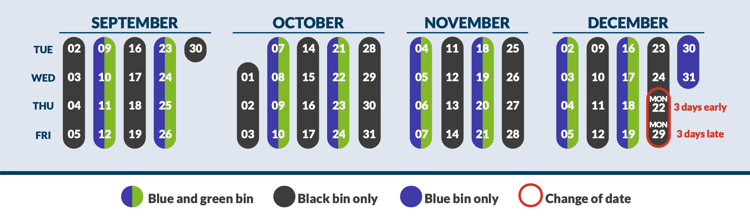
<p>Here’s an example of this sort of compact diagram from <a href="https://www.scambs.gov.uk/media/yawnruwn/bin-calendar-autumn-2025-pdf.pdf">South Cambridge</a>, where breaks the county into four different regions:</p>
<figure>
<picture>
<source sizes="(max-width:750px)100vw,750px" srcset="https://alexwlchan.net/images/2026/scambs_bins_1x.png 750w, https://alexwlchan.net/images/2026/scambs_bins_2x.png 1500w" type="image/png"/><img alt="Diagram showing bin collection days. The calendar has four rows for Tue/Wed/Thu/Fri which correspond to regular collection days, then you can see which day of the week your blue/green/black bins will be collected. Two changed days in December are highlighted in red." class="screenshot" src="https://alexwlchan.net/images/2026/scambs_bins_1x.png" width="750"/>
</picture>
<figcaption>
    I haven’t lived in South Cambridge for over eight years so this isn’t my calendar, but I don’t want to tell the Internet where I live by linking to a local council.
  </figcaption>
</figure>
<p>For example, if your usual bin day is Thursday, your final collection of the year would be on Monday 22nd December.</p>
<p>This compact representation is a marvel of design, but it’s not that useful for me, a person who only lives in a single house.
I only care about bin day on my street, not across the county.</p>
<p>For several years now, I’ve created a personalised calendar which shows when my bins will be collected, which gets printed and stuck it on my fridge.
It’s a manual process, but a small amount of effort now pays off across the year.</p>
<p>I start by generating an HTML calendar using Python.
There’s a built-in <a href="https://docs.python.org/3/library/calendar.html"><code>calendar</code> module</a>, which lets you output calendars in different formats.
It doesn’t embed individual date information in the <code>&lt;td&gt;</code> cells, so I customise the <a href="https://docs.python.org/3/library/calendar.html#calendar.HTMLCalendar"><code>HTMLCalendar</code> class</a> to write the date as an <code>id</code> attribute.</p>
<p>Here’s my script, which generates a calendar from April 2026 to March 2027:</p>
<pre class="lng-python"><code><span class="kn">from</span> <span class="n">calendar</span> <span class="kn">import</span> <span class="n">HTMLCalendar</span>
<span class="kn">from</span> <span class="n">datetime</span> <span class="kn">import</span> <span class="n">date</span>


<span class="k">class</span> <span class="n">PerDateCalendar</span><span class="p">(</span>HTMLCalendar<span class="p">):</span>
    <span class="sd">"""</span>
<span class="sd">    A customised HTML calendar that adds an `id` attribute to every day</span>
<span class="sd">    (for example, `d-2026-03-27`) and uses single-letter abbrevations for</span>
<span class="sd">    days of the week (M, Tu, W, …).</span>
<span class="sd">    """</span>

    <span class="k">def</span> <span class="n">formatday</span><span class="p">(</span><span class="bp">self</span><span class="p">,</span> <span class="n">day</span><span class="p">:</span> int<span class="p">,</span> <span class="n">weekday</span><span class="p">:</span> int<span class="p">)</span> <span class="o">-&gt;</span> str<span class="p">:</span>
        <span class="sd">"""</span>
<span class="sd">        Returns a table cell representing a single day, or an empty cell</span>
<span class="sd">        if this is a blank space in the calendar.</span>
<span class="sd">        """</span>
        <span class="k">if</span> day <span class="o">==</span> <span class="mi">0</span><span class="p">:</span>
            <span class="k">return</span> <span class="sa">f</span><span class="s1">'&lt;td class="</span><span class="si">{</span><span class="bp">self</span><span class="o">.</span>cssclass_noday<span class="si">}</span><span class="s1">"&gt;&amp;nbsp;&lt;/td&gt;'</span>
        <span class="k">else</span><span class="p">:</span>
            <span class="n">current_date</span> <span class="o">=</span> date<span class="p">(</span><span class="bp">self</span><span class="o">.</span>current_year<span class="p">,</span> <span class="bp">self</span><span class="o">.</span>current_month<span class="p">,</span> day<span class="p">)</span>
            <span class="n">date_string</span> <span class="o">=</span> current_date<span class="o">.</span>strftime<span class="p">(</span><span class="s2">"%Y-%m-</span><span class="si">%d</span><span class="s2">"</span><span class="p">)</span>
            <span class="k">return</span> <span class="sa">f</span><span class="s1">'&lt;td id="d-</span><span class="si">{</span>date_string<span class="si">}</span><span class="s1">"&gt;</span><span class="si">{</span>day<span class="si">}</span><span class="s1">&lt;/td&gt;'</span>

    <span class="k">def</span> <span class="n">formatmonth</span><span class="p">(</span><span class="bp">self</span><span class="p">,</span> <span class="n">year</span><span class="p">:</span> int<span class="p">,</span> <span class="n">month</span><span class="p">:</span> int<span class="p">,</span> <span class="n">withyear</span><span class="o">=</span><span class="kc">True</span><span class="p">)</span> <span class="o">-&gt;</span> str<span class="p">:</span>
        <span class="sd">"""</span>
<span class="sd">        Returns a table representing a month's calendar.</span>
<span class="sd">        """</span>
        <span class="c1"># Store the current month/year so they're visible to formatday()</span>
        <span class="bp">self</span><span class="o">.</span><span class="n">current_year</span> <span class="o">=</span> year
        <span class="bp">self</span><span class="o">.</span><span class="n">current_month</span> <span class="o">=</span> month

        <span class="k">return</span> super<span class="p">()</span><span class="o">.</span>formatmonth<span class="p">(</span>year<span class="p">,</span> month<span class="p">,</span> withyear<span class="p">)</span>

    <span class="k">def</span> <span class="n">formatweekday</span><span class="p">(</span><span class="bp">self</span><span class="p">,</span> <span class="n">day</span><span class="p">:</span> int<span class="p">)</span> <span class="o">-&gt;</span> str<span class="p">:</span>
        <span class="sd">"""</span>
<span class="sd">        Returns a table header cell representing the name of a single weekday.</span>
<span class="sd">        """</span>
        <span class="n">custom_names</span> <span class="o">=</span> <span class="p">[</span><span class="s2">"M"</span><span class="p">,</span> <span class="s2">"Tu"</span><span class="p">,</span> <span class="s2">"W"</span><span class="p">,</span> <span class="s2">"Th"</span><span class="p">,</span> <span class="s2">"F"</span><span class="p">,</span> <span class="s2">"Sa"</span><span class="p">,</span> <span class="s2">"Su"</span><span class="p">]</span>

        <span class="k">return</span> <span class="sa">f</span><span class="s2">"&lt;th&gt;</span><span class="si">{</span>custom_names<span class="p">[</span>day<span class="p">]</span><span class="si">}</span><span class="s2">&lt;/th&gt;"</span>


<span class="k">if</span> <span class="vm">__name__</span> <span class="o">==</span> <span class="s2">"__main__"</span><span class="p">:</span>
    <span class="n">cal</span> <span class="o">=</span> PerDateCalendar<span class="p">()</span>

    <span class="n">start_year</span><span class="p">,</span> <span class="n">start_month</span> <span class="o">=</span> <span class="mi">2026</span><span class="p">,</span> <span class="mi">4</span>
    <span class="n">end_year</span><span class="p">,</span> <span class="n">end_month</span> <span class="o">=</span> <span class="mi">2027</span><span class="p">,</span> <span class="mi">3</span>

    <span class="n">full_calendar_html</span> <span class="o">=</span> <span class="p">(</span>
        <span class="s2">"&lt;html&gt;"</span>
        <span class="s1">'&lt;head&gt;&lt;link href="style.css" rel="stylesheet"&gt;&lt;/head&gt;'</span>
        <span class="s1">'&lt;body&gt;&lt;div id="grid"&gt;'</span>
    <span class="p">)</span>

    <span class="n">current_year</span><span class="p">,</span> <span class="n">current_month</span> <span class="o">=</span> start_year<span class="p">,</span> start_month

    <span class="k">while</span> <span class="p">(</span>current_year <span class="o">&lt;</span> end_year<span class="p">)</span> <span class="ow">or</span> <span class="p">(</span>
        current_year <span class="o">==</span> end_year <span class="ow">and</span> current_month <span class="o">&lt;=</span> end_month
    <span class="p">):</span>
        <span class="n">month_html</span> <span class="o">=</span> cal<span class="o">.</span>formatmonth<span class="p">(</span>current_year<span class="p">,</span> current_month<span class="p">)</span>
        <span class="n">full_calendar_html</span> <span class="o">+=</span> month_html

        <span class="k">if</span> current_month <span class="o">==</span> <span class="mi">12</span><span class="p">:</span>
            current_month <span class="o">=</span> <span class="mi">1</span>
            current_year <span class="o">+=</span> <span class="mi">1</span>
        <span class="k">else</span><span class="p">:</span>
            current_month <span class="o">+=</span> <span class="mi">1</span>

    full_calendar_html <span class="o">+=</span> <span class="s2">"&lt;/div&gt;&lt;/body&gt;&lt;/html&gt;"</span>

    <span class="k">with</span> open<span class="p">(</span><span class="s2">"bin_calendar.html"</span><span class="p">,</span> <span class="s2">"w"</span><span class="p">)</span> <span class="k">as</span> <span class="n">f</span><span class="p">:</span>
        f<span class="o">.</span>write<span class="p">(</span>full_calendar_html<span class="p">)</span></code></pre>
<p>This writes a calendar to an HTML file, where each month is a table, and each day is an individually identifiable cell.
Here’s a sample of the output:</p>
<pre class="lng-html wrap"><code><span class="p">&lt;</span><span class="nt">table</span> <span class="na">border</span><span class="o">=</span><span class="s">"0"</span> <span class="na">cellpadding</span><span class="o">=</span><span class="s">"0"</span> <span class="na">cellspacing</span><span class="o">=</span><span class="s">"0"</span> <span class="na">class</span><span class="o">=</span><span class="s">"month"</span><span class="p">&gt;</span>
<span class="p">&lt;</span><span class="nt">tr</span><span class="p">&gt;</span>
  <span class="p">&lt;</span><span class="nt">th</span> <span class="na">colspan</span><span class="o">=</span><span class="s">"7"</span> <span class="na">class</span><span class="o">=</span><span class="s">"month"</span><span class="p">&gt;</span>April 2026<span class="p">&lt;/</span><span class="nt">th</span><span class="p">&gt;</span>
<span class="p">&lt;/</span><span class="nt">tr</span><span class="p">&gt;</span>
<span class="p">&lt;</span><span class="nt">tr</span><span class="p">&gt;</span>
  <span class="p">&lt;</span><span class="nt">th</span><span class="p">&gt;</span>M<span class="p">&lt;/</span><span class="nt">th</span><span class="p">&gt;</span>
  <span class="p">&lt;</span><span class="nt">th</span><span class="p">&gt;</span>Tu<span class="p">&lt;/</span><span class="nt">th</span><span class="p">&gt;</span>
  <span class="p">&lt;</span><span class="nt">th</span><span class="p">&gt;</span>W<span class="p">&lt;/</span><span class="nt">th</span><span class="p">&gt;</span>
  <span class="p">&lt;</span><span class="nt">th</span><span class="p">&gt;</span>Th<span class="p">&lt;/</span><span class="nt">th</span><span class="p">&gt;</span>
  <span class="p">&lt;</span><span class="nt">th</span><span class="p">&gt;</span>F<span class="p">&lt;/</span><span class="nt">th</span><span class="p">&gt;</span>
  <span class="p">&lt;</span><span class="nt">th</span><span class="p">&gt;</span>Sa<span class="p">&lt;/</span><span class="nt">th</span><span class="p">&gt;</span>
  <span class="p">&lt;</span><span class="nt">th</span><span class="p">&gt;</span>Su<span class="p">&lt;/</span><span class="nt">th</span><span class="p">&gt;</span>
<span class="p">&lt;/</span><span class="nt">tr</span><span class="p">&gt;</span>
<span class="p">&lt;</span><span class="nt">tr</span><span class="p">&gt;</span>
  <span class="p">&lt;</span><span class="nt">td</span> <span class="na">class</span><span class="o">=</span><span class="s">"noday"</span><span class="p">&gt;</span><span class="ni">&amp;nbsp;</span><span class="p">&lt;/</span><span class="nt">td</span><span class="p">&gt;</span>
  <span class="p">&lt;</span><span class="nt">td</span> <span class="na">class</span><span class="o">=</span><span class="s">"noday"</span><span class="p">&gt;</span><span class="ni">&amp;nbsp;</span><span class="p">&lt;/</span><span class="nt">td</span><span class="p">&gt;</span>
  <span class="p">&lt;</span><span class="nt">td</span> <span class="na">id</span><span class="o">=</span><span class="s">"d-2026-04-01"</span><span class="p">&gt;</span>1<span class="p">&lt;/</span><span class="nt">td</span><span class="p">&gt;</span>
  <span class="p">&lt;</span><span class="nt">td</span> <span class="na">id</span><span class="o">=</span><span class="s">"d-2026-04-02"</span><span class="p">&gt;</span>2<span class="p">&lt;/</span><span class="nt">td</span><span class="p">&gt;</span>
  <span class="p">&lt;</span><span class="nt">td</span> <span class="na">id</span><span class="o">=</span><span class="s">"d-2026-04-03"</span><span class="p">&gt;</span>3<span class="p">&lt;/</span><span class="nt">td</span><span class="p">&gt;</span>
  <span class="p">&lt;</span><span class="nt">td</span> <span class="na">id</span><span class="o">=</span><span class="s">"d-2026-04-04"</span><span class="p">&gt;</span>4<span class="p">&lt;/</span><span class="nt">td</span><span class="p">&gt;</span>
  <span class="p">&lt;</span><span class="nt">td</span> <span class="na">id</span><span class="o">=</span><span class="s">"d-2026-04-05"</span><span class="p">&gt;</span>5<span class="p">&lt;/</span><span class="nt">td</span><span class="p">&gt;</span>
<span class="p">&lt;/</span><span class="nt">tr</span><span class="p">&gt;</span></code></pre>
<p>The HTML references an external stylesheet <code>style.css</code>, which contains some basic styles that turn the calendar into a three-column view:</p>
<pre class="lng-css"><code><span class="n">#grid</span> <span class="p">{</span>
  <span class="k">display</span><span class="p">:</span> <span class="k">grid</span><span class="p">;</span>
  <span class="k">grid-template-columns</span><span class="p">:</span> repeat<span class="p">(</span><span class="mi">3</span><span class="p">,</span> <span class="mi">1</span>fr<span class="p">);</span>
  <span class="k">gap</span><span class="p">:</span> <span class="mi">3em</span><span class="p">;</span>
  <span class="k">width</span><span class="p">:</span> <span class="mi">600px</span><span class="p">;</span>
  <span class="k">margin</span><span class="p">:</span> <span class="mi">0</span> <span class="kc">auto</span><span class="p">;</span>
  <span class="k">font-family</span><span class="p">:</span> Helvetica<span class="p">;</span>
<span class="p">}</span>

<span class="n">th</span> <span class="p">{</span>
  <span class="k">padding-bottom</span><span class="p">:</span> <span class="mi">5px</span><span class="p">;</span>
<span class="p">}</span>

<span class="n">td</span> <span class="p">{</span>
  <span class="k">font-size</span><span class="p">:</span>   <span class="mf">0.9em</span><span class="p">;</span>
  <span class="k">line-height</span><span class="p">:</span> <span class="mf">1.4em</span><span class="p">;</span>
  <span class="k">text-align</span><span class="p">:</span> <span class="kc">center</span><span class="p">;</span>
<span class="p">}</span></code></pre>
<p>Then I can highlight the individual days for my bin collections, by targeting the <code>&lt;td&gt;</code> cells for each day using the <code>id</code> I created:</p>
<pre class="lng-css"><code><span class="n">#d-2026-04-03</span><span class="o">,</span>
<span class="n">#d-2026-04-24</span> <span class="p">{</span>
  <span class="k">font-size</span><span class="p">:</span> <span class="mf">1.1em</span><span class="p">;</span>
  <span class="k">font-weight</span><span class="p">:</span> <span class="kc">bold</span><span class="p">;</span>
  <span class="k">background</span><span class="p">:</span> <span class="kc">black</span><span class="p">;</span>
  <span class="k">color</span><span class="p">:</span> <span class="kc">white</span><span class="p">;</span>
  
  <span class="k">border-bottom</span><span class="p">:</span> <span class="mi">1px</span> <span class="kc">solid</span> <span class="kc">white</span><span class="p">;</span>
  <span class="k">border-top</span><span class="p">:</span>    <span class="mi">1px</span> <span class="kc">solid</span> <span class="kc">white</span><span class="p">;</span>
<span class="p">}</span>

<span class="n">#d-2026-04-10</span><span class="o">,</span>
<span class="n">#d-2026-04-24</span> <span class="p">{</span>
  <span class="k">font-size</span><span class="p">:</span> <span class="mf">1.1em</span><span class="p">;</span>
  <span class="k">font-weight</span><span class="p">:</span> <span class="kc">bold</span><span class="p">;</span>
  <span class="k">background</span><span class="p">:</span> <span class="kc">green</span><span class="p">;</span>
  <span class="k">color</span><span class="p">:</span> <span class="kc">white</span><span class="p">;</span>
  
  <span class="k">border-bottom</span><span class="p">:</span> <span class="mi">1px</span> <span class="kc">solid</span> <span class="kc">white</span><span class="p">;</span>
  <span class="k">border-top</span><span class="p">:</span>    <span class="mi">1px</span> <span class="kc">solid</span> <span class="kc">white</span><span class="p">;</span>
<span class="p">}</span></code></pre>
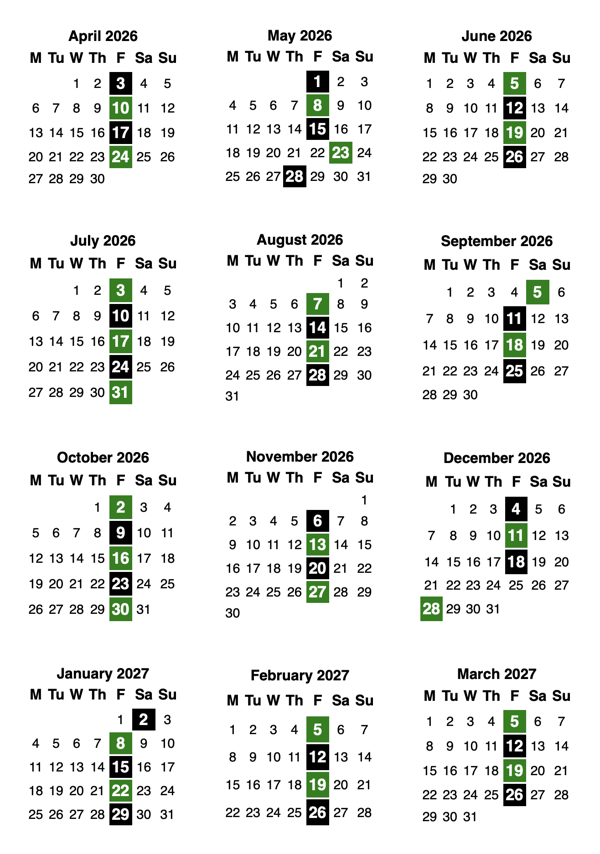
<p>It takes less than five minutes for me to transcribe all my bin dates to the calendar by hand, and this is what the result looks like:</p>
<picture>
<source sizes="(max-width:600px)100vw,600px" srcset="https://alexwlchan.net/images/2026/bin_calendar_1x.png 600w, https://alexwlchan.net/images/2026/bin_calendar_2x.png 1200w" type="image/png"/><img alt="A twelve-month calendar arranged into three columns, four rows. Certain days are highlighted in green/black corresponding to bin collections." class="screenshot" src="https://alexwlchan.net/images/2026/bin_calendar_1x.png" width="600"/>
</picture>
<p>That fits nicely on a single sheet of paper, so I print it and stick it on my fridge.
It’s easy to see when I have an off-cycle bin day, or when my next collection is going to be.</p>
<p>I often use this to know if I can skip a collection.
I live on my own and I only generate a small amount of waste, so my bins are rarely more than half-full.
I don’t think it’s worth putting out a half-empty bin, but I’ll do it anyway if I can see I’ll be away for the next few collections.</p>

    <p>[If the formatting of this post looks odd in your feed reader, <a href="https://alexwlchan.net/2026/bin-calendar/?ref=rss">visit the original article</a>]</p>
    ]]>
  </content>

    <category term="Domestic life" />
    <category term="Python" />

    <summary type="html">Every year I use Python and a bit of CSS to create a fridge calendar that tells me about bin day.</summary>
</entry><entry>
  <title type="html">Monki Gras 2026 “Prepping Craft”</title>
  <link
    href="https://alexwlchan.net/2026/monki-gras-2026/?ref=rss"
    rel="alternate"
    type="text/html"
    title="Monki Gras 2026 &quot;Prepping Craft&quot;"
  />
  <published>2026-03-23T20:46:15+00:00</published>
  <updated>2026-03-23T20:46:15+00:00</updated>

  <id>https://alexwlchan.net/2026/monki-gras-2026/</id>

  <content type="html" xml:base="https://alexwlchan.net/2026/monki-gras-2026/">
    <![CDATA[<p>While the rest of the tech world is a firehose of generative AI discourse, last week I was in a quieter, more human room.
I was back at <a href="https://monkigras.com">Monki Gras</a>, an annual London conference about the intersection between software, craft, and the tech industry.</p>
<p>This year’s theme was <em>“Prepping Craft”</em> – in a world where safety and normality are slipping away, how do we make our code, our communities, and our lives truly resilient?
I loved the topic when I first heard it, and it’s only become more urgent by the day.</p>
<p>There was very little discussion of specific tools or technologies; instead, the event focused on the politics and human impact of the tech industry.
Monki Gras has always been an interdisciplinary event, but this year it felt even more focused on humans over technology, and the politics were more pronounced than ever.</p>
<p>Despite the state of the world, the mood was constructive and upbeat.
Everything is in a bad place, <em>so how do we make it better?</em></p>
<p>Some particular highlights for me:
Heidi Waterhouse and Kim Harrison describing how to create resilient, interdependent communities in Minneapolis and Oaxaca.
Hazel Weakly gave a deeply personal, poetic talk about rebuilding a sense of self, and finding joy in your own existence.
Adam Zimman made me cry when he talked about being a cis parent of a trans child, and what he learnt about supporting them.
These are not talks you’d get at most tech events.</p>
<p>Three of this year’s talks were about trans experiences, at a time when the political winds are blowing in a transphobic direction.
Some people would find that surprising, but I didn’t – Monki Gras has always felt like a safe place to be trans and to talk about being trans.
I’ve always felt like I can be my full self there, and being trans at the event is a complete non-issue.</p>
<p>My one regret is that there’s never enough time to talk to all the cool and interesting people who attend.
The community around this event is lovely, and I wish I had more time to chat.
(Although after two days I was ready to collapse into bed; it’s as fun as it is intense.)</p>
<p>I was flattered by the number of people who expressed surprise that I wasn’t speaking this year.
I did write a proposal, but James politely suggested that since I’ve spoken at the last three events in a row, I should step aside for new speakers.
Months in advance, I knew it was a good call – preparing a talk is a lot of work, and it was nice to relax and just enjoy the event.
Now the event is over, I’m even more glad I skipped this year.</p>
<p>Watching the talks made me realise that <a href="https://alexwlchan.net/2025/meeting-my-younger-self/">since I left social media</a>, I’ve lost my nerve for talking about personal or political topics.
I worry the talk I’d have given this year would have felt anodyne next to the other speakers, and I want to fix that.
I’m inspired to be more personal and vulnerable in my public writing, and some of my talk ideas will get recycled as articles on this site.
I’ve already published one (<a href="https://alexwlchan.net/2026/ten-year-computer/">Dreaming of a ten-year computer</a>) and there’s more to come.</p>
<p>Monki Gras was created by <a href="https://redmonk.com/team/james-governor/">James Governor</a>, and he and his team have done an excellent job of creating a thoughtful, inclusive event that explores the impact of tech on the world.</p>
<p>I’ve shared my notes and highlights below, but they’re no substitute for the real thing.
If you’ve never been, I’d strongly recommend it for 2027.</p>

<nav aria-labelledby="toc-heading" class="table_of_contents">
<h3 id="toc-heading">Table of contents</h3>
<ul><li>
<a href="#be-prepared-for-more-data-vs-hype-by-a-href-https-lauratacho-com-laura-tacho-a">Be prepared for more: data vs hype, by Laura Tacho</a></li><li>
<a href="#preparing-to-win-in-the-age-of-robots-by-a-href-https-www-linkedin-com-in-anahevesi-ana-hevesi-a">Preparing to Win in The Age Of Robots, by Ana Hevesi</a></li><li>
<a href="#trust-before-truth-by-a-href-https-ashley-rolfmore-com-ashley-rolfmore-a">Trust Before Truth, by Ashley Rolfmore</a></li><li>
<a href="#do-your-fingers-remember-how-to-code-by-a-href-https-www-benormal-info-sue-smith-a">Do your fingers remember how to code? by Sue Smith</a></li><li>
<a href="#what-to-do-when-your-passport-is-taken-away-by-a-href-https-lizthegrey-com-liz-fong-jones-a">What to do when your passport is taken away, by Liz Fong-Jones</a></li><li>
<a href="#prepping-hazel-weakly-being-intentional-in-life-and-in-software-by-a-href-https-hazelweakly-me-hazel-weakly-a">Prepping Hazel Weakly – being intentional in life and in software, by Hazel Weakly</a></li><li>
<a href="#atproto-federation-kindness-and-resilience-by-a-href-https-roe-dev-daniel-roe-a">Atproto, federation, kindness, and resilience, by Daniel Roe</a></li><li>
<a href="#fixing-the-open-source-bus-number-by-a-href-https-hollycummins-com-holly-cummins-a-and-a-href-https-uk-linkedin-com-in-sannegrinovero-sanne-grinovero-a">Fixing the Open Source Bus Number, by Holly Cummins and Sanne Grinovero</a></li><li>
<a href="#resilience-needs-conscious-observability-by-a-href-https-www-linkedin-com-in-adriancockcroft-adrian-cockcroft-a">Resilience needs conscious observability, by Adrian Cockcroft</a></li><li>
<a href="#preparing-for-unimaginable-change-by-a-href-https-www-danilocampos-cc-danilo-campos-a">Preparing for unimaginable change, by Danilo Campos</a></li><li>
<a href="#story-of-a-prepper-by-chad-metcalfe">Story of a prepper, by Chad Metcalfe</a></li><li>
<a href="#cis-parent-transguide-by-a-href-https-www-linkedin-com-in-adamzimman-adam-zimman-a">CIS Parent: Transguide, by Adam Zimman</a></li><li>
<a href="#resilience-in-communities-by-a-href-https-heidiwaterhouse-com-heidi-waterhouse-a-amp-a-href-https-www-linkedin-com-in-kimberh-kim-harrison-a">Resilience in Communities, by Heidi Waterhouse &amp; Kim Harrison</a></li><li>
<a href="#planning-for-uncertainty-by-a-href-https-mattlemay-com-matt-lemay-a">Planning FOR Uncertainty, by Matt LeMay</a></li></ul>
</nav>
<h2 id="be-prepared-for-more-data-vs-hype-by-a-href-https-lauratacho-com-laura-tacho-a">Be prepared for more: data vs hype, by <a href="https://lauratacho.com/">Laura Tacho</a></h2>
<ul>
<li><p>Storytelling can be misused: Laura opened with the story of Percival Lowell, who successfully convinced many people that there were <a href="https://en.wikipedia.org/wiki/Martian_canals">canals on Mars</a>.
Any criticism was deflected back to the critic – for example, if you can’t see them, it means your telescope isn’t good enough.
The burden of proof was shifted from the sceptics to the claimant.</p>
</li>
<li><p><em>“What could somebody with bad intentions get you to believe?”</em></p>
</li>
<li><p>The average impact of AI shows a moderate improvement, but there’s increase variance and disparity.
These tools may be enhancing individual productivity, but that isn’t leading to an impact on the P&amp;L.</p>
</li>
<li><p>What’s the value of innovation?
NASA publishes <a href="https://spinoff.nasa.gov/">Spinoff</a> which describes the benefits of the space race; will AI be the same?</p>
</li>
<li><p>There is no silver bullet that will help you solve human and org-level problems.</p>
</li>
<li><p>Key takeaways:</p>
<ol>
<li>Be sceptical of extraordinary claims. <em>“How does it benefit me to believe this claim?”</em></li>
<li>Use good storytelling; narratives stick.</li>
<li>Set goals and measure progress.</li>
<li>Developer experience matters more than ever.</li>
<li>Experiment by solving real customer problems.</li>
</ol>
</li>
</ul>
<h2 id="preparing-to-win-in-the-age-of-robots-by-a-href-https-www-linkedin-com-in-anahevesi-ana-hevesi-a">Preparing to Win in The Age Of Robots, by <a href="https://www.linkedin.com/in/anahevesi">Ana Hevesi</a></h2>
<ul>
<li><p><em>“What if the next model makes us irrelevant?”</em> – is this fear grounded in reality, or is it a leftover from the initial shock of ChatGPT?</p>
</li>
<li><p>Focus on your impact on people.</p>
</li>
<li><p>What can you contro;?</p>
<ol>
<li>How much you know about how you’re serving people – metrics, user research, and s on</li>
<li>Interaction patterns</li>
<li>Docs and acquisition of mastery</li>
<li>Mastery and meaningful personal experience leads to shared culture and community</li>
</ol>
</li>
<li><p>Look for opportunities to do <em>“cultural ratcheting”</em>.</p>
</li>
</ul>
<h2 id="trust-before-truth-by-a-href-https-ashley-rolfmore-com-ashley-rolfmore-a">Trust Before Truth, by <a href="https://ashley.rolfmore.com/">Ashley Rolfmore</a></h2>
<ul>
<li><p>Numbers are scary because they are real.</p>
<p>Their context gives them meaning.
400 means nothing on its own, but £400.14 is the maximum universal credit you can receive per week.
That’s a real and scary number.</p>
</li>
<li><p>Trust in institutions has been declining over past decades; the tech industry is part of that.
(Both causing the decline in trust, and having trust decline in it.)</p>
</li>
<li><p>Ashley talked about how <a href="https://en.wikipedia.org/wiki/Double-entry_bookkeeping">double-entry bookkeeping</a> was the foundational idea that eventually led to modern accounting.</p>
</li>
<li><p>Show your working.
Help people understand where your numbers come from.</p>
</li>
<li><p>Be correctable, not just correct.</p>
</li>
<li><p><em>“Incorrect numbers disrupt your shared reality with your user.”</em></p>
</li>
<li><p><a href="https://en.wikipedia.org/wiki/Railway_time">Railway time</a> was a standardised time used on the railways to deal with the fact that different places in Britain had different local timezones.
This is a precursor to the timezones we have today.</p>
<p>GMT is centred in England.
<em>“This system had caught colonialism from its humans.”</em></p>
<p>Imagine if you had to explain the history of railway time and timezones for every timestamp you shared; it would be impossible.
Timekeeping standards on modern railways treat railway time as a historical footnote, not essential knowledge, and everything works fine.</p>
<p>Key insight: <em>“Cognitive debt is not failure if you keep the context window intentional.”</em></p>
</li>
<li><p>Extend mental models, don’t rebuild them.</p>
</li>
<li><p>Fail safe: minimise harm vs maximise accuracy.
Consider what will happen when the system goes wrong, and design for safe failure.
100% accuracy is impossible; don’t forget about failures in the pursuit of perfection.</p>
</li>
<li><p><em>“If your site URL ends with .ai, all website bugs are now AI bugs.”</em></p>
</li>
</ul>
<h2 id="do-your-fingers-remember-how-to-code-by-a-href-https-www-benormal-info-sue-smith-a">Do your fingers remember how to code? by <a href="https://www.benormal.info/">Sue Smith</a></h2>
<ul>
<li><p>What skills should devs be focusing on?
Don’t know – this talk is about strategies and techniques for discovering what developer skills are.</p>
</li>
<li><p>Acquiring a skill is different to retaining it.
Once you lose achieve a level of proficiency, it’s difficult to lose skill</p>
</li>
<li><p>Skills are <em>repeatable</em>.
This means generative AI in its current form is not a skill; it can’t be used predictably.</p>
</li>
<li><p>Teaching means guessing where the learner is, and finding out where you were wrong.</p>
</li>
<li><p>The act of saying something aloud can help you understand it.
[Alex: this is the <a href="https://pubmed.ncbi.nlm.nih.gov/20438265/">production effect</a>.]</p>
</li>
<li><p>Sue described a swimmer Terry Law (sp?), whose attitude was: “every time I get out of water, I’ll be a better swimmer”.
He took copious notes after ever swim.</p>
</li>
<li><p>Semantic waves of learning: from a high level of theory to practical implementation, and back again.</p>
</li>
<li><p><em>“Where do you find value in the process and not the outcome?”</em></p>
</li>
</ul>
<h2 id="what-to-do-when-your-passport-is-taken-away-by-a-href-https-lizthegrey-com-liz-fong-jones-a">What to do when your passport is taken away, by <a href="https://lizthegrey.com/">Liz Fong-Jones</a></h2>
<ul>
<li><p>Preparation means acting on incomplete information, and preserving resources to be able to do that.
In Liz’s case, that meant driving several hours to renew her passport after the news broke that the Trump administration wouldn’t issue new passports for trans people – but she was able to renew an existing passport.</p>
</li>
<li><p>Trans people are under greater threat than in a long time: existentially threatening politics in the US; bathroom bans in the UK.</p>
</li>
<li><p>Liz is good at resilience engineering because it affects her personal life: runbooks for personal threats, plans for leaving her home and country, and so on.
She showed us a complex risk spreadsheet she uses to track personal risk; I didn’t have time to read it in detail.</p>
</li>
</ul>
<h2 id="prepping-hazel-weakly-being-intentional-in-life-and-in-software-by-a-href-https-hazelweakly-me-hazel-weakly-a">Prepping Hazel Weakly – being intentional in life and in software, by <a href="https://hazelweakly.me/">Hazel Weakly</a></h2>
<ul>
<li><p>Hazel’s first memory is one of loneliness; she has about ten memories from before she was 26.
She talked about dissociating as a child.</p>
</li>
<li><p>Axioms of self:</p>
<ol>
<li>I choose to love humanity</li>
<li>I know what I know, what I don’t know, the difference</li>
<li>Extraordinary claims require extraordinary evidence, but nothing is absolute</li>
<li>I Embrace my shortcomings (maybe too much)</li>
<li>I choose my addictions so they don’t choose me</li>
</ol>
</li>
<li><p>Being deaf means questioning everything I hear, and never believing my own reality.</p>
</li>
<li><p>She had to learn “normality” – a combination of being autistic, trans, and ADHD.</p>
</li>
<li><p>Our past shapes us, but it does not have to guide us.</p>
</li>
<li><p><em>“I have thoughts. Lots of thoughts. They never stop thinking. Never stop thunking.”</em></p>
</li>
<li><p>Oxygen is vital to life, but it’s also poisonous in its pure form.</p>
</li>
<li><p>Purpose:</p>
<ul>
<li>Teach the world to build self-organising ecosystems</li>
<li>Find (?) the infinitesimal spirit of chaos</li>
<li>Dance in the rain</li>
</ul>
</li>
<li><p>Desires:</p>
<ul>
<li>To help others feel understood and make them feel safe</li>
<li>To build a world where nobody experiences my childhood again</li>
</ul>
</li>
<li><p>Reception: what impression do I want to give? What do I want others to see in myself?</p>
</li>
<li><p>Fashion and makeup: <em>“Vanity is a gift to myself. It is permission to live in my body with joy.”</em></p>
</li>
<li><p><em>“When I give myself permission to experience my existence with joy, then I give everybody else permission to do the same.”</em></p>
</li>
<li><p><em>“I rebuilt myself into a completely different person who is far cuter, and she’s more (entertaining? everything?) and has a spark in her eye she didn’t feel possible.”</em></p>
</li>
<li><p><em>“Build that community of belonging and you will be surprised at what life and the universe of chaos will bring to you in sparkles and fits of unmitigated joy.”</em></p>
</li>
</ul>
<h2 id="atproto-federation-kindness-and-resilience-by-a-href-https-roe-dev-daniel-roe-a">Atproto, federation, kindness, and resilience, by <a href="https://roe.dev/">Daniel Roe</a></h2>
<ul>
<li><p>Daniel started the npmx project, an alternative npm browser that’s built in part on atproto.
The project grew quickly, and attracted a lot of contributors – to the point the core maintainers took a week-long break as it was gaining traction, to prevent burnout.</p>
</li>
<li><p>There aren’t 10x developers, but there are 10x teams.
They iterate together, and make each other better.</p>
</li>
<li><p>atproto allows you to get something akin to federated JSON.
[Alex: the best explanation I’ve seen for this so far is Dan Abramov’s article <a href="https://overreacted.io/a-social-filesystem/">A Social Filesystem</a>.]</p>
</li>
<li><p><a href="https://standard.site/">Standard.site</a> is a schema for publishing blogs on atproto.</p>
</li>
<li><p>atproto is not a USP, it’s an implementation detail.</p>
</li>
<li><p>Running an app based on atproto means less responsibility, because you don’t have to run a backend – other people can look after their data.</p>
</li>
<li><p>Enshittification comes from asymmetry of power; atproto can help to level that balance.</p>
</li>
</ul>
<h2 id="fixing-the-open-source-bus-number-by-a-href-https-hollycummins-com-holly-cummins-a-and-a-href-https-uk-linkedin-com-in-sannegrinovero-sanne-grinovero-a">Fixing the Open Source Bus Number, by <a href="https://hollycummins.com/">Holly Cummins</a> and <a href="https://uk.linkedin.com/in/sannegrinovero">Sanne Grinovero</a></h2>
<ul>
<li><p>This talk covered a lot of material I’m familiar with, so I didn’t take many notes.</p>
</li>
<li><p>The problems facing open source maintainers: money, time, burnout, boredom, user hostility.</p>
</li>
<li><p><em>“The value of people isn’t cranking out code; it’s being guardians of quality and performance.”</em></p>
</li>
<li><p>Other bad things: losing keys, losing the vision and meaning of a brand.</p>
</li>
</ul>
<h2 id="resilience-needs-conscious-observability-by-a-href-https-www-linkedin-com-in-adriancockcroft-adrian-cockcroft-a">Resilience needs conscious observability, by <a href="https://www.linkedin.com/in/adriancockcroft">Adrian Cockcroft</a></h2>
<ul>
<li><p><em>“Footprints on the sand of time”</em>, from Henry Wadsworth Longfellow’s poem <a href="https://en.wikipedia.org/wiki/A_Psalm_of_Life"><em>A Psalm of Life</em></a>.</p>
</li>
<li><p><em>“Why are you trying to make something resilient?”</em></p>
</li>
<li><p>Career resilience:</p>
<ul>
<li>Quality over quantity</li>
<li>Prioritise what you want to do</li>
<li>Make your work visible [Alex: see Julia Evans’ article <a href="https://jvns.ca/blog/brag-documents/">Write a brag document</a>]</li>
<li>APIs allowed developers to do the work of dedicated ops and infrastructure teams; AI is the same thing but for developers writing code</li>
</ul>
</li>
<li><p>Business resilience:</p>
<ul>
<li>There’s a lot of FOMO around AI; speed wins here</li>
<li>Probe, sense, and respond</li>
<li>When you get a new manager, ask them for stuff.
<em>“Your predecessor didn’t approve this interesting thing, do this and it will make you look good.”</em></li>
<li>There are constraints that affect your choices</li>
</ul>
</li>
<li><p>Systems resilience:</p>
<ul>
<li>What should users see when the system falls over?</li>
<li>Test that your mitigation mechaisms work; an untested backup is broken</li>
</ul>
</li>
<li><p>Risk = severity × probability × obscurity × delay</p>
</li>
</ul>
<h2 id="preparing-for-unimaginable-change-by-a-href-https-www-danilocampos-cc-danilo-campos-a">Preparing for unimaginable change, by <a href="https://www.danilocampos.cc/">Danilo Campos</a></h2>
<ul>
<li><p>If we’re entering a post-scarcity future, we should be more excited than scared.</p>
</li>
<li><p><em>“We prefer our world of toilets to open sewers. Think about this for a moment. This is a science fiction shit. You have a magic bowl where you press a button and whatever you want to get rid of is gone.”</em></p>
</li>
<li><p>A brief history of civilisation [Alex: reminded me of <a href="https://alexwlchan.net/book-reviews/how-to-invent-everything/"><em>How to Invent Everything</em></a>].</p>
</li>
<li><p>A heat pump and solar means that on hot days, air conditioning essentially free.</p>
</li>
<li><p><em>“The fruits of abundance are often captured.”</em></p>
</li>
<li><p>We can harness solar and improve energy infrastructure: it’s possible, but it needs work.</p>
</li>
<li><p><em>“It’s not as grim as we’ve always been told.”</em>
[Alex: London’s air pollution sprung to mind; it was initially projected that it would take 193 years to bring NO2 pollution to within legal levels, but it was <a href="https://www.bbc.co.uk/news/articles/c75q9d2pqyeo">achieved in 9 years</a>.]</p>
</li>
<li><p><em>“Thought is fuel.”</em></p>
</li>
<li><p>There’s a crappy remote for the air conditioner and heating controllers; replace it with microcontrollers and a vibe-coded app in Python.</p>
</li>
<li><p><em>“Give me a context limit large enough and I can move the world.”</em></p>
</li>
<li><p>Mario’s grandfather is Fairchild Semiconductor, originally developed for military applications.
This led to an era of compounding automations on semiconductors: modems, video games, programming.</p>
<p>LLMs and AI are the start of a new 50-year super cycle of compounding automation.</p>
</li>
<li><p>The person who created Mario was <em>“not a video game designer”</em> because that job didn’t exist yet.
What new careers will be created in the era of LLMs?</p>
</li>
<li><p>We have abundant energy and cognition.</p>
</li>
<li><p>Modern warfare is different to what it used to be – widespread use of drones and automonous vehicles.
But warfare is how we got the microprocessor in the first place.</p>
</li>
<li><p>We can have a positive vision for this abundance; we can counter the vision of darkness.</p>
</li>
<li><p><em>“We can assert a positive vision of how these strange discoveries shape our future.”</em></p>
</li>
</ul>
<h2 id="story-of-a-prepper-by-chad-metcalfe">Story of a prepper, by Chad Metcalfe</h2>
<ul>
<li><p>When we hear the word “prepper”, we think of a doomsday-obsessed, right-wing obsessive with guns.</p>
</li>
<li><p>Attitudes to war have changed.
Many of Chad’s peers from Texas joined the military, and they can’t walk 5 minutes before somebody thanks them for their service.
His father fought in Vietnam, and didn’t want to talk about it when he returned.</p>
</li>
<li><p><em>“In a world that feels out of control, prepping is a mechanism to assert personal control.”</em>
This takes different forms and the meaning of “prepper” and “survivalist” has changed over time, but it’s the same underlying desire.</p>
</li>
<li><p><a href="https://github.com/docker/cli/issues/267#issuecomment-695149477">Eric Diven</a>:</p>
<blockquote>
<p>I no longer build software; I now make furniture out of wood. The hours are long, the pay sucks, and there’s always the opportunity to remove my finger with a table saw, but nobody asks me if I can add an RSS feed to a DBMS, so there’s that :-)</p>
</blockquote>
</li>
<li><p>Chad bought a 20-acre gold mine to turn into a self-sufficient space.
He had to learn about water systems, power, sewage; he broke both wrists falling off a 12′ ladder; he had to navigate open shafts across the property (one over 150′ deep).
[Alex: the pictures reminded me of Firewatch.]</p>
</li>
<li><p>This sort of living forces you to update your threat model.</p>
</li>
<li><p>Fire is scary!
Half of the USA is protected by volunteer fire departments; they can’t be everywhere.</p>
<p>[Alex: this reminded me of the Lemony Snicket series; the concept of a volunteer fire department was completely new to me as a British reader, but I guess it would make more sense to a US-ian reader?]</p>
</li>
<li><p>After a lightning strike on the corner of his property: <em>“A grass fire moves at 14mph. That lightning strike struck 800 feet away. That’s 39 seconds.”</em></p>
</li>
<li><p>We’re all prepping for something, so how do you react?</p>
<ol>
<li>Put your head in the sand and ignore it</li>
<li>Outsource it and become dependent (as we are with GPS and maps), or</li>
<li>You can prepare</li>
</ol>
</li>
</ul>
<h2 id="cis-parent-transguide-by-a-href-https-www-linkedin-com-in-adamzimman-adam-zimman-a">CIS Parent: Transguide, by <a href="https://www.linkedin.com/in/adamzimman">Adam Zimman</a></h2>
<ul>
<li><p>The talk was framed with art and typography from the game <em>Silksong</em>.
It was a shared experience with their child; a way to connect with them.</p>
</li>
<li><p>Graphic of Infinite Combinations, from <a href="https://www.irisgottlieb.com/books#:~:text=Seeing%20Gender%3A%20An%20Illustrated%20Guide%20to%20Identity%20and%20Expression%0A"><em>Seeing Gender</em></a> by Iris Gottlieb.</p>
</li>
<li><p>Consider the character creator.
There is no global “best”, there’s only “best for me”, the individual player.
Some players even like “bad” combinations because it makes the game harder.</p>
</li>
<li><p><em>Act I: How I defined you.</em>
The parent defines who the child is (name, gender, pronouns) and what the child does (clothing, toys, colours).</p>
</li>
<li><p>The reality of parenting is very different to expectations, and you cannot prepare for it in theory – you need to figure it out on the fly.</p>
</li>
<li><p>About 1.7% of people are intersex, a similar proportion to redheads (although many intersex individuals will not know it themselves).</p>
</li>
<li><p><em>“Listen to your kid when they are young. Believe them when they tell you who they are. It can change at any time, but you should believe what they say to be their truth in the moment.”</em></p>
</li>
<li><p>If a kid tells you something, it means they trust you – show them that you’ve earned it.</p>
</li>
<li><p>Don’t assume that your lived experience is the same as theirs.</p>
</li>
<li><p><em>Act II: How I defined you to who you are.</em></p>
</li>
<li><p>Items you consider permanent are not.
What do they want to do?
Things like makeup, haircuts, friends and peers.</p>
</li>
<li><p>Picking a name.
When his child first mentioned changing their name, he dropped a clanger: <em>“Your name is the first gift I ever gave you”</em>.</p>
<p>Their child’s reply is a model of grace: <em>“You picked a name for me before you knew me. This is a chance for both of us to pick a name together now that I know and you know who I am.”</em></p>
</li>
<li><p><em>“When somebody is willing to share with you their true self, they are extending an aspect of trust to you.”</em></p>
</li>
<li><p>You will fail a lot.
The important thing is that you keep trying.</p>
</li>
<li><p><em>Act III: Who I am to who I want to become.</em></p>
</li>
<li><p>How do I want to be seen?</p>
</li>
<li><p><em>“I didn’t feel it was fair to have everything that my kids were experiencing have them be the ones to explain it to me”</em> – Adam went and found trans and neurodivergent communities to do his own learning, so he could be informed in conversations with his children (but not opinionated!).</p>
</li>
<li><p><em>“How can you support a human so that they feel comfortable being themselves and sharing themselves with everyone else?”</em></p>
</li>
<li><p>Who am I legally? Passports and paperworks.</p>
</li>
<li><p><em>Support vs dangers: being yourself vs being safe.</em>
For example, the family missed a bar mitzvah during the Trump administration because both children had X markers in their passports, and it was unclear if they could safely interact with TSA during that time.
They now have passports that match their sex assigned at birth to make travel easier.</p>
</li>
<li><p>Knowing vs asking; failure vs trying. <em>“Get good.”</em></p>
</li>
<li><p><em>“There are no shortcuts.”</em></p>
</li>
</ul>
<h2 id="resilience-in-communities-by-a-href-https-heidiwaterhouse-com-heidi-waterhouse-a-amp-a-href-https-www-linkedin-com-in-kimberh-kim-harrison-a">Resilience in Communities, by <a href="https://heidiwaterhouse.com/">Heidi Waterhouse</a> &amp; <a href="https://www.linkedin.com/in/kimberh/">Kim Harrison</a></h2>

<ul>
<li><p>Case study of two communities: South Minneapolis and Oaxaca.</p>
</li>
<li><p>Change is good if it comes at the pace you’re expecting; right now change is not coming at that rate.</p>
</li>
<li><p>We’re protected by the systems around us.
What is it like to participate in the creation and maintenance of those systems?</p>
</li>
<li><p>What are the properties of a resilient system?</p>
<ul>
<li>tested</li>
<li>flexible</li>
<li>responsive to shocks</li>
<li>compassionate</li>
<li>sustainable</li>
</ul>
</li>
<li><p>Oaxaca: mutual aid tied to local resources.
Kim explained the idea of [<em>tequio</em>][wiki-tequio] and several other practices whose names I didn’t catch; it’s collective work for the benefit of the community, not paid work.</p>
</li>
<li><p><em>“If all you have is a wheelbarrow or shovel, you show up because that’s one more than nothing.”</em></p>
</li>
<li><p>You can be kicked out of a community, lose voting rights and similar if don’t participate.</p>
</li>
<li><p>How do you build resilient systms?
Decide on shared priorities.</p>
</li>
<li><p><a href="https://en.wikipedia.org/wiki/Wendigo"><em>Wendigo</em> spirit</a> means taking more resources than you need, and depriving others of them (aka capitalism).
This can lead to people getting kicked out of communities.</p>
</li>
<li><p>We’re bad at understanding our needs and gifts; we’re not all the same, and we need/provide different things.</p>
</li>
<li><p>Minneapolis is under ICE occupation; how do you ensure people can still fulfill their basic needs?</p>
</li>
<li><p>There are two strands of work involved:</p>
<table id="comparison">
<tr><td>foot patrol</td><td>driving</td></tr>
<tr><td>resistance</td><td>food aid</td></tr>
<tr><td>“community”</td><td>child care</td></tr>
<tr><td>observation</td><td>delivery</td></tr>
<tr><td>demonstration</td><td>bus patrol</td></tr>
</table>
<p>It’s not safe to cross sides; these need to be picked up by different people.</p>
</li>
<li><p>Mutual interdependence and support.
They didn’t start from zero; they ratched up, learning from previous communities, preparing to help whose next.
Previous examples: George Floyd, Portland, Chicago.</p>
</li>
<li><p>What do we owe to each other?
<em>“We exist in ecosystems […] we cannot all be rugged individual martyrs.”</em></p>
</li>
<li><p><em>“Mr Rogers stold children then when scary things happen, look for the helpers.”</em>
When scary things happen, adults look for the helpers, and then go help.</p>
</li>
<li><p><em>“Reaching out a hand and saying ‘are you okay’ is the foundation of interdependent community”</em> – the last words of <a href="https://en.wikipedia.org/wiki/Killing_of_Alex_Pretti">Alex Pretti</a> before he was murdered by ICE.</p>
</li>
</ul>
<h2 id="planning-for-uncertainty-by-a-href-https-mattlemay-com-matt-lemay-a">Planning FOR Uncertainty, by <a href="https://mattlemay.com/">Matt LeMay</a></h2>
<ul>
<li><p>In March 2020, companies were reluctant to change plans already in motion – which seems laughable now.</p>
</li>
<li><p>Strategic planning only happens once a year, even though it’s meant to align you with customers and markets.</p>
<p>Customers don’t give a shit about your “planning season”.</p>
</li>
<li><p><em>“Why are you making a five-year plan when the world doesn’t look the same as it did five years ago?”</em></p>
</li>
<li><p>How do you stop companies from treating planning as a (multi)-year planning exercise?</p>
<p>You can’t, but you can add a quarterly review… and a monthly review… and a fortnightly review.
(Flashbacks to Hazel’s makeup tutorial the previous night.)</p>
</li>
<li><p>What if more planning makes us more adaptable?</p>
</li>
<li><p>Following a plan can help us respond to change, if we plan to change.
If responding to change is part of plan, we’re more likely to do it.</p>
</li>
<li><p>It’s the difference between change as threat to the plan, and change as the plan.
We can frame plans as resilient, iterative, and the way we change course.</p>
<p>[Alex: at this point I was reminded of some career advice from a previous manager: it doesn’t matter how correct you are, if you’re annoying, you’ll be ignored.]</p>
</li>
<li><p>The way you communicate a plan<br/>
is<br/>
[as important as] the plan.</p>
</li>
<li><p>The way you communicate an idea is the idea.</p>
</li>
<li><p><em>“Planning is communication. Communication is craft. Let’s craft plans that make us less resistant to change.”</em></p>
</li>
</ul>

    <p>[If the formatting of this post looks odd in your feed reader, <a href="https://alexwlchan.net/2026/monki-gras-2026/?ref=rss">visit the original article</a>]</p>
    ]]>
  </content>

    <category term="Monki Gras" />

    <summary type="html">When safety and normality are slipping away, how do we make our code, our communities, and our lives truly resilient?</summary>
</entry><entry>
  <title type="html">The selfish case for public libraries</title>
  <link
    href="https://alexwlchan.net/2026/selfish-case-for-libraries/?ref=rss"
    rel="alternate"
    type="text/html"
    title="The selfish case for public libraries"
  />
  <published>2026-03-19T07:07:21+00:00</published>
  <updated>2026-03-19T07:07:21+00:00</updated>

  <id>https://alexwlchan.net/2026/selfish-case-for-libraries/</id>

  <content type="html" xml:base="https://alexwlchan.net/2026/selfish-case-for-libraries/">
    <![CDATA[<p>I love public libraries, and they’re where I get about half the books I read.</p>
<p>When people talk about why libraries should exist, it’s usually framing them as a social good.
Libraries provide low-cost access to books and information, they’re a hub for digital literacy and access to technology, and they’re one of the few remaining <a href="https://en.wikipedia.org/wiki/Third_place">third places</a> where people are treated as citizens rather than consumers.
Their role has grown from being a lender of books to being a vital community resource.</p>
<p>Those are noble reasons for libraries to exist, but not necessarily reasons to <em>use</em> them.
I sometimes hear them said with a patronising tone, from people who think libraries are only for other people.
To them, a library is a charity for the poor and illiterate, not a destination for the well-read.</p>
<p>I think this is a failure of imagination.
Even though I can afford to buy my own books and you could argue I don’t “need” a library, using them has made me a happier reader.</p>
<h2 id="a-risk-free-way-to-find-my-next-favourite-author">A risk-free way to find my next favourite author</h2>
<p>Libraries are a cheap and safe way to me to try lots of different books, including books I’m not sure if I’ll like.
Sometimes, those experiments become new favourites.</p>
<p>If I’m buying books in a bookshop, I lean towards the familiar, towards books like the ones I already enjoy.
It’s unusual for me to get anything radically different, because I don’t want to gamble my money on a complete unknown.</p>
<p>Borrowing a book from the library is free, so it’s easier to try a new author or genre.
I can read two chapters and return a book guilt-free if it’s not my cup of tea.
But sometimes, I try something very different, and I discover a whole new collection of books to enjoy.</p>
<p>I found some of my favourite books and authors through library books I probably wouldn’t have picked off a bookshop shelf:</p>
<ul>
<li><strong>Alexandra Bellefleur:</strong> Listening to the library audiobook of <em>Written in the Stars</em> introduced me to sapphic romances, not something I’d read before, now one of my favourite genres.</li>
<li><strong>Jodie Chapman:</strong> I’m not religious, so I’d probably have skipped her debut novel <em>Another Life</em>, which has strong religious themes.
I borrowed it from the library instead, absolutely adored it, and I still think about it four years later.</li>
<li><strong>Ravena Guron:</strong> Murder mystery is a crowded space, and the library helped me find an author who is now on my “read anything she writes” list.</li>
</ul>
<p>Most library books are just “fine” – I enjoy them and return them to the shelf.
I wouldn’t want every book to be a massive revelation, but those discoveries happen more often because the library reduces the cost of being curious.</p>
<h2 id="a-release-valve-for-my-crowded-shelves">A release valve for my crowded shelves</h2>
<p>I love living in a house with books, but I only have so much shelf space.
Libraries allow me to read lots of books without cluttering up my home.</p>
<p>If I buy a book, I’m also buying a future decision: when I’m done, do I keep it, gift it, or donate it?
It’s not a difficult decision, but it’s just another thing to think about.
It’s easy for a book to get “stuck” in my home for years, even when I don’t actually want to keep it.</p>
<p>When I finish a library book, there is no decision to make: I know I have to return it to the library.
When I’m done, I drop it in the returns bin and forget about it.
It’s an easy, safe default that keeps my home clutter-free.</p>
<p>I especially love using libraries for books that I know I’m only going to read once, like romance novels and murder mysteries.
Once I know the ending, I’m unlikely to revisit those books unless they’re really exceptional.</p>
<p>I still buy books, and if I really like a library book I’ll buy my own copy – but for everything else, the library has helped refine my shelves into the set of books I really love, not just a record of everything I’ve ever touched.</p>
<h2 id="a-built-in-deadline-to-keep-me-moving">A built-in deadline to keep me moving</h2>
<p>As I prepare to move house later this year, I’ve been uncovering stashes of unread books.
Some have followed me across multiple moves; some I’ve owned for over a decade.
I used to tell myself that these books were “maturing” on my shelf, but really they were just stagnating.
I’ve donated many of them to my local charity shop, because I’ve finally admitted I’ll never actually read them.</p>
<p>I don’t have this problem with library books, because the return period triggers a “use it or lose it” response in my brain.
I have to read a book before it’s gone, or decide not to and return it.
This works even though I know it’s a completely artificial deadline – if I run out of time, I can always renew or re-borrow a book – I still feel that sense of urgency.</p>
<p>Return periods are some form of literary placebo: the ticking clock tricks me into prioritising a book, not letting it blend into the furniture.</p>
<p>My “To Be Read” list is longer than ever, but most of it is now in the library’s digital catalogue rather than physical piles in my home.
When I get a book, I read it quickly or not at all – and either way, it doesn’t sit around untouched for fifteen years.</p>
<h2 id="an-all-you-can-read-buffet">An all-you-can-read buffet</h2>
<p>Public libraries will never be my sole source of books – I have to go elsewhere for niche, specialist, and academic texts – but using them has helped me read more and find new favourites.
They’re a vital social good, but I don’t use them out of a sense of civic duty.
I use them because they make me a happier, more adventurous, and more prolific reader.</p>

    <p>[If the formatting of this post looks odd in your feed reader, <a href="https://alexwlchan.net/2026/selfish-case-for-libraries/?ref=rss">visit the original article</a>]</p>
    ]]>
  </content>

    <category term="Personal thoughts" />
    <category term="Books and reading" />

    <summary type="html">I don't use libraries out of a sense of civic duty; I use them because they make me a happier, more adventurous, and more prolific reader.</summary>
</entry><entry>
  <title type="html">Dreaming of a ten-year computer</title>
  <link
    href="https://alexwlchan.net/2026/ten-year-computer/?ref=rss"
    rel="alternate"
    type="text/html"
    title="Dreaming of a ten-year computer"
  />
  <published>2026-03-12T14:25:03+00:00</published>
  <updated>2026-03-12T14:25:03+00:00</updated>

  <id>https://alexwlchan.net/2026/ten-year-computer/</id>

  <content type="html" xml:base="https://alexwlchan.net/2026/ten-year-computer/">
    <![CDATA[<p>I want my current computer to last for a decade.
That’s an eternity in the tech world, far longer than most people keep their hardware, but I don’t think it’s an unreasonable goal.
Personal computers keep getting faster, but my needs aren’t changing.</p>
<p>I use my computer for the same fundamental tasks I did ten years ago: browsing the web, writing, editing photos, running scripts, and building small websites.
Today’s computers can do all that and have power to spare.
You can still push their limits with high-end tasks like video editing, 3D modelling, or gaming – but I don’t do any of those things.</p>
<p>I don’t need the latest and greatest, and I haven’t for a long time.
Add in the expense, the hassle of upgrading, and the environmental impact of new hardware, and you can see why I’m keen to use my computers for as long as possible.</p>
<p>This won’t be easy.
My needs might not change, but the world around me will.
I won’t get software updates forever, the web is a bloated mess that becomes more resource-hungry every day, and AI may introduce unforeseen demands on my computer.
I’ve had to set up my computer carefully to give it the best chance of lasting the decade.</p>
<p>In my first job, we sold telecoms hardware that sat in data centres for years, unmodified.
We had to write software updates that would run on the machine as-is, because hardware upgrades were impossible.
If a new feature needed more resources, we had to find a way to make the existing code more efficient to compensate.
It was a stark contrast to cloud computing, where a more powerful machine is just a few clicks in a console.
We had to be in the habit of thinking about efficiency, because there was no other option.</p>
<p>That habit has stuck.
I try to be efficient my personal devices, and I’m very conservative about what I install – what apps, dependencies, and processes I allow to run.</p>
<ul>
<li><em>I limit what runs in the background.</em>
Currently, I have just four apps that are always running: <a href="https://www.alfredapp.com/">Alfred</a>, <a href="https://www.backblaze.com/">Backblaze</a>, <a href="https://tailscale.com/">Tailscale</a>, and a small static web server.</li>
<li><em>I browse the web on my own terms.</em> I disable JavaScript by default.
It breaks a lot of websites so I can’t recommend it for everybody, but it makes my computer run faster and cooler.
It’s hard for bloated websites to slow me down when they can only serve HTML and CSS.</li>
<li><em>I’m comfortable ignoring AI.</em>
I don’t do much with AI, and right now I have little interest in exploring it further.
Even if I do, the most powerful models run in cloud data centres – so if my local machine starts to fall behind, I won’t be missing out.</li>
<li><em>I use lots of <a href="https://alexwlchan.net/2024/static-websites/">static websites</a>.</em>
These are very lightweight, and they provide easy access to my media collections – my bookmarks, movies, TV shows, and so on.
This is ’90s era web tech that still works brilliantly today.</li>
</ul>
<p>I also write a lot of my own tools.
If something feels slow or sluggish, I don’t have to buy a faster machine; I can look for a way to improve my code.</p>
<p>This might look like a process that requires discipline, but at this point it’s just my standard routine.
I’ve always tried to use my computer efficiently and it’s meant my computers last a long time; it’s only with my latest purchase that I’ve made it an explicit goal.</p>
<h2 id="why-now">Why now?</h2>
<p>I bought this computer as I was wrapping up my career in digital preservation, and that’s why I approached it with such a long-term mindset.
In that job, I’d been designing collections to survive over decades and centuries; what seems like an eternity in tech is a heartbeat in heritage.
With that mindset, trying to keep a computer for a decade didn’t seem so ridiculous – especially when I remembered that I <em>almost did it already</em>, with an eight-year-old iMac that was running perfectly until the desk underneath it collapsed, a calamity that would kill any computer.</p>
<p>Global politics is another factor; I’m keen to avoid needing to buy a new computer in the near future, because I’m not sure how easy it will be.
Right now I can just walk into a high street store, but that relies on a fragile and complex supply chain that’s showing cracks.</p>
<p>I bought my computer in November 2024, just after Trump was re-elected as US president, and his campaign threatened heavy tariffs and trade wars.
A year later, that trade uncertainty has become the status quo; his war with Iran threatens global energy markets; computer prices are rising as parts are diverted to AI data centres; and the majority of the world’s microprocessors are still built in Taiwan, under the constant shadow of a Chinese invasion.
And the background to all of this is climate change, which won’t make manufacturing computers any easier.</p>
<p>I hope I’m wrong, and that buying a new computer continues to be as simple as it is today.
But if I’m right, and they become scarce or expensive, I’ll be glad to have a device that I’m ready to use for years more, rather than be stuck with something too slow that I can’t afford to upgrade.</p>
<p>I’ll have to replace it eventually, but hopefully I can be patient and outlast any short-term disruptions to the supply chain.
And if there are long-term disruptions, I’ll have more time to plan my next purchase.</p>
<figure>
<picture>
<source sizes="(max-width:750px)100vw,750px" srcset="https://alexwlchan.net/images/2026/broken-imac_1x.avif 750w, https://alexwlchan.net/images/2026/broken-imac_2x.avif 1500w, https://alexwlchan.net/images/2026/broken-imac_3x.avif 2250w" type="image/avif"/><source sizes="(max-width:750px)100vw,750px" srcset="https://alexwlchan.net/images/2026/broken-imac_1x.webp 750w, https://alexwlchan.net/images/2026/broken-imac_2x.webp 1500w, https://alexwlchan.net/images/2026/broken-imac_3x.webp 2250w" type="image/webp"/><source sizes="(max-width:750px)100vw,750px" srcset="https://alexwlchan.net/images/2026/broken-imac_1x.jpg 750w, https://alexwlchan.net/images/2026/broken-imac_2x.jpg 1500w, https://alexwlchan.net/images/2026/broken-imac_3x.jpg 2250w" type="image/jpeg"/><img alt="An iMac with a broken screen, a large crack on the left-hand side and lots of lines on the screen. Next to it are two dinged-up hard drives, and the packaging for the new hard drive I had to buy in a hurry." src="https://alexwlchan.net/images/2026/broken-imac_1x.jpg" width="750"/>
</picture>
<figcaption>
    My 2012 iMac just after it discovered that “airplane mode” doesn’t give you literal wings.
    Unfortunately for me, its fall was broken by the two backup drives sitting on the same desk – so the first thing I did was go out and buy a new hard drive, so I could have a backup that hadn't been squashed by 10kg of falling computer.
  </figcaption>
</figure>
<h2 id="what-computer-did-i-buy">What computer did I buy?</h2>
<p>I have a home office with a fixed setup, and my main computer is a desktop, which makes this easier – I don’t know if I could make a laptop last ten years.
A desktop never moves, so it’s less vulnerable to dings and drops (assuming the desk stays standing), and there’s no internal battery to degrade or swell.
I also don’t eat or drink at my desk, so there’s minimal risk of liquid damage.</p>
<p>I use Macs, and Apple offers three Mac desktops: the Mac mini, the Mac Studio, and the Mac Pro.
The Studio and Pro are overpowered for my needs, and while that extra power would give me headroom, it would be a lot of extra expense for marginal gain.
Instead, I looked at the Mac mini.</p>
<p>When I was buying, Apple offered two stock configurations of the Mac mini: an M4 chip with 16GB of RAM and 256GB of storage for £599, or an M4 Pro chip with 24GB of RAM and 512GB of storage for £1399.
Both models got favourable reviews and seemed like good value, because they avoid Apple’s egregiously-priced upgrades.</p>
<p>I bought the M4 Pro rather than the base M4 – I think I’d been fine with the base M4 for now, but 16GB of RAM might become tight as macOS gets more memory hungry.
I do want some headroom, I just don’t want to pay Mac Studio prices for it.</p>
<p>I’ve expanded the storage with a 4TB external SSD which is permanently plugged in.
It was much cheaper than Apple’s upgrades, and it means I won’t run out of space any time soon.
It also reduces wear on the internal SSD, which feels like the most likely component to fail.</p>
<p>The big question mark is software support, and I’m keeping my fingers crossed.
Macs are typically supported by the latest version of macOS for six to eight years, and they get security updates for another two years after that.
That should take me close to a decade, if not all the way.</p>
<p>For comparison, the M1 MacBook Air was released in November 2020, and I expect it will still be supported in this year’s macOS 27 release.
Apple have already announced that this release will drop support for Intel Macs; it would be aggressive to drop M1 support at the same time, especially as an M1 MacBook Air was on sale at Walmart until a few weeks ago.
If so, the M1 will get macOS updates until at least autumn 2027, and security updates until 2029 – a nine year span.
Suddenly, running my M4 Mac mini for ten years doesn’t feel so ridiculous.</p>
<p>Apple’s hardware is in fantastic shape, and I absolutely believe their Mac minis can run for a decade without failing.
(Maybe their hardware chief should be in charge of more things?)
There’s always a risk of buying a lemon which has a manufacturing defect, but I’ve had mine for over a year and nothing has failed yet.
I’m confident this machine can go the distance.</p>
<figure>
<picture>
<source sizes="(max-width:750px)100vw,750px" srcset="https://alexwlchan.net/images/2026/mac-mini_1x.avif 750w, https://alexwlchan.net/images/2026/mac-mini_2x.avif 1500w, https://alexwlchan.net/images/2026/mac-mini_3x.avif 2250w" type="image/avif"/><source sizes="(max-width:750px)100vw,750px" srcset="https://alexwlchan.net/images/2026/mac-mini_1x.webp 750w, https://alexwlchan.net/images/2026/mac-mini_2x.webp 1500w, https://alexwlchan.net/images/2026/mac-mini_3x.webp 2250w" type="image/webp"/><source sizes="(max-width:750px)100vw,750px" srcset="https://alexwlchan.net/images/2026/mac-mini_1x.jpg 750w, https://alexwlchan.net/images/2026/mac-mini_2x.jpg 1500w, https://alexwlchan.net/images/2026/mac-mini_3x.jpg 2250w" type="image/jpeg"/><img alt="A Mac mini covered in stickers with a distinctly green tinge, reflected off the green wall behind it." src="https://alexwlchan.net/images/2026/mac-mini_1x.jpg" width="750"/>
</picture>
<figcaption>
    My 2024 Mac mini, nicknamed <a href="https://alexwlchan.net/2024/how-i-name-my-computers/">Phaenna</a>.
  </figcaption>
</figure>
<h2 id="one-year-down-nine-years-to-go">One year down, nine years to go</h2>
<p>So far, it’s great – my Mac mini is a fantastic machine.
It never feels slow; it’s never crashed; it takes up a tiny space on my desk; and I have enough storage that I never need to worry about cleaning up files.
It’s just what I want a computer to be – an appliance I never have to think about.</p>
<p>You’d expect it to feel easy right now, because I’m still in the usual lifetime of this product.
This will get harder over time, and the first year will be easier than the final year, but it’s still an encouraging start.</p>
<p>I hope that I’ve bought a decade of not having to think about hardware.
Modern computers are ridiculously capable, and short of a catastrophic failure, it’s hard to imagine a reason to upgrade.</p>
<p>See you again in 2034!</p>

    <p>[If the formatting of this post looks odd in your feed reader, <a href="https://alexwlchan.net/2026/ten-year-computer/?ref=rss">visit the original article</a>]</p>
    ]]>
  </content>

    <category term="Computers and code" />
    <category term="Personal thoughts" />

    <summary type="html">Modern computers are more powerful than I know what to do with, but the norm is still to upgrade every few years. I want my current computer to last a decade, and I don't think that's unreasonable.</summary>
</entry><entry>
  <title type="html">Gumdrop, a silly app for messing with my webcam</title>
  <link
    href="https://alexwlchan.net/2026/gumdrop/?ref=rss"
    rel="alternate"
    type="text/html"
    title="Gumdrop, a silly app for messing with my webcam"
  />
  <published>2026-03-05T08:58:35+00:00</published>
  <updated>2026-03-05T08:58:35+00:00</updated>

  <id>https://alexwlchan.net/2026/gumdrop/</id>

  <content type="html" xml:base="https://alexwlchan.net/2026/gumdrop/">
    <![CDATA[<p>During the COVID lockdowns, I spent long evenings at home on my own, and I amused myself by dressing up in extravagant and glamorous clothing.
One dark night, I realised I could use my home working setup to have some fun, with just a webcam and a monitor.</p>
<p>I turned off every light in my office, cranked up my monitor to max brightness, then I changed the colour on the screen to turn my room red or green or pink.
Despite the terrible image quality, I enjoyed looking at myself in the webcam as my outfits took on a vivid new hue.</p>
<p>Here are three pictures with my current office lit up in different colours, each with a distinct vibe:</p>
<figure>
<picture>
<source sizes="(max-width:250px)100vw,250px" srcset="https://alexwlchan.net/images/2026/gumdrop_red_1x.avif 250w, https://alexwlchan.net/images/2026/gumdrop_red_2x.avif 500w" type="image/avif"/><source sizes="(max-width:250px)100vw,250px" srcset="https://alexwlchan.net/images/2026/gumdrop_red_1x.webp 250w, https://alexwlchan.net/images/2026/gumdrop_red_2x.webp 500w" type="image/webp"/><source sizes="(max-width:250px)100vw,250px" srcset="https://alexwlchan.net/images/2026/gumdrop_red_1x.png 250w, https://alexwlchan.net/images/2026/gumdrop_red_2x.png 500w" type="image/png"/><img alt="A photo of me in a red room. Most of the background has faded to dark red, and my face is glowing red in the middle of the frame." src="https://alexwlchan.net/images/2026/gumdrop_red_1x.png" width="250"/>
</picture>
<picture>
<source sizes="(max-width:250px)100vw,250px" srcset="https://alexwlchan.net/images/2026/gumdrop_green_1x.avif 250w, https://alexwlchan.net/images/2026/gumdrop_green_2x.avif 500w" type="image/avif"/><source sizes="(max-width:250px)100vw,250px" srcset="https://alexwlchan.net/images/2026/gumdrop_green_1x.webp 250w, https://alexwlchan.net/images/2026/gumdrop_green_2x.webp 500w" type="image/webp"/><source sizes="(max-width:250px)100vw,250px" srcset="https://alexwlchan.net/images/2026/gumdrop_green_1x.png 250w, https://alexwlchan.net/images/2026/gumdrop_green_2x.png 500w" type="image/png"/><img alt="A photo of me in a green room. The background is more visible, a shade of clover green, while my face looks positively radioactive." src="https://alexwlchan.net/images/2026/gumdrop_green_1x.png" width="250"/>
</picture>
<picture>
<source sizes="(max-width:250px)100vw,250px" srcset="https://alexwlchan.net/images/2026/gumdrop_blue_1x.avif 250w, https://alexwlchan.net/images/2026/gumdrop_blue_2x.avif 500w" type="image/avif"/><source sizes="(max-width:250px)100vw,250px" srcset="https://alexwlchan.net/images/2026/gumdrop_blue_1x.webp 250w, https://alexwlchan.net/images/2026/gumdrop_blue_2x.webp 500w" type="image/webp"/><source sizes="(max-width:250px)100vw,250px" srcset="https://alexwlchan.net/images/2026/gumdrop_blue_1x.png 250w, https://alexwlchan.net/images/2026/gumdrop_blue_2x.png 500w" type="image/png"/><img alt="A photo of me in a blue room. Everything is dark and moody, like in a sci-fi film." src="https://alexwlchan.net/images/2026/gumdrop_blue_1x.png" width="250"/>
</picture>
</figure>
<p>For a while I was using Keynote to change my screen colour, and Photo Booth to use the webcam.
It worked, but juggling two apps was clunky, and a bunch of the screen was taken up with toolbars or UI that diluted the colour.</p>
<p>To make it easier, I built a tiny web app that helps me take these silly pictures.
It’s mostly a solid colour background, with a small preview from the webcam, and buttons to take a picture or change the background colour.
It’s a fun little toy, and it’s lived on my desktop ever since.</p>
<p>Here’s a screenshot:</p>
<picture>
<source sizes="(max-width:750px)100vw,750px" srcset="https://alexwlchan.net/images/2026/gumdrop-screenshot_1x.avif 750w, https://alexwlchan.net/images/2026/gumdrop-screenshot_2x.avif 1500w, https://alexwlchan.net/images/2026/gumdrop-screenshot_3x.avif 2250w" type="image/avif"/><source sizes="(max-width:750px)100vw,750px" srcset="https://alexwlchan.net/images/2026/gumdrop-screenshot_1x.webp 750w, https://alexwlchan.net/images/2026/gumdrop-screenshot_2x.webp 1500w, https://alexwlchan.net/images/2026/gumdrop-screenshot_3x.webp 2250w" type="image/webp"/><source sizes="(max-width:750px)100vw,750px" srcset="https://alexwlchan.net/images/2026/gumdrop-screenshot_1x.png 750w, https://alexwlchan.net/images/2026/gumdrop-screenshot_2x.png 1500w, https://alexwlchan.net/images/2026/gumdrop-screenshot_3x.png 2250w" type="image/png"/><img alt="Screenshot of a web page which is mostly hot pink, with two small inline pictures of me in my office. One picture is very pink (the current view) and the other is less pink (a photo taken a few seconds prior). Below the current view are three buttons to allow camera permissions, take a picture, and change the colour." src="https://alexwlchan.net/images/2026/gumdrop-screenshot_1x.png" width="750"/>
</picture>
<p>If you want to play with it yourself, turn out the lights, crank up the screen brightness, and visit <a href="https://alexwlchan.net/fun-stuff/gumdrop.html">alexwlchan.net/fun-stuff/gumdrop.html</a>.
All the camera processing runs locally, so the webcam feed is completely private – your pictures are never sent to me or my server.</p>
<p>The picture quality on my webcam is atrocious, even more so in a poorly-lit room, but that’s all part of the fun.
One thing I discovered is that I prefer this with my desktop webcam rather than my iPhone – the iPhone is a better camera, but it does more aggressive colour correction.
That makes the pictures less goofy, which defeats the purpose!</p>
<p>I’m not going to explain how the code works – most of it comes from an MDN tutorial which explains <a href="https://developer.mozilla.org/en-US/docs/Web/API/Media_Capture_and_Streams_API/Taking_still_photos">how to use a webcam from an HTML page</a>, so I’d recommend reading that.</p>
<p>I don’t play dress up as much as I used to, but on occasion I’ll still break it out and amuse myself by seeing what I look like in deep blue, or vivid green, or hot pink.
It’s also how I took one of my favourite pictures of myself, a witchy vibe I’d love to capture more often:</p>
<picture>
<source sizes="(max-width:750px)100vw,750px" srcset="https://alexwlchan.net/images/2026/gumdrop-witchy_1x.avif 750w, https://alexwlchan.net/images/2026/gumdrop-witchy_2x.avif 1500w" type="image/avif"/><source sizes="(max-width:750px)100vw,750px" srcset="https://alexwlchan.net/images/2026/gumdrop-witchy_1x.webp 750w, https://alexwlchan.net/images/2026/gumdrop-witchy_2x.webp 1500w" type="image/webp"/><source sizes="(max-width:750px)100vw,750px" srcset="https://alexwlchan.net/images/2026/gumdrop-witchy_1x.jpg 750w, https://alexwlchan.net/images/2026/gumdrop-witchy_2x.jpg 1500w" type="image/jpeg"/><img alt="A picture of me smiling at the camera from inside my office. The room is lit up in a moody green, I have dark lipstick and a dark dress, and some cat ears vaguely visible. I am absolutely beaming with joy." src="https://alexwlchan.net/images/2026/gumdrop-witchy_1x.jpg" width="750"/>
</picture>
<p>Computers can be used for serious work, but they can do silly stuff as well.</p>

    <p>[If the formatting of this post looks odd in your feed reader, <a href="https://alexwlchan.net/2026/gumdrop/?ref=rss">visit the original article</a>]</p>
    ]]>
  </content>

    <category term="Fun stuff" />
    <category term="Computers and code" />

    <summary type="html">When it's dark, a large computer monitor is a fun way to make the room change into different colours.</summary>
</entry><entry>
  <title type="html">The bare minimum for syncing Git repos</title>
  <link
    href="https://alexwlchan.net/2026/bare-git/?ref=rss"
    rel="alternate"
    type="text/html"
    title="The bare minimum for syncing Git repos"
  />
  <published>2026-02-17T08:08:40+00:00</published>
  <updated>2026-02-17T08:08:40+00:00</updated>

  <id>https://alexwlchan.net/2026/bare-git/</id>

  <content type="html" xml:base="https://alexwlchan.net/2026/bare-git/">
    <![CDATA[<p>I have some personal Git repos that I want to sync between my devices – my dotfiles, text expansion macros, terminal colour schemes, and so on.</p>
<p>For a long time, I used GitHub as my sync layer – it’s free, convenient, and I was already using it – but recently I’ve been looking at alternatives.
I’m trying to reduce my dependency on cloud services, especially those based in the USA, and I don’t need most of GitHub’s features.
I made these repos public, in case somebody else might find them useful, but in practice I think very few people ever looked at them.</p>
<p>There are plenty of GitHub-lookalikes, which are variously self-hosted or hosted outside the USA, like GitLab, Gitea, or Codeberg – but like GitHub, they all have more features than I need.
I just care about keeping my files in sync.
Maybe I could avoid introducing another service?</p>
<p>As I thought about how Git works, I thought of a much simpler way – and I’m almost embarrassed by how long it took me to figure this out.</p>
<h2 id="a-git-repo-is-just-a-collection-of-files">A Git repo is just a collection of files</h2>
<p>In Git repos, there’s a <code>.git</code> folder which holds the complete state of the repo.
It includes the branches, the commits, and the contents of every file.
If you copy that <code>.git</code> folder to a new location, you’d get another copy of the repo.
You could copy a repo with basic utilities like <code>cp</code> or <code>rsync</code> – at least, as a one-off.
I wouldn’t recommend using them for regular syncing; it would be easy to lose data, because they don’t know how to merge changes from different devices.</p>
<p>Git’s built-in <code>push</code> and <code>pull</code> commands are smarter: they can synchronise this state between locations, compare the history of different copies, and stitch the changes together safely.
Within a repo, you can create a <a href="https://git-scm.com/book/ms/v2/Git-Basics-Working-with-Remotes">remote location</a>, a pointer to another copy of the repo that lives somewhere else.
When you push or pull, your local <code>.git</code> folder gets synchronised with that other copy.</p>
<p>We’ve become used to the idea that the remote location is a cloud service – but it can just as easily be a folder on your local disk – and that gives me everything I want.</p>
<h2 id="bare-and-non-bare-repositories">Bare and non-bare repositories</h2>
<p>Before I explain the steps, I need to explain the difference between bare and non-bare repositories.</p>
<p>In our day-to-day work, we use <strong>non-bare</strong> repositories.
They have a “working directory” – the files you can see and edit.
The <code>.git</code> folder lives under this directory, and stores the entire history of the repo.
The working directory is a view into a particular point in that history.</p>
<p>By contrast, a <strong>bare</strong> repository is just the <code>.git</code> folder without the working directory.
It’s the history without the view.</p>
<p>You can’t push changes to a non-bare repo – if you try, Git will reject your push.
This is to avoid confusing situations where the working directory and the <code>.git</code> folder get out of sync.
Imagine if you had the repo open in a text editor, and somebody else pushed new code to the repo – suddenly your files would no longer match the Git history.</p>
<p>Whenever we push, we’re normally pushing to a bare repository.
Because nobody can “work” inside a bare repo, it’s always safe to receive pushes from other locations – there’s no working directory to get out of sync.</p>
<h2 id="my-new-setup">My new setup</h2>
<p>I have a home desktop which is always running, and it’s connected to a large external drive.
For each repo, there’s a bare repository on the external drive, and then all my devices have a checked-out copy that points to the path on that external drive as their remote location.
The desktop connects to the drive directly; the other devices connect over SSH.</p>
<p>This only takes a few commands to set up:</p>
<ol>
<li><p><strong>Create a bare repository on the external drive.</strong></p>
<pre class="lng-console"><code><span class="gp">$</span><span class="w"> </span>cd<span class="w"> </span>/Volumes/Media/bare-repos
<span class="gp">$</span><span class="w"> </span>git<span class="w"> </span>init<span class="w"> </span>--bare<span class="w"> </span>dotfiles</code></pre>
</li>
<li><p><strong>Set the bare repository as a remote location.</strong></p>
<p>On the home desktop, which mounts the external drive directly:</p>
<pre class="lng-console"><code><span class="gp">$</span><span class="w"> </span>cd<span class="w"> </span>~/repos/dotfiles
<span class="gp">$</span><span class="w"> </span>git<span class="w"> </span>remote<span class="w"> </span>add<span class="w"> </span>origin<span class="w"> </span>/Volumes/Media/bare-repos/dotfiles</code></pre>
<p>On a machine, which can access the drive over SSH:</p>
<pre class="lng-console wrap"><code><span class="gp">$</span><span class="w"> </span>cd<span class="w"> </span>~/repos/dotfiles
<span class="gp">$</span><span class="w"> </span>git<span class="w"> </span>remote<span class="w"> </span>add<span class="w"> </span>origin<span class="w"> </span>alexwlchan@desktop:/Volumes/Media/bare-repos/dotfiles</code></pre>
<p>This allows me to run <code>git push</code> and <code>git pull</code> commands as normal, which will copy my history to the bare repository.</p>
</li>
<li><p><strong>Clone the bare repository to a new location.</strong></p>
<p>When I set up a new computer:</p>
<pre class="lng-console"><code><span class="gp">$</span><span class="w"> </span>git<span class="w"> </span>clone<span class="w"> </span>/Volumes/Media/bare-repos/dotfiles<span class="w"> </span>~/repos/dotfiles</code></pre>
</li>
</ol>
<p>This approach is very flexible, and you can store your bare repository in any location that’s accessible on your local filesystem or SSH.
You could use an external drive, a web server, a NAS, whatever.
I’m using <a href="https://tailscale.com">Tailscale</a> to get SSH access to my repos from other devices, but any mechanism for connecting devices over SSH will do.
(Disclaimer: I work at Tailscale.)</p>
<p>Of course, this is missing many features of GitHub and the like – there’s no web interface, no issue tracking, no collaboration – but for my small, personal repos, that’s fine.
There’s also no third-party hosting, no risk of outages, no services to manage.
I’m just moving files about over the filesystem.
It feels like the Git equivalent of <a href="https://alexwlchan.net/2024/static-websites/">static websites</a>, in a good way.</p>
<h2 id="reflections">Reflections</h2>
<p>I used to throw every scrap of code onto GitHub in the vague hope of “sharing knowledge”, but most of it was <a href="https://alexwlchan.net/2024/digital-decluttering/">digital clutter</a>.</p>
<p>Nobody was reading my personal repos in the hope of learning something.
They’re a grab bag of assorted snippets, with only a loose definition or purpose – it’s unlikely another person would know what they could find, or spend the time to go looking.
Sharing knowledge requires more than just publishing code somewhere; you need to make it possible for somebody to find.</p>
<p>Extracting my ideas into standalone, searchable snippets makes them dramatically more useful and discoverable.
There are single blog posts that have done more good than my entire corpus of code on GitHub – and I have hundreds of blog posts.</p>
<p>I still have plenty of public repos, but it’s specific libraries or tools with a clear purpose.
It’s more obvious whether you might want to read it, and better documented if you do.
It’s an intentional selection, not a random set of things I want to keep in sync.</p>
<p>For years, I’ve been using a social media site as a glorified file-syncing service, but I don’t need pull requests, an issue tracker, or a CI/CD pipeline to move a few macros between my machines – just a place to put my code.
As with so many digital things, files and folders are all I need.</p>

    <p>[If the formatting of this post looks odd in your feed reader, <a href="https://alexwlchan.net/2026/bare-git/?ref=rss">visit the original article</a>]</p>
    ]]>
  </content>

    <category term="Git" />

    <summary type="html">I don't need GitHub or a cloud service to keep my Git repos in sync -- files and folders work just fine.</summary>
</entry><entry>
  <title type="html">Creating Caddyfiles with Cog</title>
  <link
    href="https://alexwlchan.net/2026/cog-in-my-caddy/?ref=rss"
    rel="alternate"
    type="text/html"
    title="Creating Caddyfiles with Cog"
  />
  <published>2026-02-05T08:21:14+00:00</published>
  <updated>2026-02-05T08:21:14+00:00</updated>

  <id>https://alexwlchan.net/2026/cog-in-my-caddy/</id>

  <content type="html" xml:base="https://alexwlchan.net/2026/cog-in-my-caddy/">
    <![CDATA[<p>I’m currently restructuring my site, and I’m going to change some of the URLs.
I don’t want to <a href="https://en.wikipedia.org/wiki/Link_rot">break inbound links</a> to the old URLs, so I’m creating <a href="https://en.wikipedia.org/wiki/Http_redirect">redirects</a> between old and new.</p>
<p>My current web server is <a href="https://caddyserver.com/">Caddy</a>, so I define redirects in my Caddyfile with the <a href="https://caddyserver.com/docs/caddyfile/directives/redir"><code>redir</code> directive</a>.
Here’s an example that creates permanent redirects for three URLs:</p>
<pre><code><span class="n">alexwlchan.net</span> <span class="p">{</span>
  redir /videos/crossness_flywheel.mp4  /files/2017/crossness_flywheel.mp4 permanent
  redir /2021/12/2021-in-reading/       /2021/2021-in-reading/ permanent
  redir /2022/12/print-sbt/             /til/2022/print-sbt/ permanent
<span class="p">}</span></code></pre>
<p>This syntax is easy to write by hand, but it’s annoying if I want to define lots of redirects – and when I’m doing a big restructure, I do.
In particular, it’s tricky to write scripts to modify this file.</p>
<p>This is a good use case for <a href="https://cog.readthedocs.io/en/latest/">Cog</a>, made by Ned Batchelder.</p>
<h2 id="how-i-automate-this-with-cog">How I automate this with Cog</h2>
<p>Cog is a tool for running snippets of Python inside text files, allowing you to generate content without external templates or additional files.
When you process a file with Cog, it finds those snippets of Python, executes them, then inserts the output back into the original file.</p>
<p>Here’s an example:</p>
<pre><code><span class="n">alexwlchan.net</span> <span class="p">{</span>
  <span class="c">#[[[cog
  # import cog
  # 
  # redirects = [
  #     {"old_url": "/videos/crossness_flywheel.mp4", "new_url": "/files/2017/crossness_flywheel.mp4"},
  #     {"old_url": "/2021/12/2021-in-reading/", "new_url": "/2021/2021-in-reading/"},
  #     {"old_url": "/2022/12/print-sbt/", "new_url": "/til/2022/print-sbt/"},
  # ]
  # 
  # for r in redirects:
  #     cog.outl(f"redir {r['old_url']} {r['new_url']} permanent")
  #]]]
  #[[[end]]]</span>
<span class="p">}</span></code></pre>
<p>All the Python code that Cog runs is inside a comment, so it will be ignored by Caddy.
The <code>[[[cog …]]]</code> and <code>[[[end]]]</code> markers tell Cog where to find the code, and it’s smart enough to remove the leading whitespace and comment markers.</p>
<p>When I process this file with Cog (<code>pip install cogapp; cog Caddyfile</code>), it runs the Python snippet, and anything passed to <code>cog.outl()</code> is written between the markers.
This is the output, which gets printed to stdout:</p>
<pre><code><span class="n">alexwlchan.net</span> <span class="p">{</span>
  <span class="c">#[[[cog
  # import cog
  # 
  # redirects = [
  #     {"old_url": "/videos/crossness_flywheel.mp4", "new_url": "/files/2017/crossness_flywheel.mp4"},
  #     {"old_url": "/2021/12/2021-in-reading/", "new_url": "/2021/2021-in-reading/"},
  #     {"old_url": "/2022/12/print-sbt/", "new_url": "/til/2022/print-sbt/"},
  # ]
  # 
  # for r in redirects:
  #     cog.outl(f"redir {r['old_url']} {r['new_url']} permanent")
  #]]]</span>
  redir /videos/crossness_flywheel.mp4 /files/2017/crossness_flywheel.mp4 permanent
  redir /2021/12/2021-in-reading/ /2021/2021-in-reading/ permanent
  redir /2022/12/print-sbt/ /til/2022/print-sbt/ permanent
  <span class="c">#[[[end]]]</span>
<span class="p">}</span></code></pre>
<p>If I want to write the output back to the file, I run Cog with the <code>-r</code> flag (<code>cog -r Caddyfile</code>).
All the original Cog code is preserved, so I can run it again and again to regenerate the file.
This means that if I want to add a new redirect, I can edit the list and run Cog again.</p>
<p>Cog is running a full version of Python, so I can rewrite the snippet to read the list of redirects <em>from an external file</em>.
Here’s another example:</p>
<pre><code><span class="n">alexwlchan.net</span> <span class="p">{</span>
  <span class="c">#[[[cog
  # import cog
  # import json
  #
  # with open("redirects.json") as in_file:
  #     redirects = json.load(in_file)
  # 
  # for r in redirects:
  #     cog.outl(f"redir {r['old_url']} {r['new_url']} permanent")
  #]]]</span>
  redir /videos/crossness_flywheel.mp4 /files/2017/crossness_flywheel.mp4 permanent
  redir /2021/12/2021-in-reading/ /2021/2021-in-reading/ permanent
  redir /2022/12/print-sbt/ /til/2022/print-sbt/ permanent
  <span class="c">#[[[end]]]</span>
<span class="p">}</span></code></pre>
<p>This is a powerful change – unlike the original Caddyfile, it’s easy to write scripts that insert entries in this external JSON file, and now I can programatically update this file.</p>
<p>My scripts that are rearranging my URLs can populate <code>redirects.json</code>, then I only need to re-run Cog and I have a complete set of redirects in my Caddyfile.</p>
<p>I usually run Cog with two flags:</p>
<ul>
<li><code>-r</code> writes the output back to the original file, and</li>
<li><code>-c</code> adds a checksum to the end marker, like <code>[[[end]]] (sum: Rwh4n2CfQD)</code>.
This checksum allows Cog to detect if the output has been manually edited since it last processed the file – and if so, it will refuse to overwrite those changes.
You have to revert the manual edits or remove the checksum.</li>
</ul>
<p>You can also run Cog with a <code>--check</code> flag, which checks if a file is up-to-date.
I run this as a <a href="https://cog.readthedocs.io/en/latest/running.html#continuous-integration">continuous integration task</a>, to make sure I’ve updated my files properly.</p>
<h2 id="why-i-like-cog">Why I like Cog</h2>
<p>What separates Cog from traditional templating engines like Jinja2 or Liquid is that it operates entirely in-place on the original file.
Usually, you have a source template file and a build step which produce a separate output file, but with Cog, the source and the result are stored in the same document.
Storing templates in separate files is useful for larger projects, but it’s overkill for something like my Caddyfiles.</p>
<p>Having everything in a single file makes it easy to resume working on a file managed with Cog.
I don’t need to remember where I saved the build script or the template; I can operate directly on that single text file.
If I come back to this project in six months, the instructions for how the file is generated are right in front of me.</p>
<p>The design also means that I’m not locked into using Cog.
At any point, I could delete the Cog comments and still have a fully functional file.</p>
<p>Cog isn’t a replacement for a full-blown templating language, and it’s not the right tool for larger projects – but it’s indispensable for small amounts of automation.
If you’ve never used it, I recommend <a href="https://cog.readthedocs.io/en/latest/">giving it a look</a> – it’s a handy tool to know.</p>

    <p>[If the formatting of this post looks odd in your feed reader, <a href="https://alexwlchan.net/2026/cog-in-my-caddy/?ref=rss">visit the original article</a>]</p>
    ]]>
  </content>

    <category term="Python" />
    <category term="Caddy" />

    <summary type="html">Cog is a tool for doing in-place text generation for static files. It's useful for generating repetitive config, like my web server redirects.</summary>
</entry><entry>
  <title type="html">Swapping gems for tiles</title>
  <link
    href="https://alexwlchan.net/2026/mosaic/?ref=rss"
    rel="alternate"
    type="text/html"
    title="Swapping gems for tiles"
  />
  <published>2026-01-31T07:43:53+00:00</published>
  <updated>2026-01-31T07:43:53+00:00</updated>

  <id>https://alexwlchan.net/2026/mosaic/</id>

  <content type="html" xml:base="https://alexwlchan.net/2026/mosaic/">
    <![CDATA[<p>On Sunday evening, I quietly swapped out a key tool that I use to write this site.
It’s a big deal for me, but hopefully nobody else noticed.</p>
<p>The tool I changed was my <a href="https://en.wikipedia.org/wiki/Static_site_generator">static site generator</a>.
I write blog posts in text files using <a href="https://daringfireball.net/projects/markdown/">Markdown</a>, and then my static site generator converts those text files into HTML pages.
I upload those HTML pages to my web server, and they become available as my website.</p>
<p>I’ve been using a Ruby-based static site generator called <a href="https://jekyllrb.com">Jekyll</a> since late 2017, and I’ve replaced it with a Python-based static site generator called Mosaic.
It’s a new tool I wrote specifically to build this website, so I know exactly how it works.
I’m getting rid of a Ruby tool I only half-understand, in favour of a Python tool I understand well.</p>
<p>Nothing is changing for readers (yet).
I tried hard to avoid breaking anything – URLs haven’t changed, pictures look identical, the RSS feed should be the same as before.
Please <a href="https://alexwlchan.net/contact/">let me know</a> if you spot something broken!</p>
<p>You’ll see more changes soon, because I have lots of ideas to try this year.
I want to make this website into more of a <a href="https://tomcritchlow.com/2019/02/17/building-digital-garden/">“digital garden”</a>, getting even further away from <a href="https://alexwlchan.net/2024/not-all-posts/">a single list</a> of chronologically ordered posts.
I don’t want to build that with Jekyll – or to be precise, I don’t want to build it with Ruby.</p>
<h2 id="it-s-not-ru-by-it-s-me">It’s not Ru(by), it’s me</h2>
<p>I don’t want to sound dismissive of Jekyll.
It’s an impressive project that powers thousands of sites, and I used it happily for over eight years.
I pushed it to build a lot of custom and bespoke pages, and it handled it with ease.</p>
<p>Jekyll’s superpower is its <a href="https://jekyllrb.com/docs/themes/">theming</a> and <a href="https://jekyllrb.com/docs/plugins/">plugin system</a>, which allow you to customise its behaviour.
Want something that Jekyll can’t do out of the box?
Create your own template or plugin.
But those plugins have to be written in Ruby, the same language as Jekyll itself – and I only write Ruby to make blog plugins.
I can do it, but I’m slow, I’m unsure, and writing Ruby has never felt familiar.</p>
<p>You can build a digital garden with Jekyll and Ruby – plenty of people already have – but I know I’d find it a difficult and frustrating experience.
My lack of Ruby experience would slow me down.</p>
<p>While my Ruby knowledge has sat still, I’ve become a much better Python programmer.
Since I set up Jekyll in 2017, I’ve worked on big Python projects with extensive tests, thorough data validation, and an explicit goal of longevity.
I tried writing a Python static site generator in 2016 and I got stuck; a decade later and I’m ready for another attempt.</p>
<p>This isn’t just general Python expertise – I’ve written about how I’m using <a href="https://alexwlchan.net/2024/static-websites/">static websites for tiny archives</a>, and all the surrounding tools are written in Python.
Porting this website to Python means I can reuse a lot of that code.</p>
<p>I hacked together an experimental Python static site generator over Christmas, and I wrote it properly over the last few weeks.
I named it “Mosaic” after the square-filled headers on every page, and I really like it.
I already feel faster when I’m working on the site, writing a language I know properly.</p>
<h2 id="how-does-mosaic-work">How does Mosaic work?</h2>
<p>Mosaic works like other static site generators: it reads a folder full of Markdown files, converts them to HTML, and writes the HTML into a new folder.
And just like Jekyll and similar tools, I’m building on powerful open-source libraries.</p>
<p>Here’s a comparison of the key dependencies:</p>

<table class="block" id="comparison">
<thead>
<tr>
<th>Purpose</th>
<th>Jekyll</th>
<th>Mosaic</th>
</tr>
</thead>
<tbody>
<tr>
<td>Templates</td>
<td><a href="https://shopify.dev/docs/api/liquid">Liquid</a></td>
<td><a href="https://jinja.palletsprojects.com/en/stable/">Jinja</a></td>
</tr>
<tr>
<td>Markdown rendering</td>
<td><a href="https://kramdown.gettalong.org/">kramdown</a></td>
<td><a href="https://mistune.lepture.com/en/latest/">Mistune</a></td>
</tr>
<tr>
<td>Image generation</td>
<td><a href="https://github.com/libvips/ruby-vips">ruby-vips</a></td>
<td><a href="https://pillow.readthedocs.io/en/stable/">Pillow</a></td>
</tr>
<tr>
<td>Syntax highlighting</td>
<td><a href="http://rouge.jneen.net">Rouge</a></td>
<td><a href="https://pygments.org/">Pygments</a></td>
</tr>
<tr>
<td>Data validation</td>
<td><a href="https://github.com/voxpupuli/json-schema/">json-schema</a></td>
<td><a href="https://docs.pydantic.dev/latest/">Pydantic</a></td>
</tr>
<tr>
<td>HTML linting</td>
<td><a href="https://github.com/gjtorikian/html-proofer">HTMLProofer</a></td>
<td>???</td>
</tr>
</tbody>
</table>
<p>Here are some thoughts on each.</p>
<h3 id="templates-with-jinja">Templates with Jinja</h3>
<p>Jinja is the templating engine used by <a href="https://flask.palletsprojects.com/en/stable/">Flask</a>, a framework I’ve used to build dozens of small web apps, so I was very familiar with the basic syntax.
It’s similar to Liquid – both use <code>{% … %}</code> for operators and <code>{{ … }}</code> to insert values – so I could reuse my templates with only small changes.</p>
<p>The tricky part was replicating my custom tags, which I’d previously implemented using <a href="https://jekyllrb.com/docs/plugins/tags/">Jekyll plugins</a>.
I had to write my own <a href="https://jinja.palletsprojects.com/en/stable/extensions/#module-jinja2.ext">Jinja extensions</a>, which are harder than writing Jekyll tags.
In Jinja, I have to interact directly with the lexer and parser, whereas a Jekyll plugin is a simple <code>render</code> function.</p>
<h3 id="markdown-with-mistune">Markdown with Mistune</h3>
<p>Mistune is a Markdown library I discovered while working on this project.
I used <a href="https://python-markdown.github.io/">Python-Markdown</a> previously, but Mistune is faster and easier to extend.
In particular, it provides a friendly way to <a href="https://mistune.lepture.com/en/latest/renderers.html#customize-htmlrenderer">customise the HTML output</a> by overriding named methods.
For example, I can add an <code>id</code> attribute to my headings by overriding the <code>header(text, level)</code> method.</p>
<p>The tricky part about changing Markdown renderer is all the subtle differences in the places where Markdown isn’t defined clearly.
Mistune and kramdown return the same output in 95% of cases, but there’s a lot of variation and broken HTML in the remaining 5%.</p>
<p>One particular difficulty was all my <a href="https://daringfireball.net/projects/markdown/syntax#html">inline HTML</a>.
This is one of my favourite Markdown features – you can include arbitrary HTML and it gets passed through as-is – and I make heavy use of it in this blog.
But kramdown and Mistune disagree about where inline HTML starts and ends, and Mistune was wrapping <code>&lt;p&gt;</code> tags around HTML that kramdown left unchanged.
I had to adjust my templates and whitespace to help Mistune distinguish Markdown and HTML.</p>
<h3 id="image-generation-with-pillow">Image generation with Pillow</h3>
<p>I generate <a href="https://alexwlchan.net/2023/picture-plugin/">multiple sizes and formats</a> for every image, so they get served in a fast and efficient way.
I use Pillow to generate each of those derivatives.</p>
<p>Pillow is easier to install and supports a wider range of image formats than any of the Ruby gems I tried; it’s a highlight of the Python ecosystem.</p>
<p>The picture handling code has always been the thorniest bit of the website, and I hope that building it atop a nicer library will give me the space to simplify that code.</p>
<h3 id="syntax-highlighting-with-pygments">Syntax highlighting with Pygments</h3>
<p>Rouge and Pygments are both capable libraries, and they return compatible HTML which made it easy to switch – I could reuse my CSS and my <a href="https://alexwlchan.net/2025/syntax-highlighting/">syntax highlighting tweaks</a>.</p>
<p>I think Pygments theoretically supports highlighting a wider variety of languages, but I never found Rouge lacking so it’s not a meaningful improvement.</p>
<h3 id="data-validation-with-pydantic">Data validation with Pydantic</h3>
<p>Every Markdown file in my site has <a href="https://jekyllrb.com/docs/front-matter/">YAML “front matter”</a> for storing metadata, for example:</p>
<pre class="lng-yaml"><code>---
layout<span class="p">:</span> <span class="l l-Scalar l-Scalar-Plain">article</span>
title<span class="p">:</span> <span class="l l-Scalar l-Scalar-Plain">Swapping gems for tiles</span>
---</code></pre>
<p>Jekyll treats this as arbitrary data and doesn’t do any validation on it, which made it harder to change and keep consistent as the site evolved.
I built a rudimentary validation layer using json-schema, but it was always an add-on.</p>
<p>In Mosaic, this front matter is parsed straight into a Pydantic model, so it’s type-checked throughout my code.
This means I can write stricter validation checks, and catch more issues and inconsistencies before they break the website.</p>
<h3 id="linting-html-with-html-proofer">Linting HTML with HTML-Proofer</h3>
<p>I’ve been using the <a href="https://github.com/gjtorikian/html-proofer">HTMLProofer gem</a> to check my HTML since 2019.
It checks my HTML for errors like broken links or missing images, so I’m less likely to publish a broken page.
It’s caught so many mistakes.</p>
<p>There’s no obvious Python equivalent, so for now I’m still running it as a separate step after I generate my HTML.
It has a much lower overhead than running Jekyll so I’m not in a hurry to remove it – although eventually I’d like to reimplement the checks I care about with <a href="https://www.crummy.com/software/BeautifulSoup/">BeautifulSoup</a>, so I can fully expunge Ruby.</p>
<p>I’m also considering using <a href="https://playwright.dev">Playwright</a> for some static site testing, but that’s a larger piece of work.</p>
<h2 id="it-s-not-named-after-a-museum-in-georgia">It’s not named after a museum in Georgia</h2>
<p>The name isn’t so important, because I’m the only person who will ever use this tool – but I discovered a fun nugget that’s too juicy not to share.</p>
<p>I named my tool “Mosaic” after the tiled headers that appear at the top of every page.
Those headers are a design element I added in 2016, and I’m so fond of them now I can’t imagine getting rid of them.
I later remembered that Mosaic is also the name of <a href="https://en.wikipedia.org/wiki/Mosaic_web_browser">a discontinued web browser</a>, and I like the “old web” vibes of that name.
One of the best compliments I’ve ever received about this site was “it looks like something from the 1990s” – fast, clean, and not junked up with ads.</p>
<p>One of the bizarre things I discovered while writing this post is that it’s not the first time the names “Mosaic” and “Jekyll” have appeared alongside each other.</p>
<p>There’s a small historical island off the coast of Georgia (the USA one) called <a href="https://en.wikipedia.org/wiki/Jekyll_Island">Jekyll Island</a>.
It includes bike trails, golf courses, a beach that’s been in several films… and a history museum called <a href="https://en.wikipedia.org/wiki/Jekyll_Island_Museum">Mosaic</a>.
What are the chances?</p>
<p>I know nothing about Jekyll Island or the history of Georgia, but if I ever feel safe enough to return to the US, I’d love to visit.</p>
<h2 id="growing-the-garden">Growing the garden</h2>
<p>I’ve been using Mosaic for several weeks and I’m really enjoying it.
I wouldn’t recommend using it for anything else – it’s only designed to build this exact site – but all the <a href="https://github.com/alexwlchan/alexwlchan.net/tree/main/mosaic">source code is public</a>, if you’d like to read it and understand how it works.</p>
<p>Switching to Mosaic has allowed me to start working on three improvements to the site:</p>
<ol>
<li><p><strong>Replace my “today I learned” (TIL) posts with “notes”.</strong>
I really like how the TIL section has allowed me to write more frequent, smaller posts, but they’re still point-in-time snapshots.
I want to replace them with notes that aren’t tied to a particular date, and instead can be living documents I update as I learn more.</p>
</li>
<li><p><strong>Make the list of topics more useful.</strong>
My current tags page is a wall of text, a list of 241 keywords with minimal context or explanation.
Nobody is wading through that to find something interesting – I want to add some hierarchy to make it easier to read, and give a better overview of the site.</p>
</li>
<li><p><strong>Fold my book reviews into my main site.</strong>
My book reviews currently live on a separate site, which is only half-maintained.
I’d like to merge them into the main site, let them benefit from the design improvements here, and start writing reviews of other entertainment.</p>
</li>
</ol>
<p>I’ve had these ideas for months, and I’m excited to finally ship them, and bring this site closer to my idea of a “digital garden”</p>

    <p>[If the formatting of this post looks odd in your feed reader, <a href="https://alexwlchan.net/2026/mosaic/?ref=rss">visit the original article</a>]</p>
    ]]>
  </content>

    <category term="Blogging about blogging" />

    <summary type="html">I've replaced Jekyll with Mosaic, a Python-based static site generator that I wrote just for me.</summary>
</entry><entry>
  <title type="html">Parody posters for made-up movies</title>
  <link
    href="https://alexwlchan.net/2026/parody-movie-posters/?ref=rss"
    rel="alternate"
    type="text/html"
    title="Parody posters for made-up movies"
  />
  <published>2026-01-16T08:29:53+00:00</published>
  <updated>2026-01-16T08:29:53+00:00</updated>

  <id>https://alexwlchan.net/2026/parody-movie-posters/</id>

  <content type="html" xml:base="https://alexwlchan.net/2026/parody-movie-posters/">
    <![CDATA[<p>In <a href="https://alexwlchan.net/2026/movie-poster-grid/">my previous post</a>, I needed a collection of movies to show off my CSS grid layout.
The easy thing to do would be to use real movie posters, but I decided to have some fun and get a custom collection.
I went to Blockbuster, HBO Max-Width, and Netflex, and this is what I got:</p>
<p><a href="https://alexwlchan.net/images/2026/movie-poster-hero.png"><picture></picture></a></p>
<source sizes="(max-width:750px)100vw,750px" srcset="https://alexwlchan.net/images/2026/movie-poster-hero_1x.png 750w, https://alexwlchan.net/images/2026/movie-poster-hero_2x.png 1500w" type="image/png"/><img alt="A grid of portrait-sized posters for made-up movies." class="screenshot dark_aware" src="https://alexwlchan.net/images/2026/movie-poster-hero_1x.png" width="750"/>

<p>In this post, I’ll explain how I created this collection, and why I spent so much time on it.</p>
<h2 id="glossary-of-the-galaxy-what-do-the-titles-mean">Glossary of the Galaxy: what do the titles mean?</h2>
<p>Each title is a reference to a concept in CSS or web development:</p>

<blockquote>
<dl>
<dt>Apollo 13px</dt>
<dd>
      Pixels (<code>px</code>) are a <a href="https://developer.mozilla.org/en-US/docs/Learn_web_development/Core/Styling_basics/Values_and_units#lengths">unit of length</a> in CSS.
      They’re a common way to define fixed sizes for text, borders, and spacing.
    </dd>
<dt>Breakpoint at Tiffany’s</dt>
<dd>
      A <a href="https://developer.mozilla.org/en-US/docs/Learn_web_development/Core/CSS_layout/Responsive_Design#media_queries">breakpoint</a> is the screen width at which a website’s layout changes – for example, when it switches from a single column on a phone to a multi-column grid on a desktop.
    </dd>
<dt>The Color #9D00FF</dt>
<dd>
      This is a <a href="https://developer.mozilla.org/en-US/docs/Web/CSS/Reference/Values/hex-color">hexadecimal colour</a> code for a shade of purple.
      Hex codes are a common way to define colours in CSS.
    </dd>
<dt>Chungking Flexpress</dt>
<dd>
<a href="https://developer.mozilla.org/en-US/docs/Glossary/Flexbox">Flexbox</a> is a layout model that allows elements to “flex” – growing to fill extra space, or shrinking to fit into small spaces.
    </dd>
<dt>The Devil Wears Padding</dt>
<dd>
      The <a href="https://developer.mozilla.org/en-US/docs/Web/CSS/Guides/Box_model/Introduction#padding_area">padding</a> is the space inside an element, between its content and its border.
      In this list, the padding is the gap between the grey border and the text.
    </dd>
<dt>The Empire Strikes Block</dt>
<dd>
      A <a href="https://developer.mozilla.org/en-US/docs/Glossary/Block/CSS">block-level element</a> is one that starts on a new line and reserves the full width available, like a heading or a paragraph.
    </dd>
<dt>Git Out</dt>
<dd>
<a href="https://en.wikipedia.org/wiki/Git">Git</a> is a version control tool used to track changes in source code.
      It’s the industry standard for managing web development projects.
    </dd>
<dt>Gridiator</dt>
<dd>
<a href="https://developer.mozilla.org/en-US/docs/Web/CSS/Guides/Grid_layout">CSS Grid</a> is a layout system for arranging elements in rows and columns.
      Unlike Flexbox, which is one-dimensional, Grid is designed for two-dimensional layouts.
    </dd>
<dt>Hidden &lt;Figure&gt;</dt>
<dd>
      The <a href="https://developer.mozilla.org/en-US/docs/Web/HTML/Reference/Elements/figure"><code>&lt;figure&gt;</code> element</a> is used to show an image with a caption, while the <a href="https://developer.mozilla.org/en-US/docs/Web/HTML/Reference/Global_attributes/hidden"><code>hidden</code> attribute</a> tells browsers not to render a specific element on a page.
    </dd>
<dt>Interstyler</dt>
<dd>
      The <a href="https://developer.mozilla.org/en-US/docs/Web/HTML/Reference/Elements/style"><code>&lt;style&gt;</code> element</a> is used to embed CSS rules directly in an HTML page.
      These rules are colloquially referred to as “styles”.
    </dd>
<dt>The Margin</dt>
<dd>
      The <a href="https://developer.mozilla.org/en-US/docs/Web/CSS/Guides/Box_model/Introduction#margin_area">margin</a> is the space outside an element, the gap between it and its neighbours.
      In this list, the margin is the gap between the grey border and the text above it.
    </dd>
<dt>vh for Vendetta</dt>
<dd>
      The <a href="https://developer.mozilla.org/en-US/docs/Glossary/Viewport">viewport</a> is the visible area of a web page in your browser.
      The <code>vh</code> unit stands for <a href="https://developer.mozilla.org/en-US/docs/Web/CSS/Reference/Values/length#vh">viewport height</a>, where <code>1vh</code> is equal to 1% of the screen's height.
    </dd>
</dl>
</blockquote>
<p>I’m pretty happy with this list, and with the amount of variety and wordplay I managed to fit into a dozen titles.</p>
<h2 id="top-pun-choosing-the-movie-titles">Top Pun: choosing the movie titles</h2>
<p>The trick to writing good puns is to write lots of puns, then throw away the bad ones.
I only needed a dozen movies, but I had over thirty other titles that I didn’t use.</p>
<p>If the puns aren’t coming immediately, I write two lists: the phrases or words I want to parody, and the words I’m trying to shoehorn in.
In this case, the first list had phrases like <em>X-Men</em> or <em>Mission Impossible</em>, and the second had words like <em>pixel</em>, <em>margin</em>, and <em>flex</em>.</p>
<p>This is where I reach for search engines – I won’t find anybody else making the exact puns I want, but I can find pre-existing lists of these building blocks.
In this case, I looked at lists of famous and iconic films, and I read web development tutorials and glossaries.
I leant toward popular films so more people would get the reference; a pun on an obscure film would likely be missed.</p>
<p>As I build the two lists, I start to spot connections, like the fact that <em>X-Men</em> could become <em>Flex-Men</em>.
I write down all my ideas, even the bad ones – often a bad idea is the jumping off point for a good one.
For example, an early idea was <em>Block to the Future</em>, which isn’t very good, but later I realised I could use <em>Back</em>/<em>Block</em> for <em>The Empire Strikes Block</em> instead, which is much better.</p>
<p>If this was a purely text-based exercise, the titles would be enough – but I also needed posters.</p>
<h2 id="blurhemian-rhapsody-making-the-posters-with-primitive">Blurhemian Rhapsody: making the posters with Primitive</h2>
<p>I needed some posters to go with the titles, but what to use?</p>
<p>I wanted to use the movie posters because many films have iconic posters, and that would help people recognise the pun – but I didn’t want to use the real movie posters, because they often show the title.
That would contradict my text, not help it.</p>
<p>But I do have an image editor, and while I lack the Photoshop skills to replace the title in a convincing way, I can make text that looks okay if you squint – and that gave me an idea.</p>
<p>Several years ago, I used Michael Fogleman’s <a href="https://github.com/fogleman/primitive">Primitive tool</a> to create some wallpapers.
Primitive redraws images with a simple geometric shapes, adding one shape at a time, trying to get closer and closer to the original image.</p>
<p>Here’s an example, in which my face has been redrawn as several hundred triangles:</p>
<figure>
<picture>
<source sizes="(max-width:300px)100vw,300px" srcset="https://alexwlchan.net/images/2026/profile_original_1x.avif 300w, https://alexwlchan.net/images/2026/profile_original_2x.avif 600w, https://alexwlchan.net/images/2026/profile_original_3x.avif 900w" type="image/avif"/><source sizes="(max-width:300px)100vw,300px" srcset="https://alexwlchan.net/images/2026/profile_original_1x.webp 300w, https://alexwlchan.net/images/2026/profile_original_2x.webp 600w, https://alexwlchan.net/images/2026/profile_original_3x.webp 900w" type="image/webp"/><source sizes="(max-width:300px)100vw,300px" srcset="https://alexwlchan.net/images/2026/profile_original_1x.jpg 300w, https://alexwlchan.net/images/2026/profile_original_2x.jpg 600w, https://alexwlchan.net/images/2026/profile_original_3x.jpg 900w" type="image/jpeg"/><img alt="A selfie. I'm wearing glasses, have dark brown hair falling down one side of my face, I'm smiling at the camera, I'm wearing a green dress, and sitting in front of some plants and greenery." src="https://alexwlchan.net/images/2026/profile_original_1x.jpg" width="300"/>
</picture>
<picture>
<source sizes="(max-width:300px)100vw,300px" srcset="https://alexwlchan.net/images/2026/profile_primitive_1x.avif 300w, https://alexwlchan.net/images/2026/profile_primitive_2x.avif 600w, https://alexwlchan.net/images/2026/profile_primitive_3x.avif 900w" type="image/avif"/><source sizes="(max-width:300px)100vw,300px" srcset="https://alexwlchan.net/images/2026/profile_primitive_1x.webp 300w, https://alexwlchan.net/images/2026/profile_primitive_2x.webp 600w, https://alexwlchan.net/images/2026/profile_primitive_3x.webp 900w" type="image/webp"/><source sizes="(max-width:300px)100vw,300px" srcset="https://alexwlchan.net/images/2026/profile_primitive_1x.png 300w, https://alexwlchan.net/images/2026/profile_primitive_2x.png 600w, https://alexwlchan.net/images/2026/profile_primitive_3x.png 900w" type="image/png"/><img alt="The same picture, but now redrawn in coloured triangles. There's a resemblance to the original image, but the detailed elements like the plant leaves or strands of hair have been blurred out." src="https://alexwlchan.net/images/2026/profile_primitive_1x.png" width="300"/>
</picture>
</figure>
<p>This gives a recognisable version of the image, but it’s a distinct style and you won’t mistake it for the real thing.</p>
<p>For each movie I was considering, I downloaded a poster from <a href="https://www.themoviedb.org/">The Movie Databaase</a>, and I used Primitive to blur it.
Sometimes the original title would appear through the blur, in which case I used an image editor to replace the title and re-blurred it.
The blurring meant I could get away with a rough edit – for example, I didn’t need the exact font – because any imperfections would be blurred away by Primitive.</p>
<p>This added a new dimension to my search for puns – I wanted movie posters that would still be recognisable after this blurring.
This ruled out posters that are very busy, because it’s difficult to distinguish individual elements after the blurring.
I looked at lists of iconic movie posters, which often have clear, distinct shapes that hold up well when converted into triangles.</p>
<p>One of the best examples of an iconic poster is <em>The Devil Wears Prada</em>.
I know nothing about the film, but I remember the poster with the big red heel.
When you blur the poster with Primitive, it becomes recognisable almost immediately.
This is what it looks like with 5, 25, and 50 triangles:</p>
<figure>
<picture>
<source sizes="(max-width:200px)100vw,200px" srcset="https://alexwlchan.net/images/2026/devil-wears-prada_1x.avif 200w, https://alexwlchan.net/images/2026/devil-wears-prada_2x.avif 400w, https://alexwlchan.net/images/2026/devil-wears-prada_3x.avif 600w" type="image/avif"/><source sizes="(max-width:200px)100vw,200px" srcset="https://alexwlchan.net/images/2026/devil-wears-prada_1x.webp 200w, https://alexwlchan.net/images/2026/devil-wears-prada_2x.webp 400w, https://alexwlchan.net/images/2026/devil-wears-prada_3x.webp 600w" type="image/webp"/><source sizes="(max-width:200px)100vw,200px" srcset="https://alexwlchan.net/images/2026/devil-wears-prada_1x.jpg 200w, https://alexwlchan.net/images/2026/devil-wears-prada_2x.jpg 400w, https://alexwlchan.net/images/2026/devil-wears-prada_3x.jpg 600w" type="image/jpeg"/><img alt="The original poster, which shows a glossy red high-heeled shoe. The point of the heel has been replaced with a trident that looks like a three-pronged devil's tail." src="https://alexwlchan.net/images/2026/devil-wears-prada_1x.jpg" width="200"/>
</picture>
<picture>
<source sizes="(max-width:200px)100vw,200px" srcset="https://alexwlchan.net/images/2026/devil-wears-prada-5_1x.avif 200w, https://alexwlchan.net/images/2026/devil-wears-prada-5_2x.avif 400w, https://alexwlchan.net/images/2026/devil-wears-prada-5_3x.avif 600w" type="image/avif"/><source sizes="(max-width:200px)100vw,200px" srcset="https://alexwlchan.net/images/2026/devil-wears-prada-5_1x.webp 200w, https://alexwlchan.net/images/2026/devil-wears-prada-5_2x.webp 400w, https://alexwlchan.net/images/2026/devil-wears-prada-5_3x.webp 600w" type="image/webp"/><source sizes="(max-width:200px)100vw,200px" srcset="https://alexwlchan.net/images/2026/devil-wears-prada-5_1x.png 200w, https://alexwlchan.net/images/2026/devil-wears-prada-5_2x.png 400w, https://alexwlchan.net/images/2026/devil-wears-prada-5_3x.png 600w" type="image/png"/><img alt="The blurred poster with 5 triangles. A maroon red triangular shape is discernible on the left-hand side, which is recognisable if you compare it to the original, but doesn't stand out on its own." src="https://alexwlchan.net/images/2026/devil-wears-prada-5_1x.png" width="200"/>
</picture>
<picture>
<source sizes="(max-width:200px)100vw,200px" srcset="https://alexwlchan.net/images/2026/devil-wears-prada-25_1x.avif 200w, https://alexwlchan.net/images/2026/devil-wears-prada-25_2x.avif 400w, https://alexwlchan.net/images/2026/devil-wears-prada-25_3x.avif 600w" type="image/avif"/><source sizes="(max-width:200px)100vw,200px" srcset="https://alexwlchan.net/images/2026/devil-wears-prada-25_1x.webp 200w, https://alexwlchan.net/images/2026/devil-wears-prada-25_2x.webp 400w, https://alexwlchan.net/images/2026/devil-wears-prada-25_3x.webp 600w" type="image/webp"/><source sizes="(max-width:200px)100vw,200px" srcset="https://alexwlchan.net/images/2026/devil-wears-prada-25_1x.png 200w, https://alexwlchan.net/images/2026/devil-wears-prada-25_2x.png 400w, https://alexwlchan.net/images/2026/devil-wears-prada-25_3x.png 600w" type="image/png"/><img alt="The blurred poster with 10 triangles. The shape of the shoe is now clearly visible, and the heel is starting to resolve." src="https://alexwlchan.net/images/2026/devil-wears-prada-25_1x.png" width="200"/>
</picture>
<picture>
<source sizes="(max-width:200px)100vw,200px" srcset="https://alexwlchan.net/images/2026/devil-wears-prada-50_1x.avif 200w, https://alexwlchan.net/images/2026/devil-wears-prada-50_2x.avif 400w, https://alexwlchan.net/images/2026/devil-wears-prada-50_3x.avif 600w" type="image/avif"/><source sizes="(max-width:200px)100vw,200px" srcset="https://alexwlchan.net/images/2026/devil-wears-prada-50_1x.webp 200w, https://alexwlchan.net/images/2026/devil-wears-prada-50_2x.webp 400w, https://alexwlchan.net/images/2026/devil-wears-prada-50_3x.webp 600w" type="image/webp"/><source sizes="(max-width:200px)100vw,200px" srcset="https://alexwlchan.net/images/2026/devil-wears-prada-50_1x.png 200w, https://alexwlchan.net/images/2026/devil-wears-prada-50_2x.png 400w, https://alexwlchan.net/images/2026/devil-wears-prada-50_3x.png 600w" type="image/png"/><img alt="The blurred poster with 10 triangles. The shape of the shoe is now clear, the shades match the gloss colouring, and the three points of the trident are also appearing." src="https://alexwlchan.net/images/2026/devil-wears-prada-50_1x.png" width="200"/>
</picture>
</figure>
<p>I had a year where all my desktop wallpapers were photos that I’d blurred using Primitive, and I’ve been waiting for a chance to use it in a bigger project.
I’m really pleased with the result – it lets me lean into the titles I’ve created, and it gives the whole collection a coherent appearance.</p>
<h2 id="widening-the-lens-choosing-a-more-diverse-selection">Widening the Lens: choosing a more diverse selection</h2>
<p>I picked a dozen movies and started writing the article.
But as I was taking screenshots of the movie grid, I noticed that my initial selection wasn’t very representative.
Ten of the twelve films had all-or-mostly men in the main roles, and all of the lead characters were white.</p>
<p>I was tempted to ignore this problem, because this is just a fake collection for a blog post and does it really matter?
But that was disingenuous – I cared enough to put in all this effort, so it must be a meaningful selection to me.
I wanted a more diverse and interesting selection.</p>
<p>I looked for lists of famous movies which centre women and non-white characters, and added several to my made-up collection.
Ideally I’d also have some movies that centre queer or disabled characters, but I couldn’t find any with an iconic poster or a pun-worthy title.</p>
<h2 id="blooper-reel-the-movies-i-didn-t-use">Blooper Reel: the movies I didn’t use</h2>
<p>I made a lot of puns and posters, including a couple of personal favourites that I cut from the post:</p>
<figure>
<picture>
<source sizes="(max-width:250px)100vw,250px" srcset="https://alexwlchan.net/images/2026/fifty-shades-of-999_1x.avif 250w, https://alexwlchan.net/images/2026/fifty-shades-of-999_2x.avif 500w" type="image/avif"/><source sizes="(max-width:250px)100vw,250px" srcset="https://alexwlchan.net/images/2026/fifty-shades-of-999_1x.webp 250w, https://alexwlchan.net/images/2026/fifty-shades-of-999_2x.webp 500w" type="image/webp"/><source sizes="(max-width:250px)100vw,250px" srcset="https://alexwlchan.net/images/2026/fifty-shades-of-999_1x.png 250w, https://alexwlchan.net/images/2026/fifty-shades-of-999_2x.png 500w" type="image/png"/><img alt="A blurred poster for ‘Fifty Shades of #999’. It’s a mostly-grey image with a man pushing a woman against a wall, and the title of the film. The letters ‘#999’ are especially prominent." src="https://alexwlchan.net/images/2026/fifty-shades-of-999_1x.png" width="250"/>
</picture>
<picture>
<source sizes="(max-width:250px)100vw,250px" srcset="https://alexwlchan.net/images/2026/flex-men_1x.avif 250w, https://alexwlchan.net/images/2026/flex-men_2x.avif 500w" type="image/avif"/><source sizes="(max-width:250px)100vw,250px" srcset="https://alexwlchan.net/images/2026/flex-men_1x.webp 250w, https://alexwlchan.net/images/2026/flex-men_2x.webp 500w" type="image/webp"/><source sizes="(max-width:250px)100vw,250px" srcset="https://alexwlchan.net/images/2026/flex-men_1x.png 250w, https://alexwlchan.net/images/2026/flex-men_2x.png 500w" type="image/png"/><img alt="A blurred poster for ‘X-Men’. It’s a bright and colourful image with lots of superheroes, not enough detail to discern any of them clearly. The title ‘X-Men’ is clearly visible in bold colours at the top of the poster." src="https://alexwlchan.net/images/2026/flex-men_1x.png" width="250"/>
</picture>
<picture>
<source sizes="(max-width:250px)100vw,250px" srcset="https://alexwlchan.net/images/2026/home-align_1x.avif 250w, https://alexwlchan.net/images/2026/home-align_2x.avif 500w" type="image/avif"/><source sizes="(max-width:250px)100vw,250px" srcset="https://alexwlchan.net/images/2026/home-align_1x.webp 250w, https://alexwlchan.net/images/2026/home-align_2x.webp 500w" type="image/webp"/><source sizes="(max-width:250px)100vw,250px" srcset="https://alexwlchan.net/images/2026/home-align_1x.png 250w, https://alexwlchan.net/images/2026/home-align_2x.png 500w" type="image/png"/><img alt="A blurred poster for ‘Home Align’. A small child holds their hands up to their face, while two criminals look through a window behind them. The title of the movie is just about readable at the top of the poster." src="https://alexwlchan.net/images/2026/home-align_1x.png" width="250"/>
</picture>
</figure>
<p><em>Fifty Shades of Grey</em> became <em>Fifty Shades of #999</em> and was the first movie where I considered replacing a colour with a hex code.
I swapped this out for <em>The Colour Purple</em> when I was trying to create a more diverse list, and replacing a mostly-grey poster with a pop of colour helped too.</p>
<p><em>X-Men</em> became <em>Flex-men</em>, and I’m really sad I couldn’t use that pun.
This was let down by the poster – the original X-Men branding is very prominent and would be hard to change, and all of the colourful X-Men posters are very busy with lots of characters.</p>
<p><em>Home Alone</em> became <em>Home Align</em>, which is a weaker pun but another easily-recognisable poster.</p>
<p>I had good reasons to cut all of them, and the selection is better off without them – but maybe they’ll reappear in a future post.</p>
<h2 id="why-would-you-do-this">Why would you do this?</h2>
<p>This is a lot of effort for placeholder data in a single blog post.
I did it because it was fun, and it helped me enjoy writing the rest of the post.
Every time I thought of another title or saw a poster in a screenshot, it made me smile.
That’s enough of a reason.</p>
<p>This sort of fun detail is why I like having a personal blog which isn’t a business or an income stream.
I write because I enjoy it, and I can make decisions that don’t make commercial sense because it’s not a commercial website.
This side quest had terrible return on investment if you only care about time and money – but it was fantastic for joy.</p>

    <p>[If the formatting of this post looks odd in your feed reader, <a href="https://alexwlchan.net/2026/parody-movie-posters/?ref=rss">visit the original article</a>]</p>
    ]]>
  </content>

    <category term="Fun stuff" />
    <category term="Blogging about blogging" />

    <summary type="html">I rented movies from Blockbuster, HBO Max-Width and Netflex.</summary>
</entry><entry>
  <title type="html">The Good, the Bad, and the Gutters</title>
  <link
    href="https://alexwlchan.net/2026/movie-poster-grid/?ref=rss"
    rel="alternate"
    type="text/html"
    title="The Good, the Bad, and the Gutters"
  />
  <published>2026-01-14T08:38:52+00:00</published>
  <updated>2026-01-14T08:38:52+00:00</updated>

  <id>https://alexwlchan.net/2026/movie-poster-grid/</id>

  <content type="html" xml:base="https://alexwlchan.net/2026/movie-poster-grid/">
    <![CDATA[<p>I’ve been organising my local movie collection recently, and converting it into <a href="https://alexwlchan.net/2024/static-websites/">a static site</a>.
I want the homepage to be a scrolling grid of movie posters, where I can click on any poster and start watching the movie.
Here’s a screenshot of the design:</p>

<p><a href="https://alexwlchan.net/images/2026/movie-poster-hero.png"><picture></picture></a></p>
<source sizes="(max-width:750px)100vw,750px" srcset="https://alexwlchan.net/images/2026/movie-poster-hero_1x.png 750w, https://alexwlchan.net/images/2026/movie-poster-hero_2x.png 1500w" type="image/png"/><img alt="A grid of portrait-sized posters for made-up movies. There are two rows of six posters, and each poster is the same height. The posters line up horiozntally, and below each poster is the title of the movie." class="screenshot dark_aware" src="https://alexwlchan.net/images/2026/movie-poster-hero_1x.png" width="750"/>

<p>This scrolling grid of posters is something I’d like to reuse for other media collections – books, comics, and TV shows.</p>
<p>I wrote an initial implementation with <a href="https://developer.mozilla.org/en-US/docs/Web/CSS/Guides/Grid_layout">CSS grid layout</a>, but over time I found rough edges and bugs.
I kept adding rules and properties to “fix” the layout, but these piecemeal changes introduced new bugs and conflicts, and eventually I no longer understood the page as a whole.
This gradual degradation often happens when I write CSS, and when I no longer understand how the page works, it’s time to reset and start again.</p>
<p>To help me understand how this layout works, I’m going to step through it and explain how I built the new version of the page.</p>

<nav aria-labelledby="toc-heading" class="table_of_contents">
<h3 id="toc-heading">Table of contents</h3>
<ul><li>
<a href="#step-1-write-the-unstyled-html">Step 1: Write the unstyled HTML</a></li><li>
<a href="#step-2-add-a-css-grid-layout">Step 2: Add a CSS grid layout</a></li><li>
<a href="#step-3-choosing-the-correct-column-size">Step 3: Choosing the correct column size</a></li><li>
<a href="#step-4-invert-the-colours-with-a-dark-background">Step 4: Invert the colours with a dark background</a></li><li>
<a href="#step-5-add-a-border-underline-on-hover">Step 5: Add a border/underline on hover</a></li><li>
<a href="#step-6-add-placeholder-colours">Step 6: Add placeholder colours</a></li><li>
<a href="#the-final-page">The final page</a></li></ul>
</nav>
<h2 id="step-1-write-the-unstyled-html">Step 1: Write the unstyled HTML</h2>
<p>This is a list of movies, so I use an <a href="https://developer.mozilla.org/en-US/docs/Web/HTML/Reference/Elements/ul">unordered list <code>&lt;ul&gt;</code></a>.
Each list item is pretty basic, with just an image and a title.
I wrap them both in a <a href="https://developer.mozilla.org/en-US/docs/Web/HTML/Reference/Elements/figure"><code>&lt;figure&gt;</code> element</a> – I don’t think that’s strictly necessary, but it feels semantically correct to group the image and title together.</p>
<pre class="lng-html"><code><span class="p">&lt;</span><span class="nt">ul</span> <span class="na">id</span><span class="o">=</span><span class="s">"movies"</span><span class="p">&gt;</span>
  <span class="p">&lt;</span><span class="nt">li</span><span class="p">&gt;</span>
    <span class="p">&lt;</span><span class="nt">a</span> <span class="na">href</span><span class="o">=</span><span class="s">"#"</span><span class="p">&gt;</span>
      <span class="p">&lt;</span><span class="nt">figure</span><span class="p">&gt;</span>
        <span class="p">&lt;</span><span class="nt">img</span> <span class="na">src</span><span class="o">=</span><span class="s">"apollo-13px.png"</span><span class="p">&gt;</span>
        <span class="p">&lt;</span><span class="nt">figcaption</span><span class="p">&gt;</span>Apollo 13px<span class="p">&lt;/</span><span class="nt">figcaption</span><span class="p">&gt;</span>
      <span class="p">&lt;/</span><span class="nt">figure</span><span class="p">&gt;</span>
    <span class="p">&lt;/</span><span class="nt">a</span><span class="p">&gt;</span>
  <span class="p">&lt;/</span><span class="nt">li</span><span class="p">&gt;</span>
  <span class="p">&lt;</span><span class="nt">li</span><span class="p">&gt;</span>
    <span class="p">&lt;</span><span class="nt">a</span> <span class="na">href</span><span class="o">=</span><span class="s">"#"</span><span class="p">&gt;</span>
      <span class="p">&lt;</span><span class="nt">figure</span><span class="p">&gt;</span>
        <span class="p">&lt;</span><span class="nt">img</span> <span class="na">src</span><span class="o">=</span><span class="s">"breakpoint-at-tiffanys.png"</span><span class="p">&gt;</span>
        <span class="p">&lt;</span><span class="nt">figcaption</span><span class="p">&gt;</span>Breakpoint at Tiffany’s<span class="p">&lt;/</span><span class="nt">figcaption</span><span class="p">&gt;</span>
      <span class="p">&lt;/</span><span class="nt">figure</span><span class="p">&gt;</span>
    <span class="p">&lt;/</span><span class="nt">a</span><span class="p">&gt;</span>
  <span class="p">&lt;/</span><span class="nt">li</span><span class="p">&gt;</span>
  ...
<span class="p">&lt;/</span><span class="nt">ul</span><span class="p">&gt;</span></code></pre>
<p>I did wonder if this should be an <a href="https://developer.mozilla.org/en-US/docs/Web/HTML/Reference/Elements/ol">ordered list</a>, because the list is ordered alphabetically, but I decided against it because the numbering isn’t important.</p>
<p>Having a particular item be #1 is meaningful in a ranked list (the 100 best movies) or a sequence of steps (a cooking recipe), but there’s less significance to #1 in an alphabetical list.
If I get a new movie that goes at the top of the list, it doesn’t matter that the previous #1 has moved to #2.</p>
<p>This is an unstyled HTML page, so it looks pretty rough:</p>

<p><a href="https://alexwlchan.net/files/2026/movie-poster-css/demo1-markup.html"><picture></picture></a></p>
<source sizes="(max-width:750px)100vw,750px" srcset="https://alexwlchan.net/images/2026/mp-css-demo1-markup_1x.png 750w, https://alexwlchan.net/images/2026/mp-css-demo1-markup_2x.png 1500w" type="image/png"/><img alt="A web page which is mostly dominated by a poster for ‘Apollo 13px’, with a bullet point vaguely visible on the left. The title of the movie is visible in small blue, underlined text below the image. The spacing looks weird." class="screenshot dark_aware" src="https://alexwlchan.net/images/2026/mp-css-demo1-markup_1x.png" width="750"/>

<h2 id="step-2-add-a-css-grid-layout">Step 2: Add a CSS grid layout</h2>
<p>Next, let’s get the items arranged in a grid.
This is a textbook use case for <a href="https://developer.mozilla.org/en-US/docs/Web/CSS/Guides/Grid_layout">CSS grid layout</a>.</p>
<p>I start by resetting some default styles: removing the bullet point and whitespace from the list, and the whitespace around the figure.</p>
<pre class="lng-css"><code><span class="n">#movies</span> <span class="p">{</span>
  <span class="k">list-style-type</span><span class="p">:</span> <span class="s2">""</span><span class="p">;</span>
  <span class="k">padding</span><span class="p">:</span> <span class="mi">0</span><span class="p">;</span>
  <span class="k">margin</span><span class="p">:</span>  <span class="mi">0</span><span class="p">;</span>
  
  <span class="n">figure</span> <span class="p">{</span>
    <span class="k">margin</span><span class="p">:</span> <span class="mi">0</span><span class="p">;</span>
  <span class="p">}</span>
<span class="p">}</span></code></pre>

<aside class="update" id="update-2026-04-02" role="note">
<p><strong>Update, <time datetime="2026-04-02">2 April 2026</time>:</strong> The original version of this post used <code>list-style-type: none</code>, but Jeremy Driver emailed me to point out that this <a href="https://gerardkcohen.me/writing/2017/voiceover-list-style-type.html">removes the list semantics</a>.</p>
<p>I’ve changed it to <code>list-style-type: ""</code>, which hides the bullet points but <a href="https://www.matuzo.at/blog/2023/removing-list-styles-without-affecting-semantics">preserves the list semantics</a>.</p>
</aside>
<p>Then I create a grid that creates columns which are 200px wide, as many columns as will fit on the screen.
The column width was an arbitrary choice and caused some layout issues – I’ll explain how to choose this properly in the next step.</p>
<pre class="lng-css"><code><span class="n">#movies</span> <span class="p">{</span>
  <span class="k">display</span><span class="p">:</span> <span class="k">grid</span><span class="p">;</span>
  <span class="k">grid-template-columns</span><span class="p">:</span> repeat<span class="p">(</span><span class="kc">auto</span>-fill<span class="p">,</span> <span class="mi">200px</span><span class="p">);</span>
  <span class="k">column-gap</span><span class="p">:</span> <span class="mi">1em</span><span class="p">;</span>
  <span class="k">row-gap</span><span class="p">:</span>    <span class="mi">2em</span><span class="p">;</span>
<span class="p">}</span></code></pre>
<p>By default, browsers show images at their original size, which means they overlap each other.
For now, clamp the width of the images to the columns, so they don’t overlap:</p>
<pre class="lng-css"><code><span class="n">#movies</span> <span class="p">{</span>
  <span class="n">img</span> <span class="p">{</span>
    <span class="k">width</span><span class="p">:</span> <span class="mi">100%</span><span class="p">;</span>
  <span class="p">}</span>
<span class="p">}</span></code></pre>
<p>With these styles, the grid fills up from the left and stops as soon as it runs out of room for a full 200px column.
It looks a bit like an unfinished game of Tetris – there’s an awkward gap on the right-hand side of the window that makes the page feel off-balance.</p>

<p><a href="https://alexwlchan.net/files/2026/movie-poster-css/demo2-grid-no-space-evenly.html"><picture></picture></a></p>
<source sizes="(max-width:750px)100vw,750px" srcset="https://alexwlchan.net/images/2026/mp-css-demo2-grid-no-space-evenly_1x.png 750w, https://alexwlchan.net/images/2026/mp-css-demo2-grid-no-space-evenly_2x.png 1500w" type="image/png"/><img alt="A grid of movie posters on a white background, two rows of six posters. All the posters are pushed to the left of the screen, with a big white gap on the right-hand side." class="screenshot dark_aware" src="https://alexwlchan.net/images/2026/mp-css-demo2-grid-no-space-evenly_1x.png" width="750"/>

<p>We can space the columns more evenly by adding a <a href="https://developer.mozilla.org/en-US/docs/Web/CSS/Reference/Properties/justify-content"><code>justify-content</code> property</a> which tells the browser to create equal spacing between each of them, including on the left and right-hand side:</p>
<pre class="lng-css"><code><span class="n">#movies</span> <span class="p">{</span>
  <span class="k">justify-content</span><span class="p">:</span> <span class="kc">space</span><span class="o">-</span>evenly<span class="p">;</span>
<span class="p">}</span></code></pre>
<p>With just ten CSS properties, the page looks a lot closer to the desired result:</p>

<p><a href="https://alexwlchan.net/files/2026/movie-poster-css/demo2-grid.html"><picture></picture></a></p>
<source sizes="(max-width:750px)100vw,750px" srcset="https://alexwlchan.net/images/2026/mp-css-demo2-grid_1x.png 750w, https://alexwlchan.net/images/2026/mp-css-demo2-grid_2x.png 1500w" type="image/png"/><img alt="A grid of movie posters on a white background, two rows of six posters. Below each poster is a blue link with the title of the movie. Every poster is the same width, but some are different heights." class="screenshot dark_aware" src="https://alexwlchan.net/images/2026/mp-css-demo2-grid_1x.png" width="750"/>

<p>After this step, what stands out here is the inconsistent heights, especially the text beneath the posters.
The mismatched height of <em>The Empire Strikes Block</em> is obvious, but the posters for <em>The Devil Wears Padding</em> and <em>vh for Vendetta</em> are also slightly shorter than their neighbours.
Let’s fix that next.</p>
<h2 id="step-3-choosing-the-correct-column-size">Step 3: Choosing the correct column size</h2>
<p>Although movie posters are always portrait orientation, the aspect ratio can vary.
Because my first grid fixes the width, some posters will be a different height to others.</p>
<p>I prefer to have the posters be fixed height and allow varied widths, so all the text is on the same level.
Let’s replace the width rule on images:</p>
<pre class="lng-css"><code><span class="n">#movies</span> <span class="p">{</span>
  <span class="n">img</span> <span class="p">{</span>
    <span class="k">height</span><span class="p">:</span> <span class="mi">300px</span><span class="p">;</span>
  <span class="p">}</span>
<span class="p">}</span></code></pre>
<p>This causes an issue with my columns, because now some of the posters are wider than 200px, and overflow into their neighbour.
I need to pick a column size which is wide enough to allow all of my posters at this fixed height.
I can calculate the displayed width of a single poster:</p>
<math display="block">
<mtext>display width</mtext>
<mo>=</mo>
<mi>300px</mi>
<mo>×</mo>
<mfrac>
<mtext>poster width</mtext>
<mtext>poster height</mtext>
</mfrac>
</math>
<p>Then I pick the largest display width in my collection, so even the widest poster has enough room to breathe without overlapping its neighbour.</p>
<p>In my case, the largest poster is 225px wide when it’s shown at 300px tall, so I change my column rule to match:</p>
<pre class="lng-css"><code><span class="n">#movies</span> <span class="p">{</span>
  <span class="k">grid-template-columns</span><span class="p">:</span> repeat<span class="p">(</span><span class="kc">auto</span>-fill<span class="p">,</span> <span class="mi">225px</span><span class="p">);</span>
<span class="p">}</span></code></pre>
<p>If I ever change the height of the posters or get a wider poster, I’ll need to adjust this widths.
If I was adding movies too fast for that to be sustainable, I’d look at using something like <a href="https://developer.mozilla.org/en-US/docs/Web/CSS/Reference/Properties/object-fit#cover"><code>object-fit: cover</code></a> to clip anything that was extra wide.
I’ve skipped that here because I don’t need it, and I like seeing the whole poster.</p>
<p>If you have big columns or small devices, you need some extra CSS to make columns and images shrink when they’re wider than the device, but I can ignore that here.
A 225px column is narrower than my iPhone, which is the smallest device I’ll use this for.
(I did try writing that CSS, and I quickly got stuck.
I’ll come back to it if it’s ever an issue, but I don’t need it today.)</p>
<p>Now the posters which are narrower than the column are flush left with the edge of the column, whereas I’d really like them to be centred inside the column.
I cam fix this with one more rule:</p>
<pre class="lng-css"><code><span class="n">#movies</span> <span class="p">{</span>
  <span class="n">li</span> <span class="p">{</span>
    <span class="k">text-align</span><span class="p">:</span> <span class="kc">center</span><span class="p">;</span>
  <span class="p">}</span>
<span class="p">}</span></code></pre>
<p>This is a more subtle transformation from the previous step – nothing’s radically different, but all the posters line up neatly in a way they didn’t before.</p>

<p><a href="https://alexwlchan.net/files/2026/movie-poster-css/demo3-geometry.html"><picture></picture></a></p>
<source sizes="(max-width:750px)100vw,750px" srcset="https://alexwlchan.net/images/2026/mp-css-demo3-geometry_1x.png 750w, https://alexwlchan.net/images/2026/mp-css-demo3-geometry_2x.png 1500w" type="image/png"/><img alt="A grid of movie posters on a white background, but now each poster is the same height and the text under each poster is centre-aligned." class="screenshot dark_aware" src="https://alexwlchan.net/images/2026/mp-css-demo3-geometry_1x.png" width="750"/>

<p>Swapping fixed width for fixed height means there’s now an inconsistent amount of horizontal space between posters – but I find that less noticeable.
You can’t get a fixed space in both directions unless all your posters have the same aspect ratio, which would mean clipping or stretching.
I’d rather have the slightly inconsistent gaps.</p>
<p>The white background and blue underlined text are still giving “unstyled HTML page” vibes, so let’s tidy up the colours.</p>
<h2 id="step-4-invert-the-colours-with-a-dark-background">Step 4: Invert the colours with a dark background</h2>
<p>The next set of rules change the page to white text on a dark background.
I use a dark grey, so I can distinguish the posters which often use black:</p>
<pre class="lng-css"><code><span class="n">body</span> <span class="p">{</span>
  <span class="k">background</span><span class="p">:</span> <span class="mh">#222</span><span class="p">;</span>
  <span class="k">font-family</span><span class="p">:</span> <span class="o">-</span>apple-system<span class="p">,</span> <span class="kc">sans-serif</span><span class="p">;</span>
<span class="p">}</span>

<span class="n">#movies</span> <span class="p">{</span>
  <span class="n">a</span> <span class="p">{</span>
    <span class="k">color</span><span class="p">:</span> <span class="kc">white</span><span class="p">;</span>
    <span class="k">text-decoration</span><span class="p">:</span> <span class="kc">none</span><span class="p">;</span>
  <span class="p">}</span>
<span class="p">}</span></code></pre>
<p>Let’s also make the text bigger, and add a bit of spacing between it and the image.
And when the title and image are more spaced apart, let’s increase the row spacing even more, so it’s always clear which title goes with which poster:</p>
<pre class="lng-css"><code><span class="n">#movies</span> <span class="p">{</span>
  grid-row-gap<span class="p">:</span> <span class="mi">3em</span><span class="p">;</span>
  
  <span class="n">figcaption</span> <span class="p">{</span>
    <span class="k">font-size</span><span class="p">:</span>  <span class="mf">1.5em</span><span class="p">;</span>
    <span class="k">margin-top</span><span class="p">:</span> <span class="mf">0.4em</span><span class="p">;</span>
  <span class="p">}</span>
<span class="p">}</span></code></pre>
<p>The movie title is a good opportunity to use <a href="https://developer.mozilla.org/en-US/docs/Web/CSS/Reference/Properties/text-wrap"><code>text-wrap: balance</code></a>.
This tells the browser to balance the length of each line, which can make the text look a bit nicer.
You’ll get several lines of roughly the same length, rather than one or more long lines and a short line.
For example, it changes <em>“The Empire Strikes // Block”</em> to the more balanced <em>“The Empire // Strikes Block”</em>.</p>
<pre class="lng-css"><code><span class="n">#movies</span> <span class="p">{</span>  
  <span class="n">figcaption</span> <span class="p">{</span>
    <span class="k">text-wrap</span><span class="p">:</span> <span class="kc">balance</span><span class="p">;</span>
  <span class="p">}</span>
<span class="p">}</span></code></pre>
<p>Here’s what the page looks like now, which is pretty close to the final result:</p>

<p><a href="https://alexwlchan.net/files/2026/movie-poster-css/demo4-cosmetic.html"><picture></picture></a></p>
<source sizes="(max-width:750px)100vw,750px" srcset="https://alexwlchan.net/images/2026/mp-css-demo4-cosmetic_1x.png 750w, https://alexwlchan.net/images/2026/mp-css-demo4-cosmetic_2x.png 1500w" type="image/png"/><img alt="A grid of movie posters on a dark grey background, and now the text under each poster is larger and white." class="screenshot dark_aware" src="https://alexwlchan.net/images/2026/mp-css-demo4-cosmetic_1x.png" width="750"/>

<p>What’s left is a couple of dynamic elements – hover states for individual posters, and placeholders while images are loading.</p>
<h2 id="step-5-add-a-border-underline-on-hover">Step 5: Add a border/underline on hover</h2>
<p>As I’m mousing around the grid, I like to add a hover style that shows me which movie is currently selected – <a href="https://alexwlchan.net/2024/hover-states/">a coloured border</a> around the poster, and a text underline on the title.</p>
<p>First, I use my <a href="https://alexwlchan.net/2021/dominant-colours/">dominant_colours tool</a> to get a suitable tint colour for use with this background:</p>

<div id="dominant_colours_example">
<pre class="lng-console"><code><span class="gp">$</span><span class="w"> </span>dominant_colours<span class="w"> </span>gridiator.png<span class="w"> </span>--best-against-bg<span class="w"> </span><span class="s1">'#222'</span>
<span class="go">▇ #ecd3ab</span></code></pre>
</div>
<p>Then I add this to my markup as a CSS variable:</p>
<pre class="lng-html"><code><span class="p">&lt;</span><span class="nt">ul</span> <span class="na">id</span><span class="o">=</span><span class="s">"movies"</span><span class="p">&gt;</span>
  ...
  <span class="p">&lt;</span><span class="nt">li</span> <span class="na">style</span><span class="o">=</span><span class="s">"--tint-colour: #ecd3ab"</span><span class="p">&gt;</span>
    <span class="p">&lt;</span><span class="nt">a</span> <span class="na">href</span><span class="o">=</span><span class="s">"#"</span><span class="p">&gt;</span>
      <span class="p">&lt;</span><span class="nt">figure</span><span class="p">&gt;</span>
        <span class="p">&lt;</span><span class="nt">img</span> <span class="na">src</span><span class="o">=</span><span class="s">"gridiator.png"</span><span class="p">&gt;</span>
        <span class="p">&lt;</span><span class="nt">figcaption</span><span class="p">&gt;</span>Gridiator<span class="p">&lt;/</span><span class="nt">figcaption</span><span class="p">&gt;</span>
      <span class="p">&lt;/</span><span class="nt">figure</span><span class="p">&gt;</span>
    <span class="p">&lt;/</span><span class="nt">a</span><span class="p">&gt;</span>
  <span class="p">&lt;/</span><span class="nt">li</span><span class="p">&gt;</span>
  ...
<span class="p">&lt;/</span><span class="nt">ul</span><span class="p">&gt;</span></code></pre>
<p>Finally, I can add some hover styles that use this new variable:</p>
<pre class="lng-css"><code><span class="n">#movies</span> <span class="p">{</span>
  <span class="n">a</span><span class="p">:</span>hover <span class="p">{</span>
    <span class="n">figcaption</span> <span class="p">{</span>
      <span class="kc">text</span><span class="o">-</span>decoration-line<span class="o">:</span> <span class="kc">underline</span><span class="p">;</span>
      <span class="k">text-decoration-thickness</span><span class="p">:</span> <span class="mi">3px</span><span class="p">;</span>
    <span class="p">}</span>
  
    <span class="n">img</span> <span class="p">{</span>
      <span class="k">outline</span><span class="p">:</span> <span class="mi">3px</span> <span class="kc">solid</span> var<span class="p">(</span>--tint-colour<span class="p">);</span>
    <span class="p">}</span>
  <span class="p">}</span>
<span class="p">}</span></code></pre>
<p>I’ve added the <code>text-decoration</code> styles directly on the <code>figcaption</code> rather than the <code>a</code>, because browsers are inconsistent about whether those properties are inherited from parent elements.</p>
<p>I used <code>outline</code> instead of <code>border</code> so the 3px width doesn’t move the image when the style is applied.</p>
<p>Here’s what the page looks like when I hover over <em>Breakpoint at Tiffany’s</em>:</p>

<p><a href="https://alexwlchan.net/files/2026/movie-poster-css/demo5-hover-styles.html"><picture></picture></a></p>
<source sizes="(max-width:750px)100vw,750px" srcset="https://alexwlchan.net/images/2026/mp-css-demo5-hover-styles_1x.png 750w, https://alexwlchan.net/images/2026/mp-css-demo5-hover-styles_2x.png 1500w" type="image/png"/><img alt="A grid of movie posters on a dark grey background, and one of the posters has a pink outline and the title is underlined." class="screenshot dark_aware" src="https://alexwlchan.net/images/2026/mp-css-demo5-hover-styles_1x.png" width="750"/>

<p>We’re almost there!</p>
<h2 id="step-6-add-placeholder-colours">Step 6: Add placeholder colours</h2>
<p>As my movie collection grows, I want to <a href="https://developer.mozilla.org/en-US/docs/Web/HTML/Reference/Elements/img#loading">lazy load</a> my images so I don’t try to load them all immediately, especially posters that aren’t scrolled into view.
But then if I scroll and I’m on a slow connection, it can take a few seconds for the image to load, and until then the page has a hole.
I like having solid colour placeholders which get replaced by the image when it loads.</p>
<p>First I have to insert a wrapper <code>&lt;div&gt;</code> which I’m going to colour, and a CSS variable with the aspect ratio of the poster so I can size it correctly:</p>
<pre class="lng-html"><code><span class="p">&lt;</span><span class="nt">ul</span> <span class="na">id</span><span class="o">=</span><span class="s">"movies"</span><span class="p">&gt;</span>
  ...
  <span class="p">&lt;</span><span class="nt">li</span> <span class="na">style</span><span class="o">=</span><span class="s">"--tint-colour: #ecd3ab; --aspect-ratio: 510 / 768"</span><span class="p">&gt;</span>
    <span class="p">&lt;</span><span class="nt">a</span> <span class="na">href</span><span class="o">=</span><span class="s">"#"</span><span class="p">&gt;</span>
      <span class="p">&lt;</span><span class="nt">figure</span><span class="p">&gt;</span>
        <span class="p">&lt;</span><span class="nt">div</span> <span class="na">class</span><span class="o">=</span><span class="s">"wrapper"</span><span class="p">&gt;</span>
          <span class="p">&lt;</span><span class="nt">img</span> <span class="na">src</span><span class="o">=</span><span class="s">"gridiator.png"</span> <span class="na">loading</span><span class="o">=</span><span class="s">"lazy"</span><span class="p">&gt;</span>
        <span class="p">&lt;/</span><span class="nt">div</span><span class="p">&gt;</span>
        <span class="p">&lt;</span><span class="nt">figcaption</span><span class="p">&gt;</span>Gridiator<span class="p">&lt;/</span><span class="nt">figcaption</span><span class="p">&gt;</span>
      <span class="p">&lt;/</span><span class="nt">figure</span><span class="p">&gt;</span>
    <span class="p">&lt;/</span><span class="nt">a</span><span class="p">&gt;</span>
  <span class="p">&lt;/</span><span class="nt">li</span><span class="p">&gt;</span>
  ...
<span class="p">&lt;/</span><span class="nt">ul</span><span class="p">&gt;</span></code></pre>
<p>We can add a coloured background to this wrapper and make it the right size:</p>
<pre class="lng-css"><code><span class="n">#movies</span> <span class="p">{</span>
  <span class="n">img</span><span class="o">,</span> <span class="n">.wrapper</span> <span class="p">{</span>
    <span class="k">height</span><span class="p">:</span> <span class="mi">300px</span><span class="p">;</span>
    <span class="k">aspect-ratio</span><span class="p">:</span> var<span class="p">(</span>--aspect-ratio<span class="p">);</span>
  <span class="p">}</span>
  
  <span class="n">.wrapper</span> <span class="p">{</span>
    <span class="k">background</span><span class="p">:</span> var<span class="p">(</span>--tint-colour<span class="p">);</span>
  <span class="p">}</span>
<span class="p">}</span></code></pre>
<p>But a <code>&lt;div&gt;</code> is a <code>block</code> element by default, so it isn’t centred properly – it sticks to the left-hand side of the column, and doesn’t line up with the text.
We could add <code>margin: 0 auto;</code> to move it to the middle, but that duplicates the <code>text-align: center;</code> property we wrote earlier.
Instead, I prefer to make the wrapper an <code>inline-block</code>, so it follows the existing text alignment rule:</p>
<pre class="lng-css"><code><span class="n">#movies</span> <span class="p">{</span>
  <span class="n">.wrapper</span> <span class="p">{</span>
    <span class="k">display</span><span class="p">:</span> <span class="kc">inline-block</span><span class="p">;</span>
  <span class="p">}</span>
<span class="p">}</span></code></pre>
<p>Here’s what the page looks like when some of the images have yet to load:</p>

<p><a href="https://alexwlchan.net/files/2026/movie-poster-css/demo6-placeholders.html"><picture></picture></a></p>
<source sizes="(max-width:750px)100vw,750px" srcset="https://alexwlchan.net/images/2026/mp-css-demo6-placeholders_1x.png 750w, https://alexwlchan.net/images/2026/mp-css-demo6-placeholders_2x.png 1500w" type="image/png"/><img alt="A grid of movie posters on a dark grey background, where three of the posters are solid colour rectangles where the images haven’t yet loaded." class="screenshot dark_aware" src="https://alexwlchan.net/images/2026/mp-css-demo6-placeholders_1x.png" width="750"/>

<p>And we’re done!</p>
<h2 id="the-final-page">The final page</h2>
<p>There’s a <a href="https://alexwlchan.net/files/2026/movie-poster-css/demo7-final.html">demo page</a> where you can try this design and see how it works in practice.</p>
<p>Here’s what the HTML markup looks like:</p>
<pre class="lng-html"><code><span class="p">&lt;</span><span class="nt">ul</span> <span class="na">id</span><span class="o">=</span><span class="s">"movies"</span><span class="p">&gt;</span>
  <span class="p">&lt;</span><span class="nt">li</span> <span class="na">style</span><span class="o">=</span><span class="s">"--tint-colour: #dbdfde; --aspect-ratio: 510 / 768"</span><span class="p">&gt;</span>
    <span class="p">&lt;</span><span class="nt">a</span> <span class="na">href</span><span class="o">=</span><span class="s">"#"</span><span class="p">&gt;</span>
      <span class="p">&lt;</span><span class="nt">figure</span><span class="p">&gt;</span>
        <span class="p">&lt;</span><span class="nt">div</span> <span class="na">class</span><span class="o">=</span><span class="s">"wrapper"</span><span class="p">&gt;</span>
          <span class="p">&lt;</span><span class="nt">img</span> <span class="na">src</span><span class="o">=</span><span class="s">"apollo-13px.png"</span> <span class="na">loading</span><span class="o">=</span><span class="s">"lazy"</span><span class="p">&gt;</span>
        <span class="p">&lt;/</span><span class="nt">div</span><span class="p">&gt;</span>
        <span class="p">&lt;</span><span class="nt">figcaption</span><span class="p">&gt;</span>Apollo 13px<span class="p">&lt;/</span><span class="nt">figcaption</span><span class="p">&gt;</span>
      <span class="p">&lt;/</span><span class="nt">figure</span><span class="p">&gt;</span>
    <span class="p">&lt;/</span><span class="nt">a</span><span class="p">&gt;</span>
  <span class="p">&lt;/</span><span class="nt">li</span><span class="p">&gt;</span>
  ...
<span class="p">&lt;/</span><span class="nt">ul</span><span class="p">&gt;</span></code></pre>
<p>and here’s the complete CSS:</p>
<pre class="lng-css"><code><span class="n">body</span> <span class="p">{</span>
  <span class="k">background</span><span class="p">:</span> <span class="mh">#222</span><span class="p">;</span>
  <span class="k">font-family</span><span class="p">:</span> <span class="o">-</span>apple-system<span class="p">,</span> <span class="kc">sans-serif</span><span class="p">;</span>
<span class="p">}</span>

<span class="n">#movies</span> <span class="p">{</span>
  <span class="k">list-style-type</span><span class="p">:</span> <span class="s2">""</span><span class="p">;</span>
  <span class="k">padding</span><span class="p">:</span> <span class="mi">0</span><span class="p">;</span>
  <span class="k">margin</span><span class="p">:</span>  <span class="mi">0</span><span class="p">;</span>
  
  <span class="k">display</span><span class="p">:</span> <span class="k">grid</span><span class="p">;</span>
  <span class="k">grid-template-columns</span><span class="p">:</span> repeat<span class="p">(</span><span class="kc">auto</span>-fill<span class="p">,</span> <span class="mi">225px</span><span class="p">);</span>
  <span class="k">column-gap</span><span class="p">:</span> <span class="mi">1em</span><span class="p">;</span>
  <span class="k">row-gap</span><span class="p">:</span>    <span class="mi">3em</span><span class="p">;</span>

  <span class="k">justify-content</span><span class="p">:</span> <span class="kc">space</span><span class="o">-</span>evenly<span class="p">;</span>

  <span class="n">figure</span> <span class="p">{</span>
    <span class="k">margin</span><span class="p">:</span> <span class="mi">0</span><span class="p">;</span>
  <span class="p">}</span>
  
  <span class="n">li</span> <span class="p">{</span>
    <span class="k">text-align</span><span class="p">:</span> <span class="kc">center</span><span class="p">;</span>
  <span class="p">}</span>
  
  <span class="n">a</span> <span class="p">{</span>
    <span class="k">color</span><span class="p">:</span> <span class="kc">white</span><span class="p">;</span>
    <span class="k">text-decoration</span><span class="p">:</span> <span class="kc">none</span><span class="p">;</span>
  <span class="p">}</span>
  
  <span class="n">figcaption</span> <span class="p">{</span>
    <span class="k">font-size</span><span class="p">:</span>  <span class="mf">1.5em</span><span class="p">;</span>
    <span class="k">margin-top</span><span class="p">:</span> <span class="mf">0.4em</span><span class="p">;</span>
    <span class="k">text-wrap</span><span class="p">:</span> <span class="kc">balance</span><span class="p">;</span>
  <span class="p">}</span>
  
  <span class="n">a</span><span class="p">:</span>hover<span class="o">,</span> <span class="n">a</span><span class="n">#tiffanys</span> <span class="p">{</span>
    <span class="n">figcaption</span> <span class="p">{</span>
      <span class="k">text-decoration-line</span><span class="p">:</span> <span class="kc">underline</span><span class="p">;</span>
      <span class="k">text-decoration-thickness</span><span class="p">:</span> <span class="mi">3px</span><span class="p">;</span>
    <span class="p">}</span>
    
    <span class="n">img</span> <span class="p">{</span>
      <span class="k">outline</span><span class="p">:</span> <span class="mi">3px</span> <span class="kc">solid</span> var<span class="p">(</span>--tint-colour<span class="p">);</span>
    <span class="p">}</span>
  <span class="p">}</span>
  
  <span class="n">img</span><span class="o">,</span> <span class="n">.wrapper</span> <span class="p">{</span>
    <span class="k">height</span><span class="p">:</span> <span class="mi">300px</span><span class="p">;</span>
    <span class="k">aspect-ratio</span><span class="p">:</span> var<span class="p">(</span>--aspect-ratio<span class="p">);</span>
  <span class="p">}</span>

  <span class="n">.wrapper</span> <span class="p">{</span>
    <span class="k">background</span><span class="p">:</span> var<span class="p">(</span>--tint-colour<span class="p">);</span>
    <span class="k">display</span><span class="p">:</span> <span class="kc">inline-block</span><span class="p">;</span>
  <span class="p">}</span>
<span class="p">}</span></code></pre>
<p>I’m really happy with the result – not just the final page, but how well I understand it.
CSS can be tricky to reason about, and writing this step-by-step guide has solidified my mental model.</p>
<p>I learnt a few new details while checking references, like the <code>outline</code> property for hover states, the way <code>text-decoration</code> isn’t meant to inherit, and the fact that <code>column-gap</code> and <code>row-gap</code> have replaced the older <code>grid-</code> prefixed versions.</p>
<p>This layout is working well enough for now, but more importantly, I’m confident I could tweak it if I want to make changes later.</p>

    <p>[If the formatting of this post looks odd in your feed reader, <a href="https://alexwlchan.net/2026/movie-poster-grid/?ref=rss">visit the original article</a>]</p>
    ]]>
  </content>

    <category term="CSS" />

    <summary type="html">A step-by-step guide to a movie poster grid that uses CSS Grid, text-wrap balanced titles, and dynamic hover states.</summary>
</entry><entry>
  <title type="html">Using perceptual distance to create better headers</title>
  <link
    href="https://alexwlchan.net/2026/perceptual-colour-headers/?ref=rss"
    rel="alternate"
    type="text/html"
    title="Using perceptual distance to create better headers"
  />
  <published>2026-01-12T18:01:38+00:00</published>
  <updated>2026-01-12T18:01:38+00:00</updated>

  <id>https://alexwlchan.net/2026/perceptual-colour-headers/</id>

  <content type="html" xml:base="https://alexwlchan.net/2026/perceptual-colour-headers/">
    <![CDATA[<p>For nearly a decade, the header of this website has been decorated with a mosaic-like pattern of coloured squares.
I can choose a colour for individual posts or pages, and that tints the title, the links, and the header.
It adds some texture and visual interest, without being too distracting.</p>
<p>The implementation is pretty straightforward: I have one function that generates the coordinates of each square, and another that generates varying shades of the tint colour.
Put those together, and it draws the header image.</p>
<p>I recently improved the way I choose the shades of the tint colour, which makes the headers look more coherent, especially in dark mode.
The change is subtle, but a definite improvement.</p>
<h2 id="the-old-approach-varying-the-hsl-lightness">The old approach: varying the HSL lightness</h2>
<p>Before, this is how I generated the shades:</p>
<ol>
<li><strong>Map to HSL.</strong>
Convert the tint colour to the <a href="https://en.wikipedia.org/wiki/HSL_and_HSV">hue-saturation-lightness (HSL) colour space</a>.</li>
<li><strong>Define the bounds.</strong>
I chose 7/8 and 8/7 of the original lightness, because it looked good in the first few colours I tried.</li>
<li><strong>Jitter lightness.</strong>
Pick a random lightness value in this range.</li>
<li><strong>Recombine and convert.</strong>
Pair this new lightness with the original hue and saturation, and convert back to sRGB.</li>
</ol>
<p>I was trying to create colours which looked similar and varied only in lightness, so you’d see lighter or darker shades of the tint colour.
My headers are PNG images, which are usually saved as sRGB, which is I why I convert back in the final step.</p>
<p>Here’s what the old code looked like:</p>
<pre class="lng-ruby"><code>require <span class="s1">'color'</span>

<span class="c1"># Given a hex colour as a string (e.g. '#123456') generate</span>
<span class="c1"># an infinite sequence of colours which vary only in brightness.</span>
<span class="k">def</span> <span class="n">get_colours_like</span><span class="p">(</span><span class="n">hex</span><span class="p">)</span>
  <span class="n">seeded_random</span> <span class="o">=</span> Random<span class="o">.</span>new<span class="p">(</span>hex<span class="o">[</span><span class="mi">1</span><span class="o">..].</span>to_i<span class="p">(</span><span class="mi">16</span><span class="p">))</span>

  <span class="n">hsl</span> <span class="o">=</span> Color<span class="o">::</span>RGB<span class="o">.</span>by_hex<span class="p">(</span>hex<span class="p">)</span><span class="o">.</span>to_hsl
  
  <span class="n">min_luminosity</span> <span class="o">=</span> hsl<span class="o">.</span>luminosity <span class="o">*</span> <span class="mi">7</span> <span class="o">/</span> <span class="mi">8</span>
  <span class="n">max_luminosity</span> <span class="o">=</span> hsl<span class="o">.</span>luminosity <span class="o">*</span> <span class="mi">8</span> <span class="o">/</span> <span class="mi">7</span>
  <span class="n">luminosity_diff</span> <span class="o">=</span> max_luminosity <span class="o">-</span> min_luminosity
  
  Enumerator<span class="o">.</span>new <span class="k">do</span> <span class="o">|</span><span class="n">enum</span><span class="o">|</span>
    <span class="kp">loop</span> <span class="k">do</span>
      <span class="n">new_hsl</span> <span class="o">=</span> Color<span class="o">::</span>HSL<span class="o">.</span>from_values<span class="p">(</span>
        hsl<span class="o">.</span>hue<span class="p">,</span>
        hsl<span class="o">.</span>saturation<span class="p">,</span>
        min_luminosity <span class="o">+</span> <span class="p">(</span>seeded_random<span class="o">.</span>rand <span class="o">*</span> luminosity_diff<span class="p">)</span>
      <span class="p">)</span>
      enum<span class="o">.</span>yield new_hsl<span class="o">.</span>to_rgb
    <span class="k">end</span>
  <span class="k">end</span>
<span class="k">end</span></code></pre>
<p>I <a href="https://en.wikipedia.org/wiki/Random_seed">seeded</a> the random generator so it always returned the same colours – this meant my local dev environment and web server would always generate identical header images.
Note that it’s seeded based on the colour, so different tint colours will have light/dark squares in different places.</p>
<p>All the colour calculations are done by Austin Ziegler’s excellent <a href="https://github.com/halostatue/color">color gem</a>, which saved me from implementing colour conversions myself.</p>
<p>This approach is simple, but it has problems.
Varying the lightness by proportion means the range varied from colour to colour – headers for dark colours didn’t have enough contrast, while light colours had too much contrast.</p>
<p>Here are three examples – notice how the dark header is almost solid colour, while the light header has enough contrast to become distracting:</p>

<div class="samples">
<figure>
<img alt="Dark red coloured squares, which all blend into a dark red mush" class="dark_aware" src="https://alexwlchan.net/images/2026/470906.png"/>
<figcaption>#470906</figcaption>
</figure>
<figure>
<img alt="Brighter red coloured squares, with some visible variation but not much" class="dark_aware" src="https://alexwlchan.net/images/2026/d01c11.png"/>
<figcaption>#d01c11</figcaption>
</figure>
<figure>
<img alt="Very bright red coloured squares, some of which are almost white or light pink" class="dark_aware" src="https://alexwlchan.net/images/2026/f69b96.png"/>
<figcaption>#f69b96</figcaption>
</figure>
</div>
<p>This heuristic worked for the first colour I tried (<code>#d01c11</code>, the site’s original tint colour) but it breaks down as I’ve added more colours, especially in dark mode.</p>
<p>I could replace the percentages with fixed offsets – for example, plus or minus 25% lightness – but this wouldn’t fix the problem.
Humans aren’t machines; we don’t perceive colours as linear numerical values.
The human eye is <a href="https://en.wikipedia.org/wiki/Color_vision#Physiology_of_color_perception">more sensitive to some colours than others</a>, so the same numerical jump in HSL doesn’t feel like the same visual difference.</p>
<p>Let’s look at another example, where I’ll fix the hue and saturation, and step the lightness by 25%.
These differences don’t feel the same:</p>

<div class="samples">
<figure>
<img alt="A deep blue square which is highly saturated" class="dark_aware" src="https://alexwlchan.net/images/2026/blue-50.png"/>
<figcaption>hsl(240, 100%, 50%)</figcaption>
</figure>
<figure>
<img alt="A lavender-coloured square" class="dark_aware" src="https://alexwlchan.net/images/2026/blue-75.png"/>
<figcaption>hsl(240, 100%, 75%)</figcaption>
</figure>
<figure>
<img alt="A square of pure white" class="dark_aware" id="white_square" src="https://alexwlchan.net/images/2026/blue-100.png"/>
<figcaption>hsl(240, 100%, 100%)</figcaption>
</figure>
</div>
<p>There are alternative colour spaces like <a href="https://en.wikipedia.org/wiki/Oklch">OKLCH</a> and <a href="https://en.wikipedia.org/wiki/CIELAB">CIELAB</a> which try to capture the nuances of human biology and how we interpret colours, and that’s where I looked at for a replacement.</p>
<h2 id="the-cielab-colour-space">The CIELAB colour space</h2>
<p>The CIELAB colour space is based on <a href="https://en.wikipedia.org/wiki/Opponent_process">opponent process theory</a>, which suggests that we perceive colour as a battle of three opposing pairs: black vs. white, red vs. green, and blue vs. yellow.
Think about how you never see a reddish-green or a blueish-yellow – these colours are opposites.</p>
<p>These three pairs give us the three coordinates in CIELAB space:</p>
<ul>
<li><em>L*</em> is the perceptual lightness (black vs. white)</li>
<li><em>a*</em> is the red-green axis</li>
<li><em>b*</em> is the blue-yellow axis</li>
</ul>
<p>(The other three letters stand for <a href="https://en.wikipedia.org/wiki/International_Commission_on_Illumination">Commission internationale de l’éclairage</a>, the standards body who developed CIELAB in 1976.)</p>
<p>Within this colour space, we can calculate the <em>perceptual difference</em> between two colours.
Ideally, that numerical distance should match our human perception of the change.
The goal is <a href="https://en.wikipedia.org/wiki/Color_difference#Tolerance"><em>perceptually uniformity</em></a>: if you move a fixed numerical distance anywhere in the space, the “amount” of change should feel the same to a human observer.</p>
<p>That’s much easier said than done: the measurement formulas (like <a href="https://en.wikipedia.org/wiki/Color_difference#CIELAB_%CE%94E*">Delta E</a>) have been refined over decades, and deficiences have been found in CIELAB, especially for shades of blue.
Newer spaces like OKLAB try to capture the nuances of human biology even more accurately.
But for the purpose of my header images, CIELAB is good enough, and a big improvement over HSL.</p>
<p>One place I already use CIELAB is in my tool for <a href="https://alexwlchan.net/2021/dominant-colours/">extracting dominant colours</a>.
I’m using <em>k</em>‑means clustering to group colours that are “close” together, and it makes sense to measure closeness using perceptual distance.</p>
<p>The Ruby gem I’m using supports CIELAB but not OKLAB, which also informed my decision.
Colour maths is complicated, and I’d rather use an existing implementation than write it all myself.</p>
<h2 id="my-new-approach-varying-the-cielab-perceptual-lightness">My new approach: varying the CIELAB perceptual lightness</h2>
<p>Here’s my new heuristic:</p>
<ol>
<li><strong>Map to CIELAB.</strong>
Convert the tint colour to CIELAB space.</li>
<li><strong>Define the bounds.</strong>
Choose a fixed distance, and find how much you need to increase/decrease the perceptual brightness <em>L*</em> to reach that distance.</li>
<li><strong>Jitter lightness.</strong>
Pick a random <em>L*</em> value in this range.</li>
<li><strong>Recombine and convert.</strong>
Pair this new lightness with the original <em>a*</em> and <em>b*</em> components, and convert back to sRGB.</li>
</ol>
<p>To find the bounds, I do a binary search on the possible lightness values to find the perceptual lightness which gets me closest to the target distance.</p>
<p>If I’m looking for the lighter shade, I search the range <math><mo>(</mo><mi>L</mi><mi>*</mi><mo>,</mo><mn>100</mn><mo>)</mo></math>.</p>
<p>If I’m looking for the darker shade, I search the range <math><mo>(</mo><mn>0</mn><mo>,</mo><mi>L</mi><mi>*</mi><mo>)</mo></math>.</p>
<p>Here’s the code:</p>
<pre class="lng-ruby"><code>require <span class="s1">'color'</span>

<span class="c1"># Find the perceptual lightness of a CIELAB colour that's a specific</span>
<span class="c1"># perceptual difference (target_distance) from the original colour, while</span>
<span class="c1"># maintaining the original hue and colourfulness.</span>
<span class="k">def</span> <span class="n">lightness_at_distance</span><span class="p">(</span><span class="n">original_lab</span><span class="p">,</span> <span class="n">direction</span><span class="p">,</span> <span class="n">target_distance</span><span class="p">)</span>
  <span class="c1"># 1. Define the search range for L*</span>
  <span class="k">if</span> direction <span class="o">==</span> <span class="s1">'lighter'</span>
    <span class="n">low_l</span> <span class="o">=</span> original_lab<span class="o">.</span>l
    <span class="n">high_l</span> <span class="o">=</span> <span class="mi">100</span>
  <span class="k">else</span>
    <span class="n">low_l</span> <span class="o">=</span> <span class="mi">0</span>
    <span class="n">high_l</span> <span class="o">=</span> original_lab<span class="o">.</span>l
  <span class="k">end</span>

  <span class="c1"># 2. Run a binary search on L*</span>
  <span class="n">best_lab</span> <span class="o">=</span> original_lab
  <span class="n">best_delta</span> <span class="o">=</span> <span class="mi">0</span>

  <span class="mi">15</span><span class="o">.</span>times <span class="k">do</span>
    <span class="n">mid_l</span> <span class="o">=</span> <span class="p">(</span>low_l <span class="o">+</span> high_l<span class="p">)</span> <span class="o">/</span> <span class="mi">2</span><span class="o">.</span><span class="mi">0</span>

    <span class="n">candidate_lab</span> <span class="o">=</span> Color<span class="o">::</span>CIELAB<span class="o">.</span>from_values<span class="p">(</span>mid_l<span class="p">,</span> original_lab<span class="o">.</span>a<span class="p">,</span> original_lab<span class="o">.</span>b<span class="p">)</span>
    <span class="n">candidate_delta</span> <span class="o">=</span> original_lab<span class="o">.</span>delta_e2000<span class="p">(</span>candidate_lab<span class="p">)</span>

    <span class="c1"># Are we closer than the current best colour? If so, replace it.</span>
    <span class="k">if</span> <span class="p">(</span>candidate_delta <span class="o">-</span> target_distance<span class="p">)</span><span class="o">.</span>abs <span class="o">&lt;</span> <span class="p">(</span>best_delta <span class="o">-</span> target_distance<span class="p">)</span><span class="o">.</span>abs
      best_lab <span class="o">=</span> candidate_lab
      best_delta <span class="o">=</span> candidate_delta
    <span class="k">end</span>

    <span class="k">if</span> candidate_delta <span class="o">&lt;</span> target_distance
      <span class="c1"># We need more distance, move away from the original L*</span>
      direction <span class="o">==</span> <span class="s1">'lighter'</span> <span class="p">?</span> <span class="p">(</span>low_l <span class="o">=</span> mid_l<span class="p">)</span> <span class="p">:</span> <span class="p">(</span>high_l <span class="o">=</span> mid_l<span class="p">)</span>
    <span class="k">else</span>
      <span class="c1"># We've gone too far, move back toward the original L*</span>
      direction <span class="o">==</span> <span class="s1">'lighter'</span> <span class="p">?</span> <span class="p">(</span>high_l <span class="o">=</span> mid_l<span class="p">)</span> <span class="p">:</span> <span class="p">(</span>low_l <span class="o">=</span> mid_l<span class="p">)</span>
    <span class="k">end</span>
  <span class="k">end</span>

  best_lab<span class="o">.</span>l
<span class="k">end</span></code></pre>
<p>Then I can write a very similar function to what I wrote for HSL:</p>
<pre class="lng-ruby"><code><span class="c1"># Given a hex colour as a string (e.g. '#123456') generate</span>
<span class="c1"># an infinite sequence of colours which vary only in lightness.</span>
<span class="k">def</span> <span class="n">get_colours_like</span><span class="p">(</span><span class="n">hex</span><span class="p">)</span>
  <span class="n">seeded_random</span> <span class="o">=</span> Random<span class="o">.</span>new<span class="p">(</span>hex<span class="o">[</span><span class="mi">1</span><span class="o">..].</span>to_i<span class="p">(</span><span class="mi">16</span><span class="p">))</span>
  
  <span class="n">lab</span> <span class="o">=</span> Color<span class="o">::</span>RGB<span class="o">.</span>by_hex<span class="p">(</span>hex<span class="p">)</span><span class="o">.</span>to_lab

  <span class="n">min_lightness</span> <span class="o">=</span> lightness_at_distance<span class="p">(</span>lab<span class="p">,</span> <span class="s1">'darker'</span><span class="p">,</span>  <span class="mi">6</span><span class="p">)</span>
  <span class="n">max_lightness</span> <span class="o">=</span> lightness_at_distance<span class="p">(</span>lab<span class="p">,</span> <span class="s1">'lighter'</span><span class="p">,</span> <span class="mi">6</span><span class="p">)</span>
  <span class="n">lightness_diff</span> <span class="o">=</span> max_lightness <span class="o">-</span> min_lightness

  Enumerator<span class="o">.</span>new <span class="k">do</span> <span class="o">|</span><span class="n">enum</span><span class="o">|</span>
    <span class="kp">loop</span> <span class="k">do</span>
      <span class="n">new_lab</span> <span class="o">=</span> Color<span class="o">::</span>CIELAB<span class="o">.</span>from_values<span class="p">(</span>
        min_lightness <span class="o">+</span> <span class="p">(</span>seeded_random<span class="o">.</span>rand <span class="o">*</span> lightness_diff<span class="p">),</span>
        lab<span class="o">.</span>a<span class="p">,</span>
        lab<span class="o">.</span>b
      <span class="p">)</span>
      
      <span class="c1"># Discard colours which don't map cleanly from CIELAB to sRGB</span>
      <span class="k">if</span> new_lab<span class="o">.</span>delta_e2000<span class="p">(</span>new_lab<span class="o">.</span>to_rgb<span class="o">.</span>to_lab<span class="p">)</span> <span class="o">&gt;</span> <span class="mi">1</span>
        <span class="k">next</span>
      <span class="k">end</span>
      
      enum<span class="o">.</span>yield new_lab<span class="o">.</span>to_rgb
    <span class="k">end</span>
  <span class="k">end</span>
<span class="k">end</span></code></pre>
<p>One gotcha is that CIELAB is a wider range than sRGB, so CIELAB colours don’t always map cleanly into sRGB.
For example, certain bright colours like neon green may lose their vibrancy when converted from CIELAB to sRGB.</p>
<p>When it does the conversion, the color gem automatically clamps colours to fit into the sRGB space, but this creates some unusually dark or bright squares.
I check if this clipping has occurred by converting back to CIELAB and looking at the distance – if there’s too much drift, I discard the colour and pick another.
This is another subtle difference, but I think it improves the overall vibe.</p>
<p>Let’s look at the results, which compare the HSL heuristic (top), the original tint colour (middle), and the CIELAB heuristic (bottom):</p>
<div class="samples">
<figure>
<img alt="Dark red coloured squares with a horizontal dark red stripe. The squares on the bottom have slightly more variety than the top." class="dark_aware" src="https://alexwlchan.net/images/2026/470906_combo.png"/>
<figcaption>#470906</figcaption>
</figure>
<figure>
<img alt="Brighter red coloured squares, with the top and bottom looking about the same" class="dark_aware" src="https://alexwlchan.net/images/2026/d01c11_combo.png"/>
<figcaption>#d01c11</figcaption>
</figure>
<figure>
<img alt="Very bright red coloured squares on the top, more muted squares which match the salmon pink tint colour" class="dark_aware" src="https://alexwlchan.net/images/2026/f69b96_combo.png"/>
<figcaption>#f69b96</figcaption>
</figure>
</div>
<p>The dark squares have a bit more variety, while the light squares have much less and avoid the bright and noticeable shades.
It’s a particular improvement in dark mode, where I always use light tint colours.
There’s almost no difference for the middle colour, which makes sense because it was how I designed the original heuristic.
It already looked pretty good.</p>
<p>The new colours are closer to what I want: a bit of subtle texture, not loud enough to draw attention.
I switched to them a fortnight ago, and nobody noticed.
It’s small refinement, not a radical change.</p>

    <p>[If the formatting of this post looks odd in your feed reader, <a href="https://alexwlchan.net/2026/perceptual-colour-headers/?ref=rss">visit the original article</a>]</p>
    ]]>
  </content>

    <category term="Colours" />
    <category term="Drawing things" />

    <summary type="html">I started picking colours for my site headers with a more perceptually uniform approach, so their colours look more correct to the human eye.</summary>
</entry><entry>
  <title type="html">The passwords I actually memorise</title>
  <link
    href="https://alexwlchan.net/2026/memorised-passwords/?ref=rss"
    rel="alternate"
    type="text/html"
    title="The passwords I actually memorise"
  />
  <published>2026-01-10T20:31:10+00:00</published>
  <updated>2026-01-10T20:31:10+00:00</updated>

  <id>https://alexwlchan.net/2026/memorised-passwords/</id>

  <content type="html" xml:base="https://alexwlchan.net/2026/memorised-passwords/">
    <![CDATA[<p>The promise of a <a href="https://en.wikipedia.org/wiki/Password_manager">password manager</a> is that it remembers and autofills all of your passwords, so you only have to remember one – the password that unlocks your password manager.</p>
<p>In practice, I have a handful passwords that I think worth memorising.
It’s still a short list, but I’m not convinced that a single password is either sensible or feasible.
I generally trust my password manager, but I don’t want it to be a single point of failure for my entire digital life.</p>
<h2 id="what-passwords-do-i-try-to-remember">What passwords do I try to remember?</h2>
<ol>
<li><p><strong>The login password for my computer.</strong>
I configure my Mac to sleep after a few minutes of inactivity, then ask for my login password when I try to resume.
Although I often use Touch ID to log in, I remember this password because I still have to enter it multiple times a day.</p>
</li>
<li><p><strong>The master password for my password manager.</strong>
This unlocks all of my other passwords.</p>
</li>
<li><p><strong>The login passcode for my phone.</strong>
I use an alphanumeric password, and I remember it because I have to enter it multiple times a day.</p>
</li>
<li><p><strong>My email password.</strong>
My email account is the gateway to all my other digital accounts.
If I lost access to my password manager but could still receive email, I could reset my passwords and regain access to everything.</p>
</li>
<li><p><strong>My remote backup password.</strong>
I have offsite backups of all of my computers with Backblaze.
If all of my devices were destroyed at once (for example, in a house fire), this would allow me to retrieve files from my backups, even without access to my password manager.</p>
</li>
<li><p><strong>The encryption password for my multi-factor authentication (MFA) recovery codes.</strong>
I have an MFA app on my phone, protected by Face ID or my passcode – but in an emergency, I have single-use recovery codes I can use instead.
These are stored in <a href="https://alexwlchan.net/2026/recovery-codes/">an encrypted disk image</a>.</p>
</li>
<li><p><strong>My Apple Account password.</strong>
I’m heavily enmeshed in the Apple ecosystem, and this account has powerful access to my devices, including remote wiping and backups.</p>
</li>
<li><p><strong>The “memorable word” for my online banking.</strong>
When I log in to my bank account, my password manager autofills a password, and then I have to fill in three characters of a longer “memorable word”.
For example, I might be asked to enter the 1st, 5th, and 8th characters.</p>
<p>I memorise this both for security and convenience.
If somebody compromises my password manager, my bank account is safe – and even if this was in my password manager, it can’t fill in single characters this way.</p>
</li>
</ol>
<p>All of these passwords are long, alphanumeric, and unique.</p>
<p>I have a regular calendar reminder to review them, and make sure I still remember them correctly.
This would be a useful feature in a password manager – periodic tests on whether you still remember important passwords.</p>
<h2 id="where-are-these-passwords-stored">Where are these passwords stored?</h2>
<p>Although I’ve memorised all eight passwords, there are some copies elsewhere.</p>
<p>Five of them are stored in my password manager, because it’s convenient: my computer’s login password, my phone’s login passcode, my email password, my remote backup password, and my Apple account password.
(My email and Apple account are protected by multi-factor authentication, and the codes aren’t in my password manager.)</p>
<p>Two of them aren’t written down anywhere, but they might be soon: the master password for my password manager, and the encryption password for my MFA recovery codes.
At some point I’d like to change this, probably with a paper copy in a fire safe or similar.
This would allow my family to retrieve those passwords in an emergency.</p>
<p>The “memorable word” for my online banking isn’t written down anywhere, and I doubt it ever will be.
If I lose access to my bank account and I’m really stuck, I can visit a physical branch.</p>
<h2 id="how-would-i-regain-access-to-my-accounts">How would I regain access to my accounts?</h2>
<p>Here’s how I’d get back into my key accounts:</p>
<ul>
<li><p><strong>Remote backups.</strong>
My Backblaze account is only protected with a password, not MFA.
I have this memorised, so I could download files from my remote backups on any device.</p>
</li>
<li><p><strong>MFA recovery codes.</strong>
These are in an encrypted disk image in my remote backups.
I’ve memorised the disk image password, so I could retrieve my MFA codes once I get to my remote backups.</p>
</li>
<li><p><strong>Email inbox.</strong>
This is protected by a password and MFA.
I’ve memorised the password, and I could use an MFA recovery code to regain access to the account.</p>
</li>
<li><p><strong>Password manager.</strong>
I use 1Password.
Logging in on a new device needs two secrets: my Master Password and <a href="https://support.1password.com/secret-key/">Secret Key</a>.</p>
<p>I remember the former, but the latter is a random UUID I don’t type in or see regularly.
Instead, I have a 1Password <a href="https://support.1password.com/emergency-kit/">Emergency Kit</a> which includes my Secret Key (but not my Master Password).
I have a printed copy of this kit in my folder of important papers, and a digital copy in my disk image of MFA recovery codes.</p>
<p>If I can get a copy of the Emergency Kit, I can regain access to my password manager.</p>
</li>
</ul>
<h2 id="what-passwords-don-t-i-remember">What passwords don’t I remember?</h2>
<p>There are a couple of important passwords you might expect me to memorise, but I don’t:</p>
<ol>
<li><p><strong>The email password for my work email.</strong>
This password is stored in the password manager I use at work, and if I unexpectedly lost access, I’d contact the IT team for help.
I don’t need self-service recovery for this account.</p>
</li>
<li><p><strong>The master password for my password manager at work.</strong>
For similar reasons to work email, I’d rely on the IT team to regain access in an emergency.</p>
</li>
<li><p><strong>My banking app username or password password.</strong>
Logging into my bank requires three values: my username, the full-length password, and the “memorable information”.
I’ve memorised the memorable information, but not the username or password.
If I need emergency access to my bank account, I can visit a high street branch.</p>
</li>
</ol>
<h2 id="what-scenario-am-i-trying-to-prevent">What scenario am I trying to prevent?</h2>
<p>Imagine you lost all of your devices.
Could you regain access to your digital life?
That’s my worst-case scenario that I’m trying to avoid, and these memorised passwords should be enough to bootstrap everything.</p>
<p>I can retrieve my MFA recovery codes from my remote backups, and then I can either log into my password manager and retrieve the current passwords, or log into my email inbox and reset all my passwords.
Either way, I’m back into my accounts.</p>
<p>This doesn’t cover the scenario where I lose access to both my email inbox and my password manager, but that would be a catastrophic digital disaster.</p>
<p>It also doesn’t cover the scenario where I’m incapacitated and a family member needs emergency access to my digital accounts.
That’s something I’m planning to fix this year.
My plan is to purchase a fire safe that somebody else can open, in which I’d place printed instructions for access my password manager.
Inside my password manager, I’ll have a note that explains what the key accounts are, which I can update regularly without reopening the safe.</p>
<p>I hope I can continue to rely on my password manager, and I never encounter one of these emergency scenarios – but I feel better knowing I’ve tried to prepare.</p>

    <p>[If the formatting of this post looks odd in your feed reader, <a href="https://alexwlchan.net/2026/memorised-passwords/?ref=rss">visit the original article</a>]</p>
    ]]>
  </content>

    <category term="Computers and code" />

    <summary type="html">Password managers promise you only need to remember one password, but I keep eight of them in my head to avoid a single point of failure.</summary>
</entry><entry>
  <title type="html">Where I store my multi-factor recovery codes</title>
  <link
    href="https://alexwlchan.net/2026/recovery-codes/?ref=rss"
    rel="alternate"
    type="text/html"
    title="Where I store my multi-factor recovery codes"
  />
  <published>2026-01-10T16:30:24+00:00</published>
  <updated>2026-01-10T16:30:24+00:00</updated>

  <id>https://alexwlchan.net/2026/recovery-codes/</id>

  <content type="html" xml:base="https://alexwlchan.net/2026/recovery-codes/">
    <![CDATA[<p>When I read advice about passwords and online accounts, it usually goes something like this:</p>
<ol>
<li>Create unique passwords for each account, and store them in a password manager.</li>
<li>Enable <a href="https://en.wikipedia.org/wiki/Multi-factor_authentication">multi-factor authentication (MFA)</a>, and use an authenticator app or hardware token as your second factor.</li>
</ol>
<p>But enabling MFA isn’t everything – what if you lose access to that second factor?
For example, I store my MFA codes in an app on my phone.
What happens if my phone is broken or stolen?</p>
<p>Most services that support MFA give me a set of recovery codes I can use in an emergency to regain access to my account, but don’t explain what to do with them.
I’m advised to “store them securely”, but what does that mean in practice?</p>
<p>I don’t want to store my recovery codes in my password manager, because that compresses multiple authentication factors back into one.
Somebody who compromised my password manager would have access to everything.
(That’s the same reason I don’t store my MFA codes in there.)</p>
<p>Instead, I have an encrypted disk image on my Mac, which I created using Disk Utility.
The password is a long, unique password that I only use for this purpose, and I only keep the disk image mounted when I’m editing or using a recovery code.</p>
<p>This disk image contains two files:</p>
<ul>
<li>My 1Password <a href="https://support.1password.com/emergency-kit/">Emergency Kit</a>, a PDF document that contains the details for my 1Password account – including a secret key that I don’t see or type on a day-to-day basis</li>
<li>An HTML file I write by hand, which has all my MFA recovery codes and notes on when I created them</li>
</ul>
<p>Here’s what the HTML file looks like (with fake data, obviously):</p>
<figure>
<picture>
<source sizes="(max-width:600px)100vw,600px" srcset="https://alexwlchan.net/images/2026/recovery_codes_1x.png 600w, https://alexwlchan.net/images/2026/recovery_codes_2x.png 1200w" type="image/png"/><img alt="A page with a couple of sections (headed 'Apple Account', 'Etsy', 'GitHub'). In each section is a bit of explanatory text, about when I saved the recovery codes and what account they're for, then the recovery codes in a monospaced font." class="screenshot" src="https://alexwlchan.net/images/2026/recovery_codes_1x.png" width="600"/>
</picture>
</figure>
<p>You can <a href="https://alexwlchan.net/files/2026/recovery_codes.html">download the HTML file</a> I use as a template.</p>
<p>When I need to save some new recovery codes, I mount the disk image, edit the HTML file, then eject the disk image.
When I need to use a recovery code, I mount the disk image, copy a code out of the HTML file, make a note that I’ve used it, then eject the disk image.
This is a plain text file that’s not dependent on proprietary software or cloud services.</p>
<p>I have a second disk image on my work laptop, with a similar file, where I store recovery codes related to my work accounts.</p>
<p>A malicious program could theoretically read the HTML file while the disk image is mounted, so I try to keep it mounted as little as possible.
But if a malicious program had long-running access to arbitrary files on my Mac, it can do more damage than just reading my recovery codes.</p>
<p>This setup assumes I’ll always have access to this disk image, which is why I have offsite backups that include it (in encrypted form, of course).
I’ve memorised the password for my offsite backups, which gives me a clear recovery path if I lose my phone and all my home devices:</p>
<ol>
<li>Log into my offsite backup</li>
<li>Download the encrypted disk image</li>
<li>Mount the disk image</li>
<li>Retrieve my 1Password Secret Key and MFA recovery codes</li>
</ol>
<p>From there, I can get access to everything in my digital life.</p>
<p>Later this year, I plan to get a fire safe where I can store important documents, and a paper copy of these codes will definitely be in there.
That’s why I include dates in the notes, and the current date at the top of the file – that way, I can see if the printed version is up-to-date.</p>
<p>I’m fortunate that I’ve never had to use this system in a real emergency – and helpful as it could be, let’s hope I never have to.</p>

    <p>[If the formatting of this post looks odd in your feed reader, <a href="https://alexwlchan.net/2026/recovery-codes/?ref=rss">visit the original article</a>]</p>
    ]]>
  </content>

    <category term="Computers and code" />

    <summary type="html">Most services give you MFA recovery codes but don't tell you where to store them. I use an encrypted disk image and a simple HTML file.</summary>
</entry><entry>
  <title type="html">Quick-and-dirty print debugging in Go</title>
  <link
    href="https://alexwlchan.net/2026/q-but-for-go/?ref=rss"
    rel="alternate"
    type="text/html"
    title="Quick-and-dirty print debugging in Go"
  />
  <published>2026-01-08T08:54:38+00:00</published>
  <updated>2026-01-08T08:54:38+00:00</updated>

  <id>https://alexwlchan.net/2026/q-but-for-go/</id>

  <content type="html" xml:base="https://alexwlchan.net/2026/q-but-for-go/">
    <![CDATA[<p>I’ve been writing a lot of Go in my new job, and trying to understand a new codebase.</p>
<p>When I’m reading unfamiliar code, I like to use <a href="https://en.wikipedia.org/wiki/Debugging#:~:text=Print%20debugging%20or%20tracing">print debugging</a> to follow what’s happening.
I print what branches I’m in, the value of different variables, which functions are being called, and so on.
Some people like debuggers or similar tools, but when you’re learning a new language they’re another thing to learn – whereas printing “hello world” is the first step in every language tutorial.</p>
<p>The built-in way to do print debugging in Go is <code>fmt.Printf</code> or <code>log.Printf</code>.
That’s fine, but my debug messages get interspersed with the existing logs so they’re harder to find, and it’s easy for those debug statements to slip through code review.</p>
<p>Instead, I’ve taken inspiration from <a href="https://github.com/zestyping/q">Ping Yee’s Python module “q”</a>.
If you’re unfamiliar with it, I recommend <a href="https://www.youtube.com/watch?v=OL3De8BAhME#t=25m15s">his lightning talk</a>, where he explains the frustration of trying to find a single variable in a sea of logs.
His module provides a function <code>q.q()</code>, which logs any expressions to a standalone file.
It’s quick and easy to type, and the output is separate from all your other logging.</p>
<p>I created something similar for Go: a module which exports a single function <code>Q()</code>, and logs anything it receives to <code>/tmp/q.txt</code>.
Here’s an example:</p>
<pre class="lng-go"><code><span class="kn">package</span> <span class="n">main</span>

<span class="kn">import</span> <span class="p">(</span>
	<span class="s">"github.com/alexwlchan/q"</span>
	<span class="s">"os"</span>
<span class="p">)</span>

<span class="kd">func</span> <span class="n">printShapeInfo</span><span class="p">(</span><span class="n">name</span> <span class="kt">string</span><span class="p">,</span> <span class="n">sides</span> <span class="kt">int</span><span class="p">)</span> <span class="p">{</span>
	q<span class="p">.</span>Q<span class="p">(</span><span class="s">"a %s has %d sides"</span><span class="p">,</span> name<span class="p">,</span> sides<span class="p">)</span>
<span class="p">}</span>

<span class="kd">func</span> <span class="n">main</span><span class="p">()</span> <span class="p">{</span>
	q<span class="p">.</span>Q<span class="p">(</span><span class="s">"hello world"</span><span class="p">)</span>

	q<span class="p">.</span>Q<span class="p">(</span><span class="mi">2</span> <span class="o">+</span> <span class="mi">2</span><span class="p">)</span>

	_<span class="p">,</span> <span class="n">err</span> <span class="o">:=</span> os<span class="p">.</span>Stat<span class="p">(</span><span class="s">"does_not_exist.txt"</span><span class="p">)</span>
	q<span class="p">.</span>Q<span class="p">(</span>err<span class="p">)</span>

	printShapeInfo<span class="p">(</span><span class="s">"triangle"</span><span class="p">,</span> <span class="mi">3</span><span class="p">)</span>
<span class="p">}</span></code></pre>
<p>The logged output in <code>/tmp/q.txt</code> includes the name of the function and the expression that was passed to <code>Q()</code>:</p>
<pre><code><span>main</span>: "hello world"

<span>main</span>: <span>2 + 2</span> = 4

<span>main</span>: <span>err</span> = stat does_not_exist.txt: no such file or directory

<span>printShapeInfo</span>: a triangle has 3 sides</code></pre>
<p>I usually open a terminal window running <code>tail -f /tmp/q.txt</code> to watch what gets logged by <code>q</code>.</p>
<p>The module is only 120 lines of Go, and <a href="https://github.com/alexwlchan/q.go/blob/main/q.go">available on GitHub</a>.
You can copy it into your project, or it’s simple enough that you could write your own version.
It has two interesting ideas that might have broader use.</p>
<h2 id="getting-context-with-the-code-runtime-code-package">Getting context with the <code>runtime</code> package</h2>
<p>When you call <code>Q()</code>, it receives the final value – for example, if you call <code>Q(2 + 2)</code>, it receives <code>4</code> – but I wanted to log the original expression and function name.
This is a feature from Ping’s Python package, and it’s what makes q so pleasant to use.
This gives context for the log messages, and saves you typing that context yourself.</p>
<p>I get this information from Go’s <a href="https://pkg.go.dev/runtime"><code>runtime</code> package</a>, in particular the <a href="https://pkg.go.dev/runtime#Caller"><code>runtime.Caller</code></a> function, which gives you information about the currently-running function.</p>
<p>I call <code>runtime.Caller(1)</code> to step up the callstack by 1, to the actual line in my code where I typed <code>Q().</code>
It tells me the “program counter”, the filename, and the line number.
I can resolve the program counter to a function name with <a href="https://pkg.go.dev/runtime#FuncForPC"><code>runtime.FuncForPC</code></a>, and I can just open the file and look up that line to read the expression.
(This assumes the source code hasn’t changed since compilation, which is always true when I’m doing local debugging.)</p>
<h2 id="not-affecting-my-coworkers-with-a-local-gitignore">Not affecting my coworkers with a local gitignore</h2>
<p>To use this file, I copy <code>q.go</code> into my work repos and add it to my <code>.git/info/exclude</code>.
The latter is a local-only ignore file, unlike the <code>.gitignore</code> file which is checked into the repo.
This means I won’t accidentally check in <code>q.go</code> or push it to GitHub.</p>
<p>It also means I can’t forget to remove my debugging code, because if I do, the tests in CI will fail when they can’t find <code>q.go</code>.</p>
<p>This avoids other approaches that would be more disruptive or annoying, like making it a project dependency or adding it to the shared <code>.gitignore</code> file.</p>

    <p>[If the formatting of this post looks odd in your feed reader, <a href="https://alexwlchan.net/2026/q-but-for-go/?ref=rss">visit the original article</a>]</p>
    ]]>
  </content>

    <category term="Go" />

    <summary type="html">I wrote a Go module to help with my print debugging, which logs expressions and values to a separate file.</summary>
</entry><entry>
  <title type="html">My favourite books from 2025</title>
  <link
    href="https://alexwlchan.net/2025/2025-in-reading/?ref=rss"
    rel="alternate"
    type="text/html"
    title="My favourite books from 2025"
  />
  <published>2025-12-31T13:33:19+00:00</published>
  <updated>2025-12-31T13:33:19+00:00</updated>

  <id>https://alexwlchan.net/2025/2025-in-reading/</id>

  <content type="html" xml:base="https://alexwlchan.net/2025/2025-in-reading/">
    <![CDATA[<p>I’ve read 54 books this year – a slight dip from last year, but still at least one book a week.
I try not to set myself rigid targets, but I hope to reverse the downward trend in 2026.</p>
<p>I’m a bit disappointed in the books I read this year; compared to previous years, there were only a few books that I feel compelled to recommend.
I’m not sure if it was bad luck or sticking too close to familiar favouites – but I can’t help notice that all of this year’s favourites are from new authors.
That feels like a sign to look further afield in 2026.</p>
<p>What saved the reading year was community and connection.
My <a href="https://aceandarolondon.org.uk/bookclub/">a book club</a> just passed its third anniversary, and the discussions are always a highlight of my month.
In particularly enjoy the conversation if it’s a book we all liked – it’s more fun to celebrate what works than to tear a book to shreds.
Two of my top picks below come from the book club list.</p>
<p>I also found some unexpected serendipity: Lizzie Huxley-Jones’s festive romance <em>Make You Mine This Christmas</em> has a meetcute in <a href="https://www.hatchards.co.uk/shop/stpancras">a bookshop in St Pancras station</a>.
I use the station regularly so I know the shop well, and it’s where my partner and I took our first photo together as a couple, at the beginning of our second date.</p>
<p>I track the books I read at <a href="https://books.alexwlchan.net/">books.alexwlchan.net</a>, and writing the annual round-up post has become a fun tradition.
You can see how my tastes have changed in <a href="https://alexwlchan.net/2024/2024-in-reading/">2024</a>, <a href="https://alexwlchan.net/2023/2023-in-reading/">2023</a>, <a href="https://alexwlchan.net/2022/2022-in-reading/">2022</a>, and <a href="https://alexwlchan.net/2021/2021-in-reading/">2021</a>.</p>
<p>Here are my favourite books from 2025, in the order I read them.</p>
<hr/>
<div class="book_review">
<picture>
<source sizes="(max-width:91px)100vw,91px" srcset="https://alexwlchan.net/images/2025/service-model_1x.avif 91w, https://alexwlchan.net/images/2025/service-model_2x.avif 182w, https://alexwlchan.net/images/2025/service-model_3x.avif 273w" type="image/avif"/><source sizes="(max-width:91px)100vw,91px" srcset="https://alexwlchan.net/images/2025/service-model_1x.webp 91w, https://alexwlchan.net/images/2025/service-model_2x.webp 182w, https://alexwlchan.net/images/2025/service-model_3x.webp 273w" type="image/webp"/><source sizes="(max-width:91px)100vw,91px" srcset="https://alexwlchan.net/images/2025/service-model_1x.jpg 91w, https://alexwlchan.net/images/2025/service-model_2x.jpg 182w, https://alexwlchan.net/images/2025/service-model_3x.jpg 273w" type="image/jpeg"/><img alt="The cover of “Service Model”. A white robotic hand holds a teacup, while a devastated landscape lit in dark blue and red is visible in the background." class="book_cover" src="https://alexwlchan.net/images/2025/service-model_1x.jpg" width="91"/>
</picture>
<div class="book_info">
<h2 class="book_title">Service Model</h2>
<p class="book_attribution">
by Adrian Tchaikovsky    (2024)
  </p>
<p class="book_meta">
    read <a href="https://books.alexwlchan.net/2025/service-model/">8 January 2025</a>
</p>
</div></div>
<p>What if the robot apocalypse happened, but nobody told the robots?</p>
<p>We follow Charles, a robot butler who finds himself unexpectedly unemployed, and he travels through an apocalyptic wasteland to find a new purpose.
In a world mostly devoid of humans, he struggles to find another household to serve.
It’s a dark and absurd journey which I very much enjoyed, and the style reminds me of Douglas Adams.
This world isn’t tragic, but absurd.</p>
<p>Beneath the lyrical and humorous style are messages about automation, class division, and our attitude towards work.
The world is full of robots who are doing things because that’s Their Purpose, with no thought for who the automation is serving or whether it’s still necessary.</p>
<p>If you enjoy this, you should follow up by reading <em>Human Resources</em>, the prequel short story about a “human resources” department that only exists to fire all the humans.</p>
<p>I’d also recommend <em>The Incomparable</em> podcast’s <a href="https://www.theincomparable.com/theincomparable/bookclub/">Book Club episodes</a>; I read <em>Service Model</em> on the strength of Jason Snell’s recommendation.</p>
<div class="book_review">
<picture>
<source sizes="(max-width:92px)100vw,92px" srcset="https://alexwlchan.net/images/2025/how-you-get-the-girl_1x.avif 92w, https://alexwlchan.net/images/2025/how-you-get-the-girl_2x.avif 184w, https://alexwlchan.net/images/2025/how-you-get-the-girl_3x.avif 276w" type="image/avif"/><source sizes="(max-width:92px)100vw,92px" srcset="https://alexwlchan.net/images/2025/how-you-get-the-girl_1x.webp 92w, https://alexwlchan.net/images/2025/how-you-get-the-girl_2x.webp 184w, https://alexwlchan.net/images/2025/how-you-get-the-girl_3x.webp 276w" type="image/webp"/><source sizes="(max-width:92px)100vw,92px" srcset="https://alexwlchan.net/images/2025/how-you-get-the-girl_1x.jpg 92w, https://alexwlchan.net/images/2025/how-you-get-the-girl_2x.jpg 184w, https://alexwlchan.net/images/2025/how-you-get-the-girl_3x.jpg 276w" type="image/jpeg"/><img alt="The cover of “How You Get the Girl”. Two women are holding hands and walking towards a basketball hoop. One of them has long red hair and a turquoise jacket, while the other has short dark hair, a black jacket, and is spinning a basketball." class="book_cover" src="https://alexwlchan.net/images/2025/how-you-get-the-girl_1x.jpg" width="92"/>
</picture>
<div class="book_info">
<h2 class="book_title">How You Get the Girl</h2>
<p class="book_attribution">
by Anita Kelly    (2024)
  </p>
<p class="book_meta">
    read <a href="https://alexwlchan.net/book-reviews/how-you-get-the-girl/">24 June 2025</a>
</p>
</div></div>
<p>A charming sapphic romance between a basketball teacher and a professional player.</p>
<p>Elle is a famous basketball player who’s proud and confident about being queer, but she struggles to be a foster parent to her niece, Vanessa.
Julie is a capable high school coach who bonds well with her team, but feels unsure and uncertain about her queer identity.
They both look up to the other, and are looked up to in return.</p>
<p>It felt like a very balanced romance, and I enjoyed our discussion of it at Ace Book Club.
It hits all the classic sapphic tropes, and it has a feel-good ending.</p>
<p>My particular reading was enhanced by the annotations – my partner read this book first, and she highlighted passages with comments like <em>“this seems familiar”</em> or <em>“remind you of anyone?”</em>.
Sadly that’s not a transferable experience, but I can tell you that <em>I</em> enjoyed it.</p>
<p>Surprisingly, I didn’t enjoy Anita Kelly’s other books.
This book is the third in the trilogy, and I tried to read the other two – one of them was so-so, and the other I gave up on.</p>
<div class="book_review">
<picture>
<source sizes="(max-width:91px)100vw,91px" srcset="https://alexwlchan.net/images/2025/the-end-crowns-all_1x.avif 91w, https://alexwlchan.net/images/2025/the-end-crowns-all_2x.avif 182w, https://alexwlchan.net/images/2025/the-end-crowns-all_3x.avif 273w" type="image/avif"/><source sizes="(max-width:91px)100vw,91px" srcset="https://alexwlchan.net/images/2025/the-end-crowns-all_1x.webp 91w, https://alexwlchan.net/images/2025/the-end-crowns-all_2x.webp 182w, https://alexwlchan.net/images/2025/the-end-crowns-all_3x.webp 273w" type="image/webp"/><source sizes="(max-width:91px)100vw,91px" srcset="https://alexwlchan.net/images/2025/the-end-crowns-all_1x.jpg 91w, https://alexwlchan.net/images/2025/the-end-crowns-all_2x.jpg 182w, https://alexwlchan.net/images/2025/the-end-crowns-all_3x.jpg 273w" type="image/jpeg"/><img alt="The cover of “The End Crowns All”. It's an abstract blue design mostly taken up by the title and author name, but at the base of the cover is a series of ships sailing away from a bright yellow sun." class="book_cover" src="https://alexwlchan.net/images/2025/the-end-crowns-all_1x.jpg" width="91"/>
</picture>
<div class="book_info">
<h2 class="book_title">The End Crowns All</h2>
<p class="book_attribution">
by Bea Fitzgerald    (2024)
  </p>
<p class="book_meta">
    read <a href="https://books.alexwlchan.net/2025/the-end-crowns-all/">9 September 2025</a>
</p>
</div></div>
<p>A sapphic retelling of the Trojan War, in which Cassandra’s curse is cast by a petty Apollo who just wants sex, and an enemies-to-lovers romance between Cassandra and Helen.</p>
<p>I really enjoyed this.
It’s a well-written story and I enjoyed the first-person perspective of the two protagonists.
It builds well towards its conclusion – a lot of stuff that becomes relevant later is established early and builds towards the end.
Apollo’s curses on Cassandra, the gods forcing a narrative on Troy, how the story eventually deviates from the conventional myth.</p>
<p>The book has modern sensibilities, but retrofits them in a thoughtful way.
It discusses consent, rape culture, and asexuality – in particular, Cassandra is implied to be ace – but never uses those words explicitly.
These themes fit into the narrative, and don’t stand out as twenty-first century terminology or ideas shoved into Greek myth.</p>
<p>This was another book club pick, and I’m planning to read Bea Fitzgerald’s other books next year.</p>
<div class="book_review">
<picture>
<source sizes="(max-width:91px)100vw,91px" srcset="https://alexwlchan.net/images/2025/finding-hester_1x.avif 91w, https://alexwlchan.net/images/2025/finding-hester_2x.avif 182w, https://alexwlchan.net/images/2025/finding-hester_3x.avif 273w" type="image/avif"/><source sizes="(max-width:91px)100vw,91px" srcset="https://alexwlchan.net/images/2025/finding-hester_1x.webp 91w, https://alexwlchan.net/images/2025/finding-hester_2x.webp 182w, https://alexwlchan.net/images/2025/finding-hester_3x.webp 273w" type="image/webp"/><source sizes="(max-width:91px)100vw,91px" srcset="https://alexwlchan.net/images/2025/finding-hester_1x.jpg 91w, https://alexwlchan.net/images/2025/finding-hester_2x.jpg 182w, https://alexwlchan.net/images/2025/finding-hester_3x.jpg 273w" type="image/jpeg"/><img alt="The cover of “Finding Hester”. A photograph of a young woman is placed on a brown file with a British government crest, with several red annotations drawn in pen." class="book_cover" src="https://alexwlchan.net/images/2025/finding-hester_1x.jpg" width="91"/>
</picture>
<div class="book_info">
<h2 class="book_title">Finding Hester</h2>
<p class="book_attribution">
by Erin Edwards, Greg Callus, Rose Crossgrove, and others    (2025)
  </p>
<p class="book_meta">
    read <a href="https://books.alexwlchan.net/2025/finding-hester/">17 November 2025</a>
</p>
</div></div>
<p>This is the true story of Hester Leggatt, a woman who wrote fake love letters for Operation Mincemeat during World War II, then became a character in a hit musical.</p>
<p>Unlike the men in the story, almost nothing was known of Hester when SpitLip wrote the musical version of <em>Operation Mincemeat</em>, except that she wrote the fake love letters.
Her character has the most emotional song in the show, but the fictional version had to be invented from scratch.</p>
<p>A group of fans were dissatisfied with this gap in history, and tracked down the real Hester.
They traced the initial mistake to an interview that misspelt her name as Legg<em>e</em>tt instead of Legg<em>a</em>tt.
Once they knew the correct surname, they went through paper archives, old school records, even contacted MI5 – all to reconstruct her life story.</p>
<p>The book weaves this discovered history into a narrative, which is organised it into a coherent and readable story of Hester’s life – her place of birth, her career before and after the war, her love life, and even coincidental similarities to her fictional depiction.</p>
<p>I’m biased because several of those fans are dear friends, and I enjoyed watching their work from the sidelines – but I enjoyed reading the details even more so.</p>

    <p>[If the formatting of this post looks odd in your feed reader, <a href="https://alexwlchan.net/2025/2025-in-reading/?ref=rss">visit the original article</a>]</p>
    ]]>
  </content>

    <category term="Books I've read" />

    <summary type="html">Sapphics and spies, butlers and basketball, prophecy and purpose – what I enjoyed reading this year.</summary>
</entry><entry>
  <title type="html">Drawing Truchet tiles in SVG</title>
  <link
    href="https://alexwlchan.net/2025/truchet-tiles/?ref=rss"
    rel="alternate"
    type="text/html"
    title="Drawing Truchet tiles in SVG"
  />
  <published>2025-12-21T18:06:56+00:00</published>
  <updated>2025-12-21T18:06:56+00:00</updated>

  <id>https://alexwlchan.net/2025/truchet-tiles/</id>

  <content type="html" xml:base="https://alexwlchan.net/2025/truchet-tiles/">
    <![CDATA[<p>I recently read <a href="https://nedbatchelder.com/blog/202208/truchet_images.html">Ned Batchelder’s post</a> about <a href="https://en.wikipedia.org/wiki/Truchet_tile">Truchet tiles</a>, which are square tiles that make nice patterns when you tile them on the plane.
I was experimenting with alternative headers for this site, and I thought maybe I’d use Truchet tiles.
I decided to scrap those plans, but I still had fun drawing some pretty pictures.</p>
<p>One of the simplest Truchet tiles is a square made of two colours:</p>
<figure>
<svg viewbox="0 0 0 0" xmlns="http://www.w3.org/2000/svg">
<defs>
<symbol id="truchetSquare">
<rect class="bg" height="100" width="100"></rect>
<path class="fg" d="M 0 0 l 100 100 l -100 0 Z"></path>
</symbol>
<symbol id="truchetSquare90">
<use href="#truchetSquare" transform="rotate(90 50 50)"></use>
</symbol>
<symbol id="truchetSquare180">
<use href="#truchetSquare" transform="rotate(180 50 50)"></use>
</symbol>
<symbol id="truchetSquare270">
<use href="#truchetSquare" transform="rotate(270 50 50)"></use>
</symbol>

<svg id="base_background">
<rect height="6" width="6" x="2" y="2"></rect>
<circle cx="2" cy="2" r="2"></circle>
<circle cx="8" cy="2" r="2"></circle>
<circle cx="2" cy="8" r="2"></circle>
<circle cx="8" cy="8" r="2"></circle>
</svg>
<svg id="base_foreground">
<circle cx="2" cy="5" r="1"></circle>
<circle cx="8" cy="5" r="1"></circle>
<circle cx="5" cy="2" r="1"></circle>
<circle cx="5" cy="8" r="1"></circle>
</svg>
<symbol id="base">
<use class="bg" href="#base_background"></use>
<use class="fg" href="#base_foreground"></use>
</symbol>
<symbol id="base-inverted">
<use class="fg" href="#base_background"></use>
<use class="bg" href="#base_foreground"></use>
</symbol>

<path d="M 4 2
           l 2 0
           a 2 2 0 0 0 2 2
           l 0 2
           a 4 4 0 0 1 -4 -4" id="slash"></path>
<path d="M 4 2
           l 2 0
           a 2 2 0 0 0 2 2
           l 0 2
           l -4 0" id="wedge"></path>
<rect height="2" id="bar" width="6" x="2" y="4"></rect>

<symbol id="carlsonFour">
<use href="#base"></use>
</symbol>
<symbol id="carlsonFour-inverted">
<use href="#base-inverted"></use>
</symbol>
<symbol id="carlsonX">
<use href="#base"></use>
<g class="fg">
<use href="#wedge"></use>
<use href="#wedge" transform="rotate(90 5 5)"></use>
<use href="#wedge" transform="rotate(180 5 5)"></use>
<use href="#wedge" transform="rotate(270 5 5)"></use>
</g>
</symbol>
<symbol id="carlsonX-inverted">
<use href="#base-inverted"></use>
<g class="bg">
<use href="#wedge"></use>
<use href="#wedge" transform="rotate(90 5 5)"></use>
<use href="#wedge" transform="rotate(180 5 5)"></use>
<use href="#wedge" transform="rotate(270 5 5)"></use>
</g>
</symbol>
<symbol id="carlsonT">
<use href="#base"></use>
<g class="fg">
<use href="#wedge"></use>
<use href="#wedge" transform="rotate(90 5 5)"></use>
</g>
</symbol>
<symbol id="carlsonT-inverted">
<use href="#base-inverted"></use>
<g class="bg">
<use href="#wedge"></use>
<use href="#wedge" transform="rotate(90 5 5)"></use>
</g>
</symbol>
<symbol id="carlsonT-r90">
<use href="#carlsonT" transform="rotate(90 5 5)"></use>
</symbol>
<symbol id="carlsonT-r90-inverted">
<use href="#carlsonT-inverted" transform="rotate(90 5 5)"></use>
</symbol>
<symbol id="carlsonT-r180">
<use href="#carlsonT" transform="rotate(180 5 5)"></use>
</symbol>
<symbol id="carlsonT-r180-inverted">
<use href="#carlsonT-inverted" transform="rotate(180 5 5)"></use>
</symbol>
<symbol id="carlsonT-r270">
<use href="#carlsonT" transform="rotate(270 5 5)"></use>
</symbol>
<symbol id="carlsonT-r270-inverted">
<use href="#carlsonT-inverted" transform="rotate(270 5 5)"></use>
</symbol>
<symbol id="carlsonPlus">
<use href="#base"></use>
<g class="fg">
<use href="#bar"></use>
<use href="#bar" transform="rotate(90 5 5)"></use>
</g>
</symbol>
<symbol id="carlsonPlus-inverted">
<use href="#base-inverted"></use>
<g class="bg">
<use href="#bar"></use>
<use href="#bar" transform="rotate(90 5 5)"></use>
</g>
</symbol>
<symbol id="carlsonSlash">
<use href="#base"></use>
<g class="fg">
<use href="#slash"></use>
<use href="#slash" transform="rotate(180 5 5)"></use>
</g>
</symbol>
<symbol id="carlsonSlash-inverted">
<use href="#base-inverted"></use>
<g class="bg">
<use href="#slash"></use>
<use href="#slash" transform="rotate(180 5 5)"></use>
</g>
</symbol>
<symbol id="carlsonSlash-r90">
<use href="#carlsonSlash" transform="rotate(90 5 5)"></use>
</symbol>
<symbol id="carlsonSlash-r90-inverted">
<use href="#carlsonSlash-inverted" transform="rotate(90 5 5)"></use>
</symbol>
<symbol id="carlsonMinus">
<use href="#base"></use>
<use class="fg" href="#bar"></use>
</symbol>
<symbol id="carlsonMinus-inverted">
<use href="#base-inverted"></use>
<use class="bg" href="#bar"></use>
</symbol>
<symbol id="carlsonMinus-r90">
<use href="#carlsonMinus" transform="rotate(90 5 5)"></use>
</symbol>
<symbol id="carlsonMinus-r90-inverted">
<use href="#carlsonMinus-inverted" transform="rotate(90 5 5)"></use>
</symbol>
<symbol id="carlsonFrown">
<use href="#base"></use>
<use class="fg" href="#slash"></use>
</symbol>
<symbol id="carlsonFrown-inverted">
<use href="#base-inverted"></use>
<use class="bg" href="#slash"></use>
</symbol>
<symbol id="carlsonFrown-r90">
<use href="#carlsonFrown" transform="rotate(90 5 5)"></use>
</symbol>
<symbol id="carlsonFrown-r90-inverted">
<use href="#carlsonFrown-inverted" transform="rotate(90 5 5)"></use>
</symbol>
<symbol id="carlsonFrown-r180">
<use href="#carlsonFrown" transform="rotate(180 5 5)"></use>
</symbol>
<symbol id="carlsonFrown-r180-inverted">
<use href="#carlsonFrown-inverted" transform="rotate(180 5 5)"></use>
</symbol>
<symbol id="carlsonFrown-r270">
<use href="#carlsonFrown" transform="rotate(270 5 5)"></use>
</symbol>
<symbol id="carlsonFrown-r270-inverted">
<use href="#carlsonFrown-inverted" transform="rotate(270 5 5)"></use>
</symbol>

</defs>
</svg>
</figure>
<p>AAA</p>
<figure class="columns_4">
<svg class="border" viewbox="0 0 100 100" xmlns="http://www.w3.org/2000/svg">
<use href="#truchetSquare"></use>
</svg>
<svg class="border" viewbox="0 0 100 100" xmlns="http://www.w3.org/2000/svg">
<use href="#truchetSquare90"></use>
</svg>
<svg class="border" viewbox="0 0 100 100" xmlns="http://www.w3.org/2000/svg">
<use href="#truchetSquare180"></use>
</svg>
<svg class="border" viewbox="0 0 100 100" xmlns="http://www.w3.org/2000/svg">
<use href="#truchetSquare270"></use>
</svg>
</figure>
<p>These can be arranged in a regular pattern, but they also look nice when arranged randomly:</p>

<figure id="square_tiles_demo">
<svg class="border" viewbox="0 0 400 400" xmlns="http://www.w3.org/2000/svg">
<use href="#truchetSquare"></use>
<use href="#truchetSquare" x="100"></use>
<use href="#truchetSquare" x="200"></use>
<use href="#truchetSquare" x="300"></use>
<use href="#truchetSquare" y="100"></use>
<use href="#truchetSquare" x="100" y="100"></use>
<use href="#truchetSquare" x="200" y="100"></use>
<use href="#truchetSquare" x="300" y="100"></use>
<use href="#truchetSquare" y="200"></use>
<use href="#truchetSquare" x="100" y="200"></use>
<use href="#truchetSquare" x="200" y="200"></use>
<use href="#truchetSquare" x="300" y="200"></use>
<use href="#truchetSquare" y="300"></use>
<use href="#truchetSquare" x="100" y="300"></use>
<use href="#truchetSquare" x="200" y="300"></use>
<use href="#truchetSquare" x="300" y="300"></use>
</svg>
<svg class="border" id="randomSquares" viewbox="0 0 400 400" xmlns="http://www.w3.org/2000/svg">
<use href="#truchetSquare180"></use>
<use href="#truchetSquare270" x="100"></use>
<use href="#truchetSquare" x="200"></use>
<use href="#truchetSquare270" x="300"></use>
<use href="#truchetSquare270" y="100"></use>
<use href="#truchetSquare90" x="100" y="100"></use>
<use href="#truchetSquare" x="200" y="100"></use>
<use href="#truchetSquare90" x="300" y="100"></use>
<use href="#truchetSquare270" y="200"></use>
<use href="#truchetSquare270" x="100" y="200"></use>
<use href="#truchetSquare270" x="200" y="200"></use>
<use href="#truchetSquare90" x="300" y="200"></use>
<use href="#truchetSquare180" y="300"></use>
<use href="#truchetSquare180" x="100" y="300"></use>
<use href="#truchetSquare90" x="200" y="300"></use>
<use href="#truchetSquare90" x="300" y="300"></use>
</svg>
</figure>
<p>The tiles that really caught my eye were <a href="https://christophercarlson.com/portfolio/multi-scale-truchet-patterns/">Christopher Carlson’s</a>.
He created a collection of “winged tiles” that can be arranged with multiple sizes in the same grid.
A tile can be overlaid with four smaller tiles with inverted colours and extra wings, and the pattern still looks seamless.</p>
<p>He defined fifteen tiles, which are seven distinct patterns and then various rotations:</p>

<figure id="carlsonTiles">
<svg viewbox="0 0 12 12" xmlns="http://www.w3.org/2000/svg">
<rect class="carlson_bg" height="12" width="12" x="0" y="0"></rect>
<use href="#carlsonFour" x="1" y="1"></use>
<rect class="carlson_grid" height="6" width="6" x="3" y="3"></rect>
</svg>
<svg viewbox="0 0 12 12" xmlns="http://www.w3.org/2000/svg">
<rect class="carlson_bg" height="12" width="12" x="0" y="0"></rect>
<use href="#carlsonT" x="1" y="1"></use>
<rect class="carlson_grid" height="6" width="6" x="3" y="3"></rect>
</svg>
<svg viewbox="0 0 12 12" xmlns="http://www.w3.org/2000/svg">
<rect class="carlson_bg" height="12" width="12" x="0" y="0"></rect>
<use href="#carlsonT-r90" x="1" y="1"></use>
<rect class="carlson_grid" height="6" width="6" x="3" y="3"></rect>
</svg>
<svg viewbox="0 0 12 12" xmlns="http://www.w3.org/2000/svg">
<rect class="carlson_bg" height="12" width="12" x="0" y="0"></rect>
<use href="#carlsonT-r180" x="1" y="1"></use>
<rect class="carlson_grid" height="6" width="6" x="3" y="3"></rect>
</svg>
<svg viewbox="0 0 12 12" xmlns="http://www.w3.org/2000/svg">
<rect class="carlson_bg" height="12" width="12" x="0" y="0"></rect>
<use href="#carlsonT-r270" x="1" y="1"></use>
<rect class="carlson_grid" height="6" width="6" x="3" y="3"></rect>
</svg>
<svg viewbox="0 0 12 12" xmlns="http://www.w3.org/2000/svg">
<rect class="carlson_bg" height="12" width="12" x="0" y="0"></rect>
<use href="#carlsonPlus" x="1" y="1"></use>
<rect class="carlson_grid" height="6" width="6" x="3" y="3"></rect>
</svg>
<svg viewbox="0 0 12 12" xmlns="http://www.w3.org/2000/svg">
<rect class="carlson_bg" height="12" width="12" x="0" y="0"></rect>
<use href="#carlsonSlash" x="1" y="1"></use>
<rect class="carlson_grid" height="6" width="6" x="3" y="3"></rect>
</svg>
<svg viewbox="0 0 12 12" xmlns="http://www.w3.org/2000/svg">
<rect class="carlson_bg" height="12" width="12" x="0" y="0"></rect>
<use href="#carlsonSlash-r90" x="1" y="1"></use>
<rect class="carlson_grid" height="6" width="6" x="3" y="3"></rect>
</svg>
<svg viewbox="0 0 12 12" xmlns="http://www.w3.org/2000/svg">
<rect class="carlson_bg" height="12" width="12" x="0" y="0"></rect>
<use href="#carlsonMinus" x="1" y="1"></use>
<rect class="carlson_grid" height="6" width="6" x="3" y="3"></rect>
</svg>
<svg viewbox="0 0 12 12" xmlns="http://www.w3.org/2000/svg">
<rect class="carlson_bg" height="12" width="12" x="0" y="0"></rect>
<use href="#carlsonMinus-r90" x="1" y="1"></use>
<rect class="carlson_grid" height="6" width="6" x="3" y="3"></rect>
</svg>
<svg viewbox="0 0 12 12" xmlns="http://www.w3.org/2000/svg">
<rect class="carlson_bg" height="12" width="12" x="0" y="0"></rect>
<use href="#carlsonX" x="1" y="1"></use>
<rect class="carlson_grid" height="6" width="6" x="3" y="3"></rect>
</svg>
<svg viewbox="0 0 12 12" xmlns="http://www.w3.org/2000/svg">
<rect class="carlson_bg" height="12" width="12" x="0" y="0"></rect>
<use href="#carlsonFrown" x="1" y="1"></use>
<rect class="carlson_grid" height="6" width="6" x="3" y="3"></rect>
</svg>
<svg viewbox="0 0 12 12" xmlns="http://www.w3.org/2000/svg">
<rect class="carlson_bg" height="12" width="12" x="0" y="0"></rect>
<use href="#carlsonFrown-r90" x="1" y="1"></use>
<rect class="carlson_grid" height="6" width="6" x="3" y="3"></rect>
</svg>
<svg viewbox="0 0 12 12" xmlns="http://www.w3.org/2000/svg">
<rect class="carlson_bg" height="12" width="12" x="0" y="0"></rect>
<use href="#carlsonFrown-r180" x="1" y="1"></use>
<rect class="carlson_grid" height="6" width="6" x="3" y="3"></rect>
</svg>
<svg viewbox="0 0 12 12" xmlns="http://www.w3.org/2000/svg">
<rect class="carlson_bg" height="12" width="12" x="0" y="0"></rect>
<use href="#carlsonFrown-r270" x="1" y="1"></use>
<rect class="carlson_grid" height="6" width="6" x="3" y="3"></rect>
</svg>
</figure>
<p>The important thing to notice here is that every tile only really “owns” the red square in the middle.
When laid down, you add the “wings” that extend outside the tile – this is what allows smaller tiles to seamlessly flow into the larger pattern.</p>
<p>Here’s an example of a Carlson Truchet tiling:</p>
<figure>
<svg class="border" id="gridlinesDemo" viewbox="0 0 48 24" xmlns="http://www.w3.org/2000/svg">
<g id="layer-1" transform="translate(-2 -2) ">
<use href="#carlsonT-r90"></use>
<use href="#carlsonFour" y="6"></use>
<use href="#carlsonX" y="12"></use>
<use href="#carlsonPlus" x="6"></use>
<use href="#carlsonX" x="6" y="6"></use>
<use href="#carlsonMinus-r90" x="6" y="12"></use>
<use href="#carlsonFrown" x="6" y="18"></use>
<use href="#carlsonMinus-r90" x="12"></use>
<use href="#carlsonFour" x="12" y="6"></use>
<use href="#carlsonFour" x="12" y="12"></use>
<use href="#carlsonSlash" x="12" y="18"></use>
<use href="#carlsonMinus-r90" x="18" y="6"></use>
<use href="#carlsonPlus" x="18" y="12"></use>
<use href="#carlsonPlus" x="24"></use>
<use href="#carlsonT-r90" x="24" y="6"></use>
<use href="#carlsonX" x="24" y="12"></use>
<use href="#carlsonSlash" x="24" y="18"></use>
<use href="#carlsonX" x="30"></use>
<use href="#carlsonT" x="30" y="6"></use>
<use href="#carlsonFour" x="30" y="12"></use>
<use href="#carlsonFrown-r270" x="30" y="18"></use>
<use href="#carlsonFour" x="36"></use>
<use href="#carlsonMinus" x="36" y="12"></use>
<use href="#carlsonFour" x="36" y="18"></use>
<use href="#carlsonFrown-r270" x="42"></use>
<use href="#carlsonMinus-r90" x="42" y="6"></use>
<use href="#carlsonSlash-r90" x="42" y="12"></use>
<use href="#carlsonFrown-r180" x="42" y="18"></use>
</g>
<g id="layer-2" transform="translate(-1 -1) scale(0.5)">
<use href="#carlsonX-inverted" x="6" y="36"></use>
<use href="#carlsonMinus-inverted" y="42"></use>
<use href="#carlsonSlash-r90-inverted" x="36"></use>
<use href="#carlsonFour-inverted" x="42"></use>
<use href="#carlsonT-inverted" x="36" y="6"></use>
<use href="#carlsonFrown-r180-inverted" x="42" y="6"></use>
<use href="#carlsonX-inverted" x="42" y="36"></use>
<use href="#carlsonPlus-inverted" x="36" y="42"></use>
<use href="#carlsonPlus-inverted" x="72" y="12"></use>
<use href="#carlsonFour-inverted" x="78" y="12"></use>
<use href="#carlsonX-inverted" x="78" y="18"></use>
</g>
<g id="layer-3" transform="translate(-0.5 -0.5) scale(0.25)">
<use href="#carlsonFour" y="72"></use>
<use href="#carlsonX" x="6" y="72"></use>
<use href="#carlsonX" y="78"></use>
<use href="#carlsonFrown-r90" x="6" y="78"></use>
<use href="#carlsonMinus" x="12" y="84"></use>
<use href="#carlsonSlash" x="18" y="84"></use>
<use href="#carlsonPlus" x="12" y="90"></use>
<use href="#carlsonX" x="18" y="90"></use>
<use href="#carlsonT-r90" x="72" y="72"></use>
<use href="#carlsonFrown" x="78" y="72"></use>
<use href="#carlsonSlash" x="72" y="78"></use>
<use href="#carlsonFrown" x="78" y="78"></use>
<use href="#carlsonFrown" x="84" y="84"></use>
<use href="#carlsonMinus-r90" x="90" y="84"></use>
<use href="#carlsonMinus" x="84" y="90"></use>
<use href="#carlsonFour" x="90" y="90"></use>
<use href="#carlsonX" x="144" y="36"></use>
<use href="#carlsonX" x="150" y="36"></use>
<use href="#carlsonPlus" x="144" y="42"></use>
<use href="#carlsonT" x="150" y="42"></use>
</g>
<line class="carlson_grid" x1="6" x2="6" y1="0" y2="24"></line>
<line class="carlson_grid" x1="12" x2="12" y1="0" y2="24"></line>
<line class="carlson_grid" x1="18" x2="18" y1="0" y2="24"></line>
<line class="carlson_grid" x1="24" x2="24" y1="0" y2="24"></line>
<line class="carlson_grid" x1="30" x2="30" y1="0" y2="24"></line>
<line class="carlson_grid" x1="36" x2="36" y1="0" y2="24"></line>
<line class="carlson_grid" x1="42" x2="42" y1="0" y2="24"></line>
<line class="carlson_grid" x1="0" x2="48" y1="6" y2="6"></line>
<line class="carlson_grid" x1="0" x2="48" y1="12" y2="12"></line>
<line class="carlson_grid" x1="0" x2="48" y1="18" y2="18"></line>
<line class="carlson_grid" x1="21" x2="21" y1="0" y2="6"></line>
<line class="carlson_grid" x1="18" x2="24" y1="3" y2="3"></line>
<line class="carlson_grid" x1="39" x2="39" y1="6" y2="12"></line>
<line class="carlson_grid" x1="36" x2="42" y1="9" y2="9"></line>
<line class="carlson_grid" x1="37.5" x2="37.5" y1="9" y2="12"></line>
<line class="carlson_grid" x1="36" x2="39" y1="10.5" y2="10.5"></line>
<line class="carlson_grid" x1="3" x2="3" y1="18" y2="24"></line>
<line class="carlson_grid" x1="0" x2="6" y1="21" y2="21"></line>
<line class="carlson_grid" x1="1.5" x2="1.5" y1="18" y2="24"></line>
<line class="carlson_grid" x1="0" x2="3" y1="19.5" y2="19.5"></line>
<line class="carlson_grid" x1="0" x2="6" y1="22.5" y2="22.5"></line>
<line class="carlson_grid" x1="4.5" x2="4.5" y1="21" y2="24"></line>
<line class="carlson_grid" x1="21" x2="21" y1="18" y2="24"></line>
<line class="carlson_grid" x1="18" x2="24" y1="21" y2="21"></line>
<line class="carlson_grid" x1="19.5" x2="19.5" y1="18" y2="21"></line>
<line class="carlson_grid" x1="18" x2="21" y1="19.5" y2="19.5"></line>
<line class="carlson_grid" x1="22.5" x2="22.5" y1="21" y2="24"></line>
<line class="carlson_grid" x1="21" x2="24" y1="22.5" y2="22.5"></line>
</svg>


<figcaption>
<input checked="" id="toggleGridLines" name="toggleGridLines" type="checkbox"/>
<label for="toggleGridLines">
      show gridlines
    </label>
</figcaption>
</figure>
<p>Conceptually, we’re giving the computer a bag of tiles, letting it pull tiles out at random, and watching what happens when it places them on the page.</p>
<p>In this post, I’ll explain how to do this: filling the bag of tiles with parametric SVGs, then placing them randomly at different sizes.
I’m assuming you’re familiar with SVG and JavaScript, but I’ll explain the geometry as we go.</p>
<h2 id="filling-the-bag-of-tiles">Filling the bag of tiles</h2>
<p>Although Carlson’s set has fifteen different tiles, they’re made of just four primitives, which I call the base, the slash, the wedge, and the bar.</p>
<figure class="columns_4">
<svg viewbox="0 0 12 12" xmlns="http://www.w3.org/2000/svg">
<rect class="carlson_bg" height="12" width="12" x="0" y="0"></rect>
<use class="fg" href="#base" x="1" y="1"></use>
<rect class="carlson_grid" height="6" width="6" x="3" y="3"></rect>
</svg>
<svg viewbox="0 0 12 12" xmlns="http://www.w3.org/2000/svg">
<rect class="carlson_bg" height="12" width="12" x="0" y="0"></rect>
<use class="fg" href="#slash" x="1" y="1"></use>
<rect class="carlson_grid" height="6" width="6" x="3" y="3"></rect>
</svg>
<svg viewbox="0 0 12 12" xmlns="http://www.w3.org/2000/svg">
<rect class="carlson_bg" height="12" width="12" x="0" y="0"></rect>
<use class="fg" href="#wedge" x="1" y="1"></use>
<rect class="carlson_grid" height="6" width="6" x="3" y="3"></rect>
</svg>
<svg viewbox="0 0 12 12" xmlns="http://www.w3.org/2000/svg">
<rect class="carlson_bg" height="12" width="12" x="0" y="0"></rect>
<use class="fg" href="#bar" x="1" y="1"></use>
<rect class="carlson_grid" height="6" width="6" x="3" y="3"></rect>
</svg>
</figure>
<p>The first step is to write SVG definitions for each of these primitives that we can reuse.</p>
<p>Whenever I’m doing this sort of generative art, I like to define it parametrically – writing a template that takes inputs I can change, so I can always see the relationship between the inputs and the result, and I can tweak the settings later.
There are lots of templating tools; I’m going to write pseudo-code rather than focus on one in particular.</p>
<p>For these primitives, there are two variables, which I call the <em>inner radius</em> and <em>outer radius</em>.
The outer radius is the radius of the larger wings on the corner of the tile, while the inner radius is the radius of the foreground components on the middle of each edge.
For the slash, the wedge, and the bar, the inner radius is half the width of the shape where it meets the edge of the tile.</p>
<p>This diagram shows the two variables, plus two variables I compute in the template:</p>
<figure>
<svg viewbox="0 0 28 17.2" xmlns="http://www.w3.org/2000/svg">
<defs>

</defs>
<g transform="translate(8 0)">
<rect class="carlson_bg" height="12" width="12" x="0" y="0"></rect>
<use class="fg" href="#base" x="1" y="1"></use>
<rect class="carlson_grid grid_thin" height="6" width="6" x="3" y="3"></rect>
<circle class="carlson_grid carlson_grid_blue" cx="3" cy="3" r="2"></circle>
<circle class="carlson_grid carlson_grid_blue" cx="9" cy="6" r="1"></circle>
<circle class="blue" cx="3" cy="3" r="0.25"></circle>
<circle class="blue" cx="9" cy="6" r="0.25"></circle>
</g>
<text dominant-baseline="middle" font-size="1px" text-anchor="end" x="6.5" y="2">outer radius</text>
<path class="dimensions" d="M 6.8 3
         l 0.6 0 l -0.3 0
         l 0 -2
         l -0.3 0
         l 0.6 0
         l -0.3 0
         l 0 2
         l -0.3 0"></path>
<path class="dimensions" d="M 20.6 6
         l 0.6 0 l -0.3 0
         l 0 -1
         l -0.3 0
         l 0.6 0
         l -0.3 0
         l 0 1
         l -0.3 0"></path>
<text dominant-baseline="middle" font-size="1px" text-anchor="start" x="21.5" y="5.5">inner radius</text>
<path class="dimensions" d="M 11 12.6
         l 0 0.6 l 0 -0.3
         l 6 0
         l 0 -0.3
         l 0 0.6
         l 0 -0.3
         l -6 0
         l 0 -0.3"></path>
<text dominant-baseline="text-top" font-size="1px" text-anchor="middle" x="14" y="14.2">tile size</text>
<path class="dimensions" d="M 9 14.8
         l 0 0.6 l 0 -0.3
         l 2 0
         l 0 -0.3
         l 0 0.6
         l 0 -0.3
         l -2 0
         l 0 -0.3"></path>
<text dominant-baseline="text-top" font-size="1px" text-anchor="middle" x="10" y="16.6">padding</text>
</svg>
</figure>
<p>Here’s the template for these primitives:</p>
<pre class="lng-xml"><code><span class="cm">&lt;!-- What's the length of one side of the tile, in the red dashed area?</span>
<span class="cm">     tileSize = (innerR + outerR) * 2 --&gt;</span>

<span class="cm">&lt;!-- How far is the tile offset from the edge of the symbol/path?</span>
<span class="cm">     padding = max(innerR, outerR) --&gt;</span>

<span class="nt">&lt;symbol</span> <span class="na">id=</span><span class="s">"base"</span><span class="nt">&gt;</span>
  <span class="cm">&lt;!--</span>
<span class="cm">    For the background, draw a square that fills the whole tile, then</span>
<span class="cm">    four circles on each of the corners.</span>
<span class="cm">    --&gt;</span>
  <span class="nt">&lt;g</span> <span class="na">class=</span><span class="s">"background"</span><span class="nt">&gt;</span>
    <span class="nt">&lt;rect</span> <span class="na">x=</span><span class="s">"{{ padding }}"</span> <span class="na">y=</span><span class="s">"{{ padding }}"</span> <span class="na">width=</span><span class="s">"{{ tileSize }}"</span> <span class="na">height=</span><span class="s">"{{ tileSize }}"</span><span class="nt">/&gt;</span>
    <span class="nt">&lt;circle</span> <span class="na">cx=</span><span class="s">"{{ padding }}"</span>            <span class="na">cy=</span><span class="s">"{{ padding }}"</span>            <span class="na">r=</span><span class="s">"{{ outerR }}"</span><span class="nt">/&gt;</span>
    <span class="nt">&lt;circle</span> <span class="na">cx=</span><span class="s">"{{ padding + tileSize }}"</span> <span class="na">cy=</span><span class="s">"{{ padding }}"</span>            <span class="na">r=</span><span class="s">"{{ outerR }}"</span><span class="nt">/&gt;</span>
    <span class="nt">&lt;circle</span> <span class="na">cx=</span><span class="s">"{{ padding }}"</span>            <span class="na">cy=</span><span class="s">"{{ padding + tileSize }}"</span> <span class="na">r=</span><span class="s">"{{ outerR }}"</span><span class="nt">/&gt;</span>
    <span class="nt">&lt;circle</span> <span class="na">cx=</span><span class="s">"{{ padding + tileSize }}"</span> <span class="na">cy=</span><span class="s">"{{ padding + tileSize }}"</span> <span class="na">r=</span><span class="s">"{{ outerR }}"</span><span class="nt">/&gt;</span>
  <span class="nt">&lt;/g&gt;</span>
  <span class="cm">&lt;!--</span>
<span class="cm">    For the foreground, draw four circles on the middle of each tile edge.</span>
<span class="cm">    --&gt;</span>
  <span class="nt">&lt;g</span> <span class="na">class=</span><span class="s">"foreground"</span><span class="nt">&gt;</span>
    <span class="nt">&lt;circle</span> <span class="na">cx=</span><span class="s">"{{ padding }}"</span>            <span class="na">cy=</span><span class="s">"{{ tileSize / 2 }}"</span>       <span class="na">r=</span><span class="s">"{{ innerR }}"</span><span class="nt">/&gt;</span>
    <span class="nt">&lt;circle</span> <span class="na">cx=</span><span class="s">"{{ padding + tileSize }}"</span> <span class="na">cy=</span><span class="s">"{{ tileSize / 2 }}"</span>       <span class="na">r=</span><span class="s">"{{ innerR }}"</span><span class="nt">/&gt;</span>
    <span class="nt">&lt;circle</span> <span class="na">cx=</span><span class="s">"{{ tileSize / 2 }}"</span>       <span class="na">cy=</span><span class="s">"{{ padding }}"</span>            <span class="na">r=</span><span class="s">"{{ innerR }}"</span><span class="nt">/&gt;</span>
    <span class="nt">&lt;circle</span> <span class="na">cx=</span><span class="s">"{{ tileSize / 2 }}"</span>       <span class="na">cy=</span><span class="s">"{{ padding + tileSize }}"</span> <span class="na">r=</span><span class="s">"{{ innerR }}"</span><span class="nt">/&gt;</span>
  <span class="nt">&lt;/g&gt;</span>
<span class="nt">&lt;/symbol&gt;</span>

<span class="cm">&lt;!--</span>
<span class="cm">  Slash:</span>
<span class="cm">    - Move to the top edge, left-hand vertex of the slash</span>
<span class="cm">    - Line to the top edge, right-hand vertex</span>
<span class="cm">    - Smaller arc to left egde, upper vertex</span>
<span class="cm">    - Line down to left edge, lower vertex</span>
<span class="cm">    - Larger arc back to the start</span>
<span class="cm">--&gt;</span>
<span class="nt">&lt;path</span>
  <span class="na">id=</span><span class="s">"slash"</span>
  <span class="na">d=</span><span class="s">"M {{ padding + outerR }} {{ padding }}</span>
<span class="s">     l {{ 2 * innerR }} 0</span>
<span class="s">     a {{ outerR }} {{ outerR }} 0 0 0 {{ outerR }} {{ outerR }}</span>
<span class="s">     l 0 {{ 2 * innerR }}</span>
<span class="s">     a {{ innerR*2 + outerR }} {{ innerR*2 + outerR }} 0 0 1 {{ -innerR*2 - outerR }} {{ -innerR*2 - outerR }}"</span><span class="nt">/&gt;</span>

<span class="cm">&lt;!--</span>
<span class="cm">  wedge:</span>
<span class="cm">    - Move to the top edge, left-hand vertex of the slash</span>
<span class="cm">    - Line to the top edge, right-hand vertex</span>
<span class="cm">    - Smaller arc to left egde, upper vertex</span>
<span class="cm">    - Line to centre of the tile</span>
<span class="cm">    - Line back to the start</span>
<span class="cm">--&gt;</span>
<span class="nt">&lt;path</span>
  <span class="na">id=</span><span class="s">"wedge"</span>
  <span class="na">d=</span><span class="s">"M {{ padding + outerR }} {{ padding }}</span>
<span class="s">     l {{ 2 * innerR }} 0</span>
<span class="s">     a {{ outerR }} {{ outerR }} 0 0 0 {{ outerR }} {{ outerR }}</span>
<span class="s">     l {{ 0 }} {{ 2 * innerR }}</span>
<span class="s">     l {{ -innerR*2 - outerR }} 0"</span><span class="nt">/&gt;</span>

<span class="cm">&lt;!--</span>
<span class="cm">  Bar: horizontal rectangle that spans the tile width and is the same height</span>
<span class="cm">  as a circle on the centre of an edge.</span>
<span class="cm">  --&gt;</span>
<span class="nt">&lt;rect</span>
  <span class="na">id=</span><span class="s">"bar"</span>
  <span class="na">x=</span><span class="s">"{{ padding }}"</span> <span class="na">y=</span><span class="s">"{{ padding + outerR }}"</span>
  <span class="na">width=</span><span class="s">"{{ tileSize }}"</span>
  <span class="na">height=</span><span class="s">"{{ 2 * innerR }}"</span><span class="nt">/&gt;</span></code></pre>
<p>The <code>foreground</code>/<code>background</code> classes are defined in CSS, so I can choose the colour of each.</p>
<p>This template is more verbose than the rendered SVG, but I can see all the geometric expressions – I find this far more readable than a file full of numbers.
This also allows easy experimentation – I can change an input, re-render the template, and instantly see the new result.</p>
<p>I can then compose the tiles by referencing these primitive shapes with a <a href="https://developer.mozilla.org/en-US/docs/Web/SVG/Reference/Element/use"><code>&lt;use&gt;</code> element</a>.
For example, the “T” tile is made of a base and two wedge shapes:</p>
<pre class="lng-xml"><code><span class="cm">&lt;!-- The centre of rotation is the centre of the whole tile, including padding.</span>
<span class="cm">     centreRotation = outerR + innerR --&gt;</span>

<span class="nt">&lt;symbol</span> <span class="na">id=</span><span class="s">"carlsonT"</span><span class="nt">&gt;</span>
  <span class="nt">&lt;use</span> <span class="na">href=</span><span class="s">"#base"</span><span class="nt">/&gt;</span>
  <span class="nt">&lt;use</span> <span class="na">href=</span><span class="s">"#wedge"</span> <span class="na">class=</span><span class="s">"foreground"</span><span class="nt">/&gt;</span>
  <span class="nt">&lt;use</span> <span class="na">href=</span><span class="s">"#wedge"</span> <span class="na">class=</span><span class="s">"foreground"</span> <span class="na">transform=</span><span class="s">"rotate(90 {{ centreRotation }} {{ centreRotation }})"</span><span class="nt">/&gt;</span>
<span class="nt">&lt;/symbol&gt;</span></code></pre>
<p>After this, I write a similar <code>&lt;symbol&gt;</code> definition for all the other tiles, plus inverted versions that swap the background and foreground.</p>
<p>Now we have a bag full of tiles, let’s tell the computer how to place them.</p>
<h2 id="placing-the-tiles-on-the-page">Placing the tiles on the page</h2>
<p>Suppose the computer has drawn a tile from the bag.
To place it on the page, it needs to know:</p>
<ul>
<li>The <em>x</em>, <em>y</em> position, and</li>
<li>The layer – should it place a full-size tile, or is it a smaller tile subdividing a larger tile</li>
</ul>
<p>From these two properties, it can work out everything else – in particular, whether to invert the tile, and how large to scale it.</p>
<p>The procedure is straightforward: get the position of all the tiles in a layer, then decide if any of those tiles are going to be subdivided into smaller tiles.
Use those to position the next layer, and repeat.
Continue until the next layer is empty, or you hit the maximum number of layers you want.</p>
<p>Here’s an implementation of that procedure in JavaScript:</p>
<pre class="lng-javascript"><code><span class="kd">function</span> <span class="n">getTilePositions</span><span class="p">({</span>
  <span class="n">columns</span><span class="p">,</span>
  <span class="n">rows</span><span class="p">,</span>
  <span class="n">tileSize</span><span class="p">,</span>
  <span class="n">maxLayers</span><span class="p">,</span>
  <span class="n">subdivideChance</span><span class="p">,</span>
<span class="p">})</span> <span class="p">{</span>
  <span class="kd">let</span> <span class="n">tiles</span> <span class="o">=</span> <span class="p">[];</span>
  
  <span class="c1">// Draw layer 1 of tiles, which is a full-sized tile for</span>
  <span class="c1">// every row and column.</span>
  <span class="k">for</span> <span class="p">(</span><span class="n">i</span> <span class="o">=</span> <span class="mf">0</span><span class="p">;</span> i <span class="o">&lt;</span> columns<span class="p">;</span> i<span class="o">++</span><span class="p">)</span> <span class="p">{</span>
    <span class="k">for</span> <span class="p">(</span><span class="n">j</span> <span class="o">=</span> <span class="mf">0</span><span class="p">;</span> j <span class="o">&lt;</span> rows<span class="p">;</span> j<span class="o">++</span><span class="p">)</span> <span class="p">{</span>
      tiles<span class="p">.</span>push<span class="p">({</span> x<span class="o">:</span> i <span class="o">*</span> tileSize<span class="p">,</span> y<span class="o">:</span> j <span class="o">*</span> tileSize<span class="p">,</span> layer<span class="o">:</span> <span class="mf">1</span> <span class="p">});</span>
    <span class="p">}</span>
  <span class="p">}</span>
  
  <span class="c1">// Now go through each layer up to maxLayers, and decide which</span>
  <span class="c1">// tiles from the previous layer to subdivide into four smaller tiles.</span>
  <span class="k">for</span> <span class="p">(</span><span class="n">layer</span> <span class="o">=</span> <span class="mf">2</span><span class="p">;</span> layer <span class="o">&lt;=</span> maxLayers<span class="p">;</span> layer<span class="o">++</span><span class="p">)</span> <span class="p">{</span>
    <span class="kd">let</span> <span class="n">previousLayer</span> <span class="o">=</span> tiles<span class="p">.</span>filter<span class="p">(</span>t <span class="p">=&gt;</span> t<span class="p">.</span>layer <span class="o">===</span> layer <span class="o">-</span> <span class="mf">1</span><span class="p">);</span>
    
    <span class="c1">// The size of tiles halves with each layer.</span>
    <span class="c1">// On layer 2, the tiles are 1/2 the size of the top layer.</span>
    <span class="c1">// On layer 3, the tiles are 1/4 the size of the top layer.</span>
    <span class="c1">// And so on.</span>
    <span class="kd">let</span> <span class="n">layerTileSize</span> <span class="o">=</span> tileSize <span class="o">*</span> <span class="p">(</span><span class="mf">0.5</span> <span class="o">**</span> <span class="p">(</span>layer <span class="o">-</span> <span class="mf">1</span><span class="p">));</span>
    
    previousLayer<span class="p">.</span>forEach<span class="p">(</span><span class="n">tile</span> <span class="p">=&gt;</span> <span class="p">{</span>
      <span class="k">if</span> <span class="p">(</span>Math<span class="p">.</span>random<span class="p">()</span> <span class="o">&lt;</span> subdivideChance<span class="p">)</span> <span class="p">{</span>
        tiles<span class="p">.</span>push<span class="p">(</span>
          <span class="p">{</span> layer<span class="p">,</span> x<span class="o">:</span> tile<span class="p">.</span>x<span class="p">,</span>                 y<span class="o">:</span> tile<span class="p">.</span>y                 <span class="p">},</span>
          <span class="p">{</span> layer<span class="p">,</span> x<span class="o">:</span> tile<span class="p">.</span>x <span class="o">+</span> layerTileSize<span class="p">,</span> y<span class="o">:</span> tile<span class="p">.</span>y                 <span class="p">},</span>
          <span class="p">{</span> layer<span class="p">,</span> x<span class="o">:</span> tile<span class="p">.</span>x<span class="p">,</span>                 y<span class="o">:</span> tile<span class="p">.</span>y <span class="o">+</span> layerTileSize <span class="p">},</span>
          <span class="p">{</span> layer<span class="p">,</span> x<span class="o">:</span> tile<span class="p">.</span>x <span class="o">+</span> layerTileSize<span class="p">,</span> y<span class="o">:</span> tile<span class="p">.</span>y <span class="o">+</span> layerTileSize <span class="p">},</span>
        <span class="p">)</span>
      <span class="p">}</span>
    <span class="p">})</span>
  <span class="p">}</span>
  
  <span class="k">return</span> tiles<span class="p">;</span>
<span class="p">}</span></code></pre>
<p>Once we know the positions, we can lay them out in our SVG element.</p>
<p>We need to make sure we scale down smaller tiles to fit, and adjust the position – remember each Carlson tile only “owns” the red square in the middle, and the wings are meant to spill out of the tile area.
Here’s the code:</p>
<pre class="lng-javascript"><code><span class="kd">function</span> <span class="n">drawTruchetTiles</span><span class="p">(</span><span class="n">svg</span><span class="p">,</span> <span class="n">tileTypes</span><span class="p">,</span> <span class="n">tilePositions</span><span class="p">,</span> <span class="n">padding</span><span class="p">)</span> <span class="p">{</span>
  tilePositions<span class="p">.</span>forEach<span class="p">(</span><span class="n">c</span> <span class="p">=&gt;</span> <span class="p">{</span>
    <span class="c1">// We need to invert the tiles every time we subdivide, so we use</span>
    <span class="c1">// the inverted tiles on even-numbered layers.</span>
    <span class="kd">let</span> <span class="n">tileName</span> <span class="o">=</span> c<span class="p">.</span>layer <span class="o">%</span> <span class="mf">2</span> <span class="o">===</span> <span class="mf">0</span>
      <span class="o">?</span> tileTypes<span class="p">[</span>Math<span class="p">.</span>floor<span class="p">(</span>Math<span class="p">.</span>random<span class="p">()</span> <span class="o">*</span> tileTypes<span class="p">.</span>length<span class="p">)]</span> <span class="o">+</span> <span class="s2">"-inverted"</span>
      <span class="o">:</span> tileTypes<span class="p">[</span>Math<span class="p">.</span>floor<span class="p">(</span>Math<span class="p">.</span>random<span class="p">()</span> <span class="o">*</span> tileTypes<span class="p">.</span>length<span class="p">)];</span>
      
    <span class="c1">// The full-sized tiles are on layer 1, and every layer below</span>
    <span class="c1">// that halves the tile size.</span>
    <span class="kd">const</span> <span class="n">scale</span> <span class="o">=</span> <span class="mf">0.5</span> <span class="o">**</span> <span class="p">(</span>c<span class="p">.</span>layer <span class="o">-</span> <span class="mf">1</span><span class="p">);</span>
    
    <span class="c1">// We don't want to draw a tile exactly at (x, y) because that</span>
    <span class="c1">// would include the wings -- we add negative padding to offset.</span>
    <span class="c1">//</span>
    <span class="c1">// At layer 1, adjustment = padding</span>
    <span class="c1">// At layer 2, adjustment = padding * 1/2</span>
    <span class="c1">// At layer 3, adjustment = padding * 1/2 + padding * 1/4</span>
    <span class="c1">//</span>
    <span class="kd">const</span> <span class="n">adjustment</span> <span class="o">=</span> <span class="o">-</span>padding <span class="o">*</span> Math<span class="p">.</span>pow<span class="p">(</span><span class="mf">0.5</span><span class="p">,</span> c<span class="p">.</span>layer <span class="o">-</span> <span class="mf">1</span><span class="p">);</span>

    svg<span class="p">.</span>innerHTML <span class="o">+=</span> <span class="sb">`</span>
<span class="sb">      &lt;use</span>
<span class="sb">        href="</span><span class="si">${</span>tileName<span class="si">}</span><span class="sb">"</span>
<span class="sb">        x="</span><span class="si">${</span>c<span class="p">.</span>x <span class="o">/</span> scale<span class="si">}</span><span class="sb">"</span>
<span class="sb">        y="</span><span class="si">${</span>c<span class="p">.</span>y <span class="o">/</span> scale<span class="si">}</span><span class="sb">"</span>
<span class="sb">        transform="translate(</span><span class="si">${</span>adjustment<span class="si">}</span><span class="sb"> </span><span class="si">${</span>adjustment<span class="si">}</span><span class="sb">) scale(</span><span class="si">${</span>scale<span class="si">}</span><span class="sb">)"/&gt;`</span><span class="p">;</span>
  <span class="p">});</span>
<span class="p">}</span></code></pre>

<p>The padding was fiddly and took me a while to work out, but now it works fine.
The tricky bits are another reason I like defining my SVGs parametrically – it forces me to really understand what’s going on, rather than tweaking values until I get something that looks correct.</p>
<h2 id="demo">Demo</h2>
<p>Here’s a drawing that uses this code to draw Carlson truchet tiles:</p>
<figure>
<svg class="border" id="randomCarlson" viewbox="0 0 48 24" xmlns="http://www.w3.org/2000/svg">
<g id="layer-demo-1" transform="translate(-2 -2) ">
<use href="#carlsonT-r90"></use>
<use href="#carlsonFour" y="6"></use>
<use href="#carlsonX" y="12"></use>
<use href="#carlsonPlus" x="6"></use>
<use href="#carlsonX" x="6" y="6"></use>
<use href="#carlsonMinus-r90" x="6" y="12"></use>
<use href="#carlsonFrown" x="6" y="18"></use>
<use href="#carlsonMinus-r90" x="12"></use>
<use href="#carlsonFour" x="12" y="6"></use>
<use href="#carlsonFour" x="12" y="12"></use>
<use href="#carlsonSlash" x="12" y="18"></use>
<use href="#carlsonMinus-r90" x="18" y="6"></use>
<use href="#carlsonPlus" x="18" y="12"></use>
<use href="#carlsonPlus" x="24"></use>
<use href="#carlsonT-r90" x="24" y="6"></use>
<use href="#carlsonX" x="24" y="12"></use>
<use href="#carlsonSlash" x="24" y="18"></use>
<use href="#carlsonX" x="30"></use>
<use href="#carlsonT" x="30" y="6"></use>
<use href="#carlsonFour" x="30" y="12"></use>
<use href="#carlsonFrown-r270" x="30" y="18"></use>
<use href="#carlsonFour" x="36"></use>
<use href="#carlsonMinus" x="36" y="12"></use>
<use href="#carlsonFour" x="36" y="18"></use>
<use href="#carlsonFrown-r270" x="42"></use>
<use href="#carlsonMinus-r90" x="42" y="6"></use>
<use href="#carlsonSlash-r90" x="42" y="12"></use>
<use href="#carlsonFrown-r180" x="42" y="18"></use>
</g>
<g id="layer-demo-2" transform="translate(-1 -1) scale(0.5)">
<use href="#carlsonX-inverted" x="6" y="36"></use>
<use href="#carlsonMinus-inverted" y="42"></use>
<use href="#carlsonSlash-r90-inverted" x="36"></use>
<use href="#carlsonFour-inverted" x="42"></use>
<use href="#carlsonT-inverted" x="36" y="6"></use>
<use href="#carlsonFrown-r180-inverted" x="42" y="6"></use>
<use href="#carlsonX-inverted" x="42" y="36"></use>
<use href="#carlsonPlus-inverted" x="36" y="42"></use>
<use href="#carlsonPlus-inverted" x="72" y="12"></use>
<use href="#carlsonFour-inverted" x="78" y="12"></use>
<use href="#carlsonX-inverted" x="78" y="18"></use>
</g>
<g id="layer-demo-3" transform="translate(-0.5 -0.5) scale(0.25)">
<use href="#carlsonFour" y="72"></use>
<use href="#carlsonX" x="6" y="72"></use>
<use href="#carlsonX" y="78"></use>
<use href="#carlsonFrown-r90" x="6" y="78"></use>
<use href="#carlsonMinus" x="12" y="84"></use>
<use href="#carlsonSlash" x="18" y="84"></use>
<use href="#carlsonPlus" x="12" y="90"></use>
<use href="#carlsonX" x="18" y="90"></use>
<use href="#carlsonT-r90" x="72" y="72"></use>
<use href="#carlsonFrown" x="78" y="72"></use>
<use href="#carlsonSlash" x="72" y="78"></use>
<use href="#carlsonFrown" x="78" y="78"></use>
<use href="#carlsonFrown" x="84" y="84"></use>
<use href="#carlsonMinus-r90" x="90" y="84"></use>
<use href="#carlsonMinus" x="84" y="90"></use>
<use href="#carlsonFour" x="90" y="90"></use>
<use href="#carlsonX" x="144" y="36"></use>
<use href="#carlsonX" x="150" y="36"></use>
<use href="#carlsonPlus" x="144" y="42"></use>
<use href="#carlsonT" x="150" y="42"></use>
</g>
</svg>
<figcaption>
<input id="foreground" name="foreground" type="color" value="#000000"/>
<label for="foreground">foreground</label>
<input id="background" name="background" type="color" value="#ffffff"/>
<label for="background">background</label>
<div>
<button>draw new shapes</button>
</div>
</figcaption>

</figure>
<p>It was generated by your browser when you loaded the page, and there are so many possible combinations that it’s a unique image.</p>
<p>If you want a different picture, reload the page, or tell the computer to <a href="#randomCarlson">draw some new tiles</a>.</p>
<p>These pictures put me in mind of an alien language – something I’d expect to see etched on the wall in a sci-fi movie.
I can imagine eyes, tentacles, roads, and warnings left by a long-gone civilisation.</p>
<p>It’s fun, but not really the tone I want for this site – I’ve scrapped my plan to use Truchet tiles as header images.
I’ll save them for something else, and in the meantime, I had a lot of fun.</p>

    <p>[If the formatting of this post looks odd in your feed reader, <a href="https://alexwlchan.net/2025/truchet-tiles/?ref=rss">visit the original article</a>]</p>
    ]]>
  </content>

    <category term="Generative art" />

    <summary type="html">Using parametric templates to draw Truchet tiles, then placing them randomly to create generative patterns.</summary>
</entry><entry>
  <title type="html">Adding a README to S3 buckets with Terraform</title>
  <link
    href="https://alexwlchan.net/2025/s3-bucket-readme/?ref=rss"
    rel="alternate"
    type="text/html"
    title="Adding a README to S3 buckets with Terraform"
  />
  <published>2025-12-19T22:57:16+00:00</published>
  <updated>2025-12-19T22:57:16+00:00</updated>

  <id>https://alexwlchan.net/2025/s3-bucket-readme/</id>

  <content type="html" xml:base="https://alexwlchan.net/2025/s3-bucket-readme/">
    <![CDATA[<p>I was creating a new S3 bucket today, and I had an idea – what if I add a README?</p>
<p>Browsing a list of S3 buckets is often an exercise in code archeology.
Although people try to pick meaningful names, it’s easy for context to be forgotten and the purpose lost to time.
Looking inside the bucket may not be helpful either, if all you see is binary objects in an unknown format named using UUIDs.
A sentence or two of prose could really help a future reader.</p>
<p>We manage our infrastructure with Terraform and the Terraform AWS provider can <a href="https://registry.terraform.io/providers/hashicorp/aws/latest/docs/resources/s3_object">upload objects to S3</a>, so I only need to add a single resource:</p>
<pre class="lng-terraform"><code>resource <span class="n">"aws_s3_bucket"</span> <span class="n">"example"</span> <span class="p">{</span>
  bucket <span class="o">=</span> <span class="s2">"alexwlchan-readme-example"</span>
<span class="p">}</span>

resource <span class="n">"aws_s3_object"</span> <span class="n">"readme"</span> <span class="p">{</span>
  bucket  <span class="o">=</span> aws_s3_bucket.example.id
  key     <span class="o">=</span> <span class="s2">"README.txt"</span>
  content <span class="o">=</span> <span class="o">&lt;&lt;</span><span class="dl">EOF</span>
<span class="sh">This bucket stores log files for the Widget Wrangler Service.</span>

<span class="sh">These log files are anonymised and expire after 30 days.</span>

<span class="sh">Docs: http://internal-wiki.example.com/widget-logs</span>
<span class="sh">Contact: logging@example.com</span>
<span class="dl">EOF</span>
  content_type <span class="o">=</span> <span class="s2">"text/plain"</span>
<span class="p">}</span></code></pre>
<p>Now when the bucket is created, it comes with its own explanation.
When you open the bucket in the S3 console, the README appears as a regular object in the list of files.</p>
<p>This is an example, but a real README needn’t be much longer:</p>
<ul>
<li>What is the bucket for?</li>
<li>Who do I talk to about what’s in this bucket?</li>
<li>Where can I find out more?</li>
</ul>
<p>This doesn’t replace longer documentation elsewhere, but it can be a useful pointer in the right direction.
It’s a quick and easy way to help the future sysadmin who’s trying to understand an account full of half-forgotten S3 buckets, and my only regret is that I didn’t think to use <code>aws_s3_object</code> this way sooner.</p>

    <p>[If the formatting of this post looks odd in your feed reader, <a href="https://alexwlchan.net/2025/s3-bucket-readme/?ref=rss">visit the original article</a>]</p>
    ]]>
  </content>

    <category term="AWS" />
    <category term="Terraform" />

    <summary type="html">If you create an S3 bucket in Terraform, you can also create a README to help a future sysadmin understand what the bucket is for.</summary>
</entry><entry>
  <title type="html">The palm tree that led to Palmyra</title>
  <link
    href="https://alexwlchan.net/2025/palmyrene-alphabet/?ref=rss"
    rel="alternate"
    type="text/html"
    title="The palm tree that led to Palmyra"
  />
  <published>2025-12-17T09:48:51+00:00</published>
  <updated>2025-12-17T09:48:51+00:00</updated>

  <id>https://alexwlchan.net/2025/palmyrene-alphabet/</id>

  <content type="html" xml:base="https://alexwlchan.net/2025/palmyrene-alphabet/">
    <![CDATA[<p>A while ago I was looking for a palm tree emoji, and the macOS Character Viewer suggested a variety of other characters I didn’t recognise:</p>
<picture>
<source media="(prefers-color-scheme: dark)" sizes="(max-width:500px)100vw,500px" srcset="https://alexwlchan.net/images/2025/palm_emojis.dark_1x.png 500w, https://alexwlchan.net/images/2025/palm_emojis.dark_2x.png 1000w" type="image/png"/><source sizes="(max-width:500px)100vw,500px" srcset="https://alexwlchan.net/images/2025/palm_emojis_1x.png 500w, https://alexwlchan.net/images/2025/palm_emojis_2x.png 1000w" type="image/png"/><img alt="A character picker with some palm-related emojis (like facepalm, palm tree, and open palms), and then some characters drawn with thick lines and gentle curves." class="screenshot dark_aware" src="https://alexwlchan.net/images/2025/palm_emojis_1x.png" width="500"/>
</picture>
<p>Some of the curves look a bit like Hebrew, but it’s definitely not that alphabet.
I clicked on the first character (𐡱) and learnt that it’s <em>Palmyrene Letter Pe</em>, which is from the <a href="https://en.wikipedia.org/wiki/Palmyrene_alphabet">Palmyrene alphabet</a>.
I’d never heard of Palmyrene, so I knew I was about to learn something.</p>
<h2 id="the-palmyrene-unicode-block">The Palmyrene Unicode block</h2>
<p>These letters are part of the <a href="https://en.wikipedia.org/wiki/Palmyrene_(Unicode_block)">Palmyrene Unicode block</a>, a set of 32 code points for the Palmyrene alphabet and digits.
One of the cool things about Unicode is that the proposals for new characters are publicly available on the Unicode Consortium website, and they’re usually pretty readable.</p>
<p>Proposals have to provide some background on the characters they’re proposing.
Here’s the introduction from the <a href="https://www.unicode.org/L2/L2010/10003-n3749-palmyrene.pdf">original proposal in 2010</a>:</p>
<blockquote>
<p>The Palmyrene alphabet was used from the first century BCE, in a small independent state established near the Red Sea, north of the Syrian desert between Damascus and the Euphrates.
The alphabet was derived as a national script by modification of the customary forms that cursive Aramaic which themselves developed during the first Persian Empire.</p>
<p>Palmyrene is known from documents distributed over a period from the year 9 BCE until 273 CE, the date of the sack of Palmyra by Aurelian. […]
No documents on perishable materials have survived; there are a few painted inscriptions, but many inscriptions on stone.</p>
</blockquote>
<p>Here’s an example of a funerary stone inscribed with Palmyrene script, whose shapes match the Unicode characters I didn’t recognise:</p>
<figure>
<a href="https://commons.wikimedia.org/wiki/File:Inscription_Palmyra_Louvre_AO2205.jpg"><picture>
<source sizes="(max-width:500px)100vw,500px" srcset="https://alexwlchan.net/images/2025/Inscription_Palmyra_Louvre_AO2205_1x.avif 500w, https://alexwlchan.net/images/2025/Inscription_Palmyra_Louvre_AO2205_2x.avif 1000w" type="image/avif"/><source sizes="(max-width:500px)100vw,500px" srcset="https://alexwlchan.net/images/2025/Inscription_Palmyra_Louvre_AO2205_1x.webp 500w, https://alexwlchan.net/images/2025/Inscription_Palmyra_Louvre_AO2205_2x.webp 1000w" type="image/webp"/><source sizes="(max-width:500px)100vw,500px" srcset="https://alexwlchan.net/images/2025/Inscription_Palmyra_Louvre_AO2205_1x.jpg 500w, https://alexwlchan.net/images/2025/Inscription_Palmyra_Louvre_AO2205_2x.jpg 1000w" type="image/jpeg"/><img alt="A large brown stone with curving letters written in horizontal lines, making six lines of text in total." src="https://alexwlchan.net/images/2025/Inscription_Palmyra_Louvre_AO2205_1x.jpg" width="500"/>
</picture></a>
<figcaption>
   Funerary slabstone held in the Louvre, catalogue reference <a href="https://collections.louvre.fr/en/ark:/53355/cl010127815">AO 2205</a>.
   Photo: Marie-Lan Nguyen, <a href="https://commons.wikimedia.org/wiki/File:Inscription_Palmyra_Louvre_AO2205.jpg">Wikimedia Commons</a>.
  </figcaption>
</figure>
<p>The proposal was written by <a href="https://en.wikipedia.org/wiki/Michael_Everson">Michael Everson</a>, a prolific contributor who’s submitted hundreds of proposals to add characters to Unicode.
His Wikipedia article lists <a href="https://en.wikipedia.org/wiki/Michael_Everson#Encoding_of_scripts">over seventy scripts</a>.
He was profiled <a href="http://www.nytimes.com/2003/09/25/technology/for-the-world-s-abc-s-he-makes-1-s-and-0-s.html">by the <em>New York Times</em></a> in 2003 – seven years before proposing Palmyrene – which described his work and his “crucial role in developing Unicode”.</p>
<p>He takes a very long view of his work.
Normally I’m sceptical of claims about the longevity of digital work, but Unicode is a rare area where I think it might just last:</p>
<blockquote>
<p>“There’s satisfaction in knowing that the work of analyzing and encoding these languages, once done, will never need to be done again,” [Everson] said. “This will be used for the next thousand years.”</p>
</blockquote>
<p>And I liked this part at the end:</p>
<blockquote>
<p>He likes to tell about how he met the president of the Tibetan Calligraphy Society at a Unicode meeting in Copenhagen.
Mr. Everson had helped the organization ensure that Tibetan was included in the standard.
The president showed Mr. Everson how to write his name in Tibetan with a highlighter pen.</p>
<p>“He thanked me,” Mr. Everson said with reverence. “I couldn’t believe that, because his organization has been in existence for over a thousand years.”</p>
</blockquote>
<p>I spent eight years working in cultural heritage and thinking about the longevity of digital collections, but I never gave much thought to the history or encoding of writing.
This is cool and important work, and I should learn more about it.</p>
<h2 id="what-are-the-characters-in-palmyrene">What are the characters in Palmyrene?</h2>
<p>Palmyrene has 22 letters in its alphabet, which expands to 32 Unicode codepoints when you include alternative letters, numbers, and a pair of symbols.</p>
<p>The only letter I recognise is <em>aleph</em> (𐡠), which looks similar to the <a href="https://en.wikipedia.org/wiki/Aleph">Hebrew letter aleph ℵ</a>.
I know the latter because it’s used by mathematicians to describe <a href="https://en.wikipedia.org/wiki/Aleph_number#Aleph-zero">the size of infinite sets</a>.
It turns out <em>aleph</em> or (<em>alef</em>) is the name of letters in a variety of languages, not all of which look the same – including Phoenician (𐤀), Syriac (ܐ), and Nabatean (𐢁/𐢀).</p>
<p>The other letters have names which are new to me, like <em>heth</em> (𐡧), <em>samekh</em> (𐡯), and <em>gimel</em> (𐡢).</p>
<p>One especially interesting letter is <em>nun</em>, which appears differently depending on whether it’s in the middle of the word (𐡮) or the end (𐡭).
This reminds me of the <a href="https://en.wikipedia.org/wiki/Sigma">ancient Greek letter <em>sigma</em></a>, which is either σ or ς.
I can’t help but see a passing resemblance between final <em>nun</em> and final <em>sigma</em>, but surely it’s a coincidence – the rest of the alphabets are so different.</p>
<p>The Palmyrene numbers look similar to the Arabic numerals we use today, but not necessarily the same meaning.
One, two, three and four are regular tally marks (<bdi>𐡹</bdi>, <bdi>𐡺</bdi>, <bdi>𐡻</bdi>, <bdi>𐡼</bdi>).
The more unusual characters are five (𐡽), ten (𐡾), and twenty (𐡿) – but again, it’s surely a coincidence that the latter resembles the modern digit 3.</p>
<p>Alongside the letters and numbers, there are two decorative symbols for left/right <a href="https://en.wikipedia.org/wiki/Fleuron_(typography)">fleurons</a> (<bdi>𐡷</bdi>/<bdi>𐡸</bdi>).</p>
<h2 id="writing-about-a-right-to-left-language">Writing about a right-to-left language</h2>
<p>Palmyrene is written horizontally from right-to-left, which introduced some new challenges while writing this blog post.</p>
<p>The first issue was in my text editor, which is fairly old and doesn’t have good right-to-left support.
I can include Palmyrene characters directly in my text, but it messes up the ordering and text selection.
I can navigate the text with the arrow keys, but it behaves in weird ways.
To get round this, I used HTML entities in all my source code (for example, <code>&amp;#67680;</code>).</p>
<p>The second issue was in the rendered HTML page, where the Unicode characters affect the ordering on the page.
In particular, I wanted to show the characters for 1, 2, 3, 4, in that order, so I wrote the four entities – but the browser uses a <a href="https://www.w3.org/International/articles/inline-bidi-markup/uba-basics">bidirectional algorithm</a> and renders the sequence of characters as right-to-left.
That’s the opposite of what I wanted:</p>

<table class="block">
<tr>
<th>HTML:</th>
<td>
<code>&amp;#67705;, &amp;#67706;, &amp;#67707;, &amp;#67708;</code>
</td>
</tr>
<tr>
<th>Output:</th>
<td>
      𐡹, 𐡺, 𐡻, 𐡼
    </td>
</tr>
</table>
<p>The fix was to wrap each character in the <a href="https://developer.mozilla.org/en-US/docs/Web/HTML/Reference/Elements/bdi">bidirectional isolate <code>&lt;bdi&gt;</code> element</a>.
This tells the browser to isolate the direction of the text within that element, so the direction of each character doesn’t affect the overall sequence.
This gave me what I wanted:</p>
<table class="block">
<tr>
<th>HTML:</th>
<td>
<code>&lt;bdi&gt;&amp;#67705;&lt;/bdi&gt;, &lt;bdi&gt;&amp;#67706;&lt;/bdi&gt;, &lt;bdi&gt;&amp;#67707;&lt;/bdi&gt;, &lt;bdi&gt;&amp;#67708;&lt;/bdi&gt;</code>
</td>
</tr>
<tr>
<th>Output:</th>
<td>
<bdi>𐡹</bdi>, <bdi>𐡺</bdi>, <bdi>𐡻</bdi>, <bdi>𐡼</bdi>
</td>
</tr>
</table>
<p>This is the first time the <code>&lt;bdi&gt;</code> element has appeared on this blog, and I think it’s the first time I’ve used it anywhere.</p>
<hr/>
<p>I took the original screenshot in September.
It took me three months to dig into the detail, and I’m glad I did.
This is a corner of history and writing that I’d never heard of, and even now I’ve only scratched the surface.</p>
<p>The Palmyrene alphabet is an example of what I call a “fractally interesting” topic.
However deep you dig, however much you learn, there’s always more to uncover.</p>

    <p>[If the formatting of this post looks odd in your feed reader, <a href="https://alexwlchan.net/2025/palmyrene-alphabet/?ref=rss">visit the original article</a>]</p>
    ]]>
  </content>

    <category term="The world around us" />

    <summary type="html">Palmyrene is an alphabet that was used to write Aramaic in 300–100 BCE, and I learnt about it while looking for a palm tree emoji.</summary>
</entry><entry>
  <title type="html">Meeting my younger self</title>
  <link
    href="https://alexwlchan.net/2025/meeting-my-younger-self/?ref=rss"
    rel="alternate"
    type="text/html"
    title="Meeting my younger self"
  />
  <published>2025-12-12T10:30:02+00:00</published>
  <updated>2025-12-12T10:30:02+00:00</updated>

  <id>https://alexwlchan.net/2025/meeting-my-younger-self/</id>

  <content type="html" xml:base="https://alexwlchan.net/2025/meeting-my-younger-self/">
    <![CDATA[<p>I’ve been building a <a href="https://alexwlchan.net/2025/social-media-scrapbook/">scrapbook of social media</a>, a place where I can save posts and conversations that I want to remember.
It has a nice web-based interface for browsing, and a carefully-designed data model that should scale as I add more platforms and more years of my life.
As I see new things I want to remember, it’s easy to save them in my scrapbook.</p>
<p>But what about everything I’d saved before?</p>
<p>Across various disks, I’d accumulated over 150,000 posts from Twitter, Tumblr, and other platforms.
These sites were important to me and I didn’t want to lose those memories, so I kept trying to back them up – but those snapshots had more enthusiasm than organisation.
They were chaotic, devoid of context, and difficult to search – but the data was there.</p>
<p>After so many failed attempts, my scrapbook finally feels sustainable.
It has a robust data model and a simple tech stack that I hope will last a long time.
I wanted to bring in my older backups, but importing everything wholesale would just reproduce the problems of the past.
I’d be polluting a clean space with a decade of disordered history.
It was finally time to do some curation.</p>
<p>I went through each post, one-by-one, and asked: <em>Is this worth keeping? Do I want this in the story of my life? Is this best left in the past?</em></p>
<p>That’s why I started looking back over fifteen years of a life lived online, which became an unexpectedly emotional meeting with my younger self.</p>
<h2 id="the-internet-as-a-teacher">The Internet as a teacher</h2>
<p>One thing I’d forgotten is how much I learnt from being online, especially in fannish spaces.
My timeline taught me about feminism and consent; about disability and the barriers of the built world; about racism in a way that went far deeper than anything I’d encountered before.
I could learn about issues directly from the people who faced them, not filtered through a journalist’s lens.
Today I take that social awareness for granted, but the Internet is where it started.</p>
<p>Social media was a crash course in humanity – broader, richer, and more diverse than anything I got from formal education.</p>
<p>Once I learned to shut up and just listen, Twitter let me follow conversations between people whose lives were nothing like mine.
I got the answers to so many questions I’d never even known to ask, and I miss that.
I stopped using Twitter after it was bought by Elon Musk, and I have yet to find another platform that replicates that passive, ambient learning.</p>
<h2 id="questioning-and-queer">Questioning and queer</h2>
<p>More than anything else I saw online, queer culture has shaped my life.
I’m queer, my partner is queer, and so are most of my friends.
There are so many people I’d never have met if social media hadn’t introduced me to this world.</p>
<p>When I was realising I was queer, it all felt very difficult and angsty.
Looking back, I can see myself following a classic path – talking to queer people, being a loud and enthusiastic ally, then starting to realise there might be a reason I cared so much.
I went through it once when I realised I wasn’t straight, and again a few years later when I realised I wasn’t cis.</p>
<p>My younger self was oblivious, but it’s all so obvious in hindsight.
I cringe at some of those older posts, but they helped me become who I am today, and I want to keep them.</p>
<h2 id="i-was-annoying-and-rude-but-i-grew-up">I was annoying and rude, but I grew up</h2>
<p>There are other posts I look back on with less fondness.
I’m embarrassed by how annoying I was when I was younger.
I spent too much time on self-indulgent moralising and pointless arguments, often with people I probably agreed with on almost everything else.
I wanted to be right more than I wanted to listen, and that got in the way of useful conversations.</p>
<p>Those arguments were worthless then and they’re worthless now.
Deleting them was a relief.</p>
<p>Among my less admirable behaviour was the performative outrage toward the <a href="https://twitter.com/maplecocaine/status/1080665226410889217">“main character”</a> of the day – the unlucky person whose viral tweet had summoned thousands of replies explaining why they were a terrible person.
Looking back, it was a symptom of misplaced familiarity.
I was reading a stranger’s posts as if I knew them, projecting motives from scraps of context, and joining dogpiles to fit in with the crowd.</p>
<p>Despite ruffling a lot of feathers, I was only the main character once, and in a small corner of the tech community.
It was still an unpleasant weekend, and I got off lightly compared to some of my friends – but I’ve never forgotten how quickly online attention can turn to anger and hostility.</p>
<p>Learning about <a href="https://en.wikipedia.org/wiki/Parasocial_relationships">parasocial relationships</a> helped me behave better.
I realised how often my reactions were shaped by a false sense of intimacy, and how easy it was to be cruel when I forgot there was a person behind the avatar.
I shifted my attention towards friends rather than strangers, and when I did talk to people I didn’t know, I tried to be constructive instead of showing off.</p>
<p>When I joined Twitter, I admired by people who were smart.
Today, I look up to people who are kind.
I’ve come to value generosity and empathy far more than cleverness and nitpicking.</p>
<h2 id="the-ghosts-in-the-posts">The ghosts in the posts</h2>
<p>Looking through old conversations, I see the ghosts of friendships and relationships I’ve since lost.
Some of those could be recovered if either of us reached out; others are gone for good.
A few people have even passed away.
I don’t know where most of those friends ended up, but I hope life has been kind to them.</p>
<p>I’ve passed through so many spaces: the PyCon UK community; fandoms like the Marmfish and the Creampuffs; the trans elders who supported me during my transition; the small, loyal group of blog readers who always left thoughtful comments.
Some I lost touch with while I was still on Twitter; others I left behind when I left Twitter altogether.</p>
<p>As my interests changed and I moved from one space to another, I often did a poor job of keeping up the friendships I already had.
I’d pour my energy into chasing new connections in the spaces I’d just discovered, <a href="https://www.lewissociety.org/innerring/">neglecting the people who had been there all along</a>.
That neglect is stark when I look at it over a decade-long span.
It was sobering to realise how many more friends I might have today if I hadn’t taken so many past connections for granted.</p>
<p>I’ve tried to keep lingering traces of those friendships by saving my mentions as well as my own tweets.
Here’s one I found that made me cry: <em>“One of the things I miss the most from my pre-pandemic Twitter timeline is seeing @alexwlchan traveling on trains and taking train selfies”</em>.
I miss that culture too – selfies were such a source of joy and affirmation, especially in queer and trans spaces.
I miss seeing pretty pictures of my friends, and sharing mine in return.</p>
<p>When Elon Musk bought Twitter, a lot of my remaining connections there were broken.
Some friends went to other platforms; others left social media entirely.
I was one of them!
I still write here, but it’s a more professional, broadcast space – it’s not a back-and-forth conversation.</p>
<p>I miss the friendships I had, and the ones that might have been.</p>
<h2 id="what-i-choose-to-remember">What I choose to remember</h2>
<p>I started with 150,000 fragments, which I reduced to 4,000 conversations.
A lot of it I was glad to forget, but there are gems I want to remember.
I’m glad I’ve done this, and it reinforces my belief that social media is an important part of my life that I should preserve properly.</p>
<p>Curating these memories has made them feel smaller and more manageable.
The mess of JSON files scattered across disks has been replaced by a meaningful, well-organised collection I can look back on with a smile.</p>
<h2 id="what-comes-next">What comes next?</h2>
<p>My use of Tumblr fell away gradually, and I stopped tweeting when Elon Musk bought Twitter.
I didn’t jump to another platform immediately, because I wanted to pause and reflect on what I wanted from social media.
Currently, my social media usage is limited to linking to blog posts.</p>
<p>Looking back over my old posts has helped with those reflections.
I’d like to think I’ve grown up a bit in the interim, and that I’d use it better if I made it a bigger part of my life again.
A lot of good things started as conversations on social media, and I often wonder if I’m missing out.
But I don’t miss the time sunk in pointless arguments, the performative anger, or the abuse from strangers.</p>
<p>I still don’t know what my future with social media will look like, but this project has me wondering.
Until I decide, my scrapbook lets me see the best of what’s already been – the friendships, the joy, and the moments that mattered.</p>

    <p>[If the formatting of this post looks odd in your feed reader, <a href="https://alexwlchan.net/2025/meeting-my-younger-self/?ref=rss">visit the original article</a>]</p>
    ]]>
  </content>

    <category term="Preserving social media" />
    <category term="Personal thoughts" />
    <category term="Tiny archives" />

    <summary type="html">I reviewed 150,000 fragments of my online life, and I was reminded of the friends I found, the mistakes I made, and the growth I gained.</summary>
</entry><entry>
  <title type="html">Hard problems in social media archiving</title>
  <link
    href="https://alexwlchan.net/2025/hard-problems-in-social-media-archiving/?ref=rss"
    rel="alternate"
    type="text/html"
    title="Hard problems in social media archiving"
  />
  <published>2025-12-10T11:43:25+00:00</published>
  <updated>2025-12-10T11:43:25+00:00</updated>

  <id>https://alexwlchan.net/2025/hard-problems-in-social-media-archiving/</id>

  <content type="html" xml:base="https://alexwlchan.net/2025/hard-problems-in-social-media-archiving/">
    <![CDATA[<p>In <a href="https://alexwlchan.net/2025/social-media-scrapbook/">my previous post</a>, I described my social media scrapbook – a tiny, private archive where I save conversations that I care about.</p>
<p>The implementation is mine, but the ideas aren’t: cultural heritage institutions have been thinking about how to preserve social media for years.
There’s decades of theory and practice behind digital preservation, but social media presents some unique challenges.</p>
<p>Institutional archiving has different constraints to individual collections – institutions serve a much wider audience, so their decisions need consistency and boundaries.
My own scrapbook is tiny and personal, and comparing it alongside institutional efforts really highlights the differences and difficulties.
It’s why I usually call it a “scrapbook”, not an “archive”: it’s informal and a bit chaotic, and that’s fine because it’s only for me.</p>
<p>In this post, I’ll explain what I see as the key issues facing institutional social media archiving: what can be saved, what resists preservation, and how context is so hard to keep.</p>

<nav aria-labelledby="toc-heading" class="table_of_contents">
<h3 id="toc-heading">Table of contents</h3>
<ul><li>
<a href="#what-exists-and-what-can-be-saved">What exists and what can be saved</a><ul><li><a href="#the-scale-of-social-media-is-overwhelming">The scale of social media is overwhelming</a></li><li><a href="#private-and-disappearing-content">Private and disappearing content</a></li><li><a href="#the-experience-of-social-media">The experience of social media</a></li></ul></li><li>
<a href="#rules-resistance-and-responsibility">Rules, resistance, and responsibility</a><ul><li><a href="#what-if-platforms-resist-preservation">What if platforms resist preservation?</a></li><li><a href="#do-people-want-to-be-preserved">Do people want to be preserved?</a></li><li><a href="#laws-and-legislation">Laws and legislation</a></li></ul></li><li>
<a href="#understanding-what-you-ve-saved">Understanding what you’ve saved</a><ul><li><a href="#how-do-you-search-your-collection">How do you search your collection?</a></li><li><a href="#who-s-the-person-behind-the-profile">Who’s the person behind the profile?</a></li><li><a href="#implicit-knowledge-cultural-context-and-memes">Implicit knowledge, cultural context, and memes</a></li></ul></li><li>
<a href="#we-won-t-save-everything-but-we-can-save-something">We won’t save everything, but we can save something</a></li></ul>
</nav>
<hr/>
<h2 id="what-exists-and-what-can-be-saved">What exists and what can be saved</h2>
<h3 id="the-scale-of-social-media-is-overwhelming">The scale of social media is overwhelming</h3>
<p>Social media exists at a scale that’s hard to comprehend: billions of posts, with millions more being added each day.</p>
<p>This makes it difficult for anyone to choose what to preserve, because any one person can only know a tiny fragment of the whole.
Making a choice inevitably introduces selection bias, and I’ve spoken to many people who’d like to avoid that bias by “collecting everything” – but that’s far beyond the capacity of any institution.</p>
<p>Since they can’t collect everything, institutions create rules – collection policies that define what’s in-scope.
These rules are meant to ensure consistency, fairness, and reduce individual bias, but they force archivists to draw boundaries in a medium that inherently resists them.</p>
<p>Social media isn’t a sequence of isolated posts; it’s a dense, interconnected graph.
A single post only makes sense in context – the replies, the people, the topic du jour.
How much of this context do you gather?
How many hops out do you follow?
Do you save the whole thread, every reply, every linked account?
How do you prevent scope creep from sucking in everything?</p>
<p>My personal scrapbook is subjective and inconsistent, because the only audience is me.
My “collection policy” is pure vibes – I save threads I think are interesting; I keep posts that I find moving; I prune replies that are embarrassing or unhelpful.
If I’m inconsistent or I delete the wrong thing, nobody else is affected.</p>
<p>Institutions can’t be that casual.
They need durable, defensible rules about where their collection starts and ends.
On social media, where every post is context to a larger tangle of conversation, drawing that boundary is a major challenge.</p>
<h3 id="private-and-disappearing-content">Private and disappearing content</h3>
<p>Social media archiving efforts often concentrate on publicly available, long-lasting content, which excludes other types of material – even though they make up an ever-growing proportion of social media.
Two major categories stand out:</p>
<ol>
<li>Private social media – direct messages, private accounts, closed groups, paywalled forums.</li>
<li>Ephemeral features – content that deliberately disappears or expires.
Think Snapchat, Instagram Stories, or one-time messages.</li>
</ol>
<p>Collecting this material is difficult.
Technically, it’s behind authentication walls or interfaces that most web archiving tools can’t reach.
And even if you save it, can you share it?
Ethically, archivists must be careful not to violate social norms or user expectations.</p>
<p>It isn’t impossible, and I’ve seen a handful of projects capture private and ephemeral media – for example, researchers analysing Instagram Stories and their use in political campaigns.
These efforts rely on a patchwork of methods: accessing content through user logins, browser plugins, even taking screenshots.
They tend to be small, targeted, and short-lived.</p>
<p>My scrapbook has a small amount of private content, mostly conversations between me and locked accounts on Twitter.
I’m comfortable with that because I was part of those conversations, and it’s a private archive.
I’m not sharing it with anybody else, so I don’t think my friends would begrudge me keeping a copy.
I haven’t saved any ephemeral content.</p>
<p>Private and ephemeral posts have a different dynamic from public timelines.
People can be more personal, vulnerable, and candid when they know their posts can’t be seen by anyone, forever.
Maybe those moments won’t appear in social media archives – but if so, we should acknowledge that limitation, and what stories it leaves out.</p>
<h3 id="the-experience-of-social-media">The experience of social media</h3>
<p>Social media is more than just posts, words, and images – it’s the experience.
The interface, interaction design, and the algorithms that shape our feeds are rarely captured in archives.</p>
<p>For example, consider TikTok and the rise of vertical-swipe video.
Because the next video is just a swipe away, creators structure their content to hook you immediately, and keep your attention throughout – a shift from the slower pace of older videos.
If you only save the video file and not the swiping experience, it’s harder to understand why the creator made those choices.</p>
<p>Even more elusive is the “algorithm”, the black box that decide what posts appear in our timeline.
These algorithms shape culture itself – amplifying some voices, suppressing others, deciding which ideas can spread – but their inner workings are deliberately opaque and impossible to archive.
Their behaviour is a closely-guarded commercial secret.</p>
<p>A purely technical approach to preserving the experience is doomed to fail – but that doesn’t mean all is lost.
We can document how these experiences shaped the flow of content: screenshots, screen recordings, detailed descriptions.
Oral histories can give future audiences a sense of what it was like to exist in these digital ecosystems.</p>
<p>One of my favourite parts of any archive is the everyday.
Often, something isn’t written down because it seems “obvious” at the time – but decades later, that knowledge has vanished.
Social media is evolving quickly, and now is the time to capture these experiences.
Future generations, looking back once the landscape settles, will want to understand the path that led there.</p>
<h2 id="rules-resistance-and-responsibility">Rules, resistance, and responsibility</h2>
<h3 id="what-if-platforms-resist-preservation">What if platforms resist preservation?</h3>
<p>In the early 2000s, many platforms were far more supportive of digital preservation.
Public APIs were common, scraping was largely tolerated, and some companies even collaborated with heritage institutions.</p>
<p>Twitter is the poster child of this sort of corporate endorsement.
Their public API allowed a flourishing ecosystem of third-party clients and research projects; researchers could easily assemble datasets; the Library of Congress even attempted to preserve <a href="https://www.npr.org/sections/thetwo-way/2017/12/26/573609499/library-of-congress-will-no-longer-archive-every-tweet">every public tweet</a> between 2006 and 2017.
The project stalled and remains largely inaccessible today – but it would never even get started in 2025.</p>
<p>Today, most platforms resist being preserved, archived, or downloaded en masse.
APIs are restricted or paywalled, rate limits are strict, and scraping is aggressively blocked.
The rise of generative AI has accelerated this trend, as companies realise their data is valuable for model training.
Why give it away for free when you can ask for money?</p>
<p>Reddit is the most recent example.
They <a href="https://www.theverge.com/news/757538/reddit-internet-archive-wayback-machine-block-limit">blocked the Internet Archive</a> after some AI companies used it to access posts for free – posts for which Google pays Reddit <a href="https://www.theverge.com/2024/2/22/24080165/google-reddit-ai-training-data">millions to access</a>.</p>
<p>Attempts to preserve content programmatically are increasingly limited, which makes it difficult to archive at scale.
In my scrapbook, I replace APIs with entering data by hand, but that’s only practical if you’re saving a small amount of data.</p>
<h3 id="do-people-want-to-be-preserved">Do people want to be preserved?</h3>
<p>A lot of web archiving has historically ignored consent.
If something is on the public web, many archives consider it eligible for capture – but preserving a post means it’s preserved forever.
Embarrassing thoughts or personal pictures can’t be deleted once they’ve been archived.</p>
<p>Not everyone would agree to their posts being permanently preserved, even if they use services like the Wayback Machine.
We see this in the popularity of private accounts, closed forums, and ephemeral posts – people want control over how and when their posts are seen.
Generative AI and the use of social media for model training has made people even more sensitive about their data.</p>
<p>The general public often ignores copyright and privacy – how many people use images they found online with <a href="https://alexwlchan.net/2025/anonymised-art/">no regard for the creator</a>? – but institutions hold themselves to a higher standard.</p>
<p>A strict ethical stance would require explicit consent from every creator.
Institutions often use donor agreements, where you allow them to keep your material and sign away the right to remove it afterwards – but that solution is hard to scale to social media, where a single conversation may involve dozens of people.</p>
<p>It would also mean losing huge amounts of historically valuable material.
It would exclude orphaned accounts, abandoned platforms, and users who have died or lost their password.
And web archives preserve content from companies, politicians, and public figures, helping keep them accountable – but these figures would rarely consent to archiving they don’t control.</p>
<p>One interesting approach is Bluesky’s proposal <a href="https://github.com/bluesky-social/proposals/blob/main/0008-user-intents/README.md">User Intents for Data Reuse</a>, letting users declare how they want their posts to be reused, such as for AI training or archiving.
Technology alone is not the solution – you also need enforcement – but this feels like a step in the right direction.</p>
<p>I like the idea of a balanced approach – collecting material from public figures is fair game; anything from private citizens needs explicit consent.
Of course, that’s easier said than done, and it’s tricky to codify that as a well-defined rule – but to me, “anything publicly available” feels increasingly insufficient as an ethical guideline.</p>
<p>In my personal scrapbook, I don’t have a formal consent process – something I feel comfortable with because my archive is small, private, and only my own reference.
My guiding rule is “don’t be a creep”.
I don’t save anything I think the original author would be uncomfortable knowing I kept.</p>
<h3 id="laws-and-legislation">Laws and legislation</h3>
<p>Consent is a preference, but legislation is a hard boundary.
Digital collections are affected by a patchwork of laws – copyright, privacy, data protection rules like the <a href="https://ico.org.uk/for-organisations/uk-gdpr-guidance-and-resources/individual-rights/individual-rights/right-to-erasure/">right to erasure</a>, and even content-related restrictions.
Institutions must ensure their collections comply with all relevant laws, even if those obligations conflict with the goals of long-term preservation.</p>
<p>Social media archiving is especially tricky.
Automated, bulk collection can easily capture illegal or sensitive content, and mistakes may go unnoticed.</p>
<p>That’s why I prefer a targeted, human-reviewed approach.
It slows you down, but reading all the material allows archivists to catch potential issues before content becomes a liability.</p>
<hr/>
<h2 id="understanding-what-you-ve-saved">Understanding what you’ve saved</h2>
<h3 id="how-do-you-search-your-collection">How do you search your collection?</h3>
<p>An archive is useless if you can’t look at what you’ve saved.
This is often a problem in social media archives: we can save posts at incredible speeds, but we can’t search them in any meaningful way.</p>
<p>Web archiving often saves page-by-page, one page per post, like the Wayback Machine.
This scales beautifully for capture, but terribly for discovery.
You can retrieve a post if you know its URL, but you can’t find everything about a single topic or written by a given author.</p>
<p>Traditional archives solve this with cataloguing: humans write descriptions, and researchers use those to find what they need.
But that model can buckle if you try to save social media at scale: machines can save thousands of posts in the time it takes a human to describe just one.</p>
<p>In my personal scrapbook, I add keyword tags to every conversation.
They’re fast, informal, and effective.
If I want something specific, I can filter by tag and find it instantly.
Since I’m the only person who uses these tags, I can define them in a way I like and change them when I decide.
If I was in an institutional context, I’d use a controlled vocabulary like <a href="https://en.wikipedia.org/wiki/Library_of_Congress_Subject_Headings">LCSH</a> or <a href="https://en.wikipedia.org/wiki/Medical_Subject_Headings">MeSH</a>.</p>
<p>These light-touch keywords feel like a realistic middle ground: human-scale data that’s quick to apply, but rich enough to cut through the fog.</p>
<h3 id="who-s-the-person-behind-the-profile">Who’s the person behind the profile?</h3>
<p>Identity on social media is a hard problem.
Many accounts are anonymous or pseudonymous, and most people have accounts scattered across multiple platforms.
This makes it tricky to track somebody’s presence on social media, because there’s rarely a mapping between a person’s real-world identity and the accounts they use online.
Often, this anonymity is intentional.</p>
<p>This ambiguity creates a big headache for support teams at social media companies.
When somebody asks for help regaining access to an account because they’ve lost the password or been hacked, how can the platform be sure they’re the real owner?
That question is even harder to answer if you’re outside the company.</p>
<p>Institutions and researchers care about identity because it provides context and authority: <em>who wrote this, and how much can we trust their words?</em>
Social media makes this hard, because many usernames don’t tell you anything about the person behind them.
Although institutions have tools to connect people across records, you need to know who the person is first!</p>
<p>My personal scrapbook sidesteps this complexity.
Nearly all of the conversations it contains are with friends I know well, so I can easily connect their identities across different services.</p>
<h3 id="implicit-knowledge-cultural-context-and-memes">Implicit knowledge, cultural context, and memes</h3>
<p>Social media relies on shared knowledge: current events, in-jokes, and memes.
Without this context, the meaning of a post can fade – or an entirely new meaning can take its place.</p>
<p>This isn’t a new problem – all human communication requires context – but social media <a href="https://en.wikipedia.org/wiki/Up_to_eleven">takes it to eleven</a>.
The pace and brevity are a fertile breeding ground for memes whose origins disappear almost immediately.
Log off for a day, and you’ll return to posts that make no sense at all.
You missed the moment that sparked the meme.
Imagine how much harder it is to understand if you arrive years – or decades – later.</p>
<p>You can try to fill in the gap with catalogue descriptions, but that’s only possible if somebody understands the references well enough to describe them.
With social media’s scale and speed, it’s impossible for anybody to know all the jokes, memes, and ideas that might affect a post.</p>
<p>In my personal scrapbook, I rely on my memory to provide that context.
I don’t write longer descriptions, and I don’t know how much I’ll remember.
Some posts that made sense in 2020 may be baffling in 2030, others will still be crystal clear.
Only one way to find out!</p>
<hr/>
<h2 id="we-won-t-save-everything-but-we-can-save-something">We won’t save everything, but we can save something</h2>
<p>Perhaps we can’t preserve social media perfectly, but that doesn’t mean we shouldn’t try.
Every archive ever assembled is incomplete, but they still have immense value.
Capturing public posts, threads, or conversations – even if we lose some of the context or ephemeral content – helps preserve a record of cultural history that could otherwise be lost.</p>
<p>Social media archiving may be a new endeavour for large institutions, but it’s not a new idea.
There are small, ad-hoc projects happening everywhere, and there’s lots of prior art to learn from.
Just today I came across <a href="https://posty.1sland.social">Posty</a>, a tool for creating archive a Mastodon account as a static site.</p>
<p>I’m always excited when I see people building tools to save tiny corners of the web – posts from a single account, fanworks from a tight-knit community, or shared advice from a community wiki.
Whenever a platform disappears or looks shaky, there’s a renewed interest to minimise the loss.</p>
<p>Social media archiving will never be perfect, but it’s possible, and I’m excited to see how institutions rise to the challenge.</p>

    <p>[If the formatting of this post looks odd in your feed reader, <a href="https://alexwlchan.net/2025/hard-problems-in-social-media-archiving/?ref=rss">visit the original article</a>]</p>
    ]]>
  </content>

    <category term="Preserving social media" />

    <summary type="html">Preserving social media is easier said than done. What makes it so difficult for institutions to back up the Internet?</summary>
</entry><entry>
  <title type="html">The Internet forgets, but I don’t want to</title>
  <link
    href="https://alexwlchan.net/2025/social-media-scrapbook/?ref=rss"
    rel="alternate"
    type="text/html"
    title="The Internet forgets, but I don't want to"
  />
  <published>2025-12-08T09:46:34+00:00</published>
  <updated>2025-12-08T09:46:34+00:00</updated>

  <id>https://alexwlchan.net/2025/social-media-scrapbook/</id>

  <content type="html" xml:base="https://alexwlchan.net/2025/social-media-scrapbook/">
    <![CDATA[<p>I grew up alongside social media, as it was changing from nerd curiosity to mainstream culture.
I joined Twitter and Tumblr in the early 2010s, and I stayed there for over a decade.
Those spaces shaped my adult life: I met friends and partners, found a career in cultural heritage, and discovered my queer identity.</p>
<p>That impact will last a long time.
The posts themselves?
Not so much.</p>
<p>Social media is fragile, and it can disappear quickly.
Sites get <a href="https://arstechnica.com/tech-policy/2022/10/elon-musk-completes-twitter-purchase-immediately-fires-ceo-and-other-execs/">sold</a>, <a href="https://web.archive.org/web/20240909195207/https://cohost.org/staff/post/7611443-cohost-to-shut-down">shut down</a> or <a href="https://www.bbc.co.uk/news/articles/c4gzxv5gy3qo">blocked</a>.
People close their accounts or <a href="https://en.wikipedia.org/wiki/Mark_Pilgrim#%22Disappearance%22_from_the_Internet">flee the Internet</a>.
Posts get <a href="https://alexwlchan.net/2024/i-deleted-all-my-tweets/">deleted</a>, <a href="https://www.theverge.com/2018/12/6/18127869/tumblr-livejournal-porn-ban-strikethrough">censored</a> or <a href="https://www.bbc.co.uk/news/technology-47610936">lost</a> by platforms that don’t care about permanence.
We live in an era of abundant technology and storage, but the everyday record of our lives is disappearing before our eyes.</p>
<p>I want to remember social media, and not just as a vague memory.
I want to remember exactly what I read, what I saw, what I wrote.
If I was born 50 years ago, I’m the sort of person who’d keep a scrapbook full of letters and postcards – physical traces of the people who mattered to me.
Today, those traces are digital.</p>
<p>I don’t trust the Internet to remember for me, so I’ve built my own scrapbook of social media.
It’s a place where I can save the posts that shaped me, delighted me, or just stuck in my mind.</p>
<figure>
<picture>
<source sizes="(max-width:750px)100vw,750px" srcset="https://alexwlchan.net/images/2025/social-media-scrapbook_1x.png 750w, https://alexwlchan.net/images/2025/social-media-scrapbook_2x.png 1500w, https://alexwlchan.net/images/2025/social-media-scrapbook_3x.png 2250w" type="image/png"/><img alt="Four-columns of cards laid out, each with a coloured border and a snippet from a social media site. The screenshot includes tweets, photos, a some videos, and some art." class="screenshot" src="https://alexwlchan.net/images/2025/social-media-scrapbook_1x.png" width="750"/>
</picture>
<figcaption>
    Each conversation appears as a little card, almost like a clipping from a magazine or newspaper.
    Most of my conversations are from Twitter, but I also have sites like Tumblr, YouTube, and Bluesky.
  </figcaption>
</figure>
<p>It’s a static site where I can save conversations from different services, enjoy them in my web browser, and search them using my own tags.
It’s less than two years old, but it already feels more permanent than many social media sites.
This post is the first in a three-part series about preserving social media, based on both my professional and personal experience.</p>

<nav aria-labelledby="toc-heading" class="table_of_contents">
<h3 id="toc-heading">Table of contents</h3>
<ul><li>
<a href="#the-long-road-to-a-lasting-archive">The long road to a lasting archive</a></li><li>
<a href="#how-it-works">How it works</a><ul><li><a href="#a-static-site-viewed-in-the-browser">A static site, viewed in the browser</a></li><li><a href="#conversations-as-the-unit-of-storage">Conversations as the unit of storage</a></li><li><a href="#a-different-data-model-and-renderer-for-each-site">A different data model and renderer for each site</a></li><li><a href="#keyword-tagging-on-every-conversation">Keyword tagging on every conversation</a></li><li><a href="#metadata-in-json-javascript-interpreted-as-a-graph">Metadata in JSON/JavaScript, interpreted as a graph</a></li><li><a href="#a-large-suite-of-tests">A large suite of tests</a></li></ul></li><li>
<a href="#inspirations-and-influences">Inspirations and influences</a><ul><li><a href="#the-static-website-in-twitter-s-first-party-archives">The static website in Twitter’s first-party archives</a></li><li><a href="#data-lifeboat-at-the-flickr-foundation">Data Lifeboat at the Flickr Foundation</a></li><li><a href="#my-web-bookmarks">My web bookmarks</a></li><li><a href="#tapestry-by-the-iconfactory">Tapestry, by the Iconfactory</a></li><li><a href="#social-media-embeds-on-this-site">Social media embeds on this site</a></li></ul></li><li>
<a href="#you-can-make-your-own-scrapbook-too">You can make your own scrapbook, too</a></li></ul>
</nav>
<h2 id="the-long-road-to-a-lasting-archive">The long road to a lasting archive</h2>
<p>Before I ever heard the phrase “digital preservation”, I knew I wanted to keep my social media.
I wrote scripts to capture my conversations and stash them away on storage I controlled.</p>
<p>Those scripts worked, technically, but the end result was a mess.
I focusing on saving data, and organisation and presentation were an afterthought.
I was left with disordered folders full of JSON and XML files – archives I couldn’t actually use, let along search or revisit with any joy.</p>
<p>I’ve tried to solve this problem more times than I can count.
I have screenshots of at least a dozen different attempts, and there are probably just as many I’ve forgotten.</p>
<p>For the first time, though, I think I have a sustainable solution.
I can store conversations, find them later, and the tech stack is simple enough to keep going for a long time.
Saying something will last always has a whiff of hubris, especially if software is involved, but I have a good feeling.</p>
<p>Looking back, I realise my previous attempts failed because I focused too much on my tools.
I kept thinking that if I just picked the right language, or found a better framework, or wrote cleaner code, I’d finally land on a permanent solution.
The tools do matter – and a static site will easily outlive my hacky Python web apps – but other things are more important.</p>
<p>What I really needed was a good data model.
Every earlier version started with a small schema that could hold simple conversations, which worked until I tried to save something more complex.
Whenever that happened, I’d make a quick fix, thinking about the specific issue rather than the data model as a whole.
Too many one-off changes and everything would become a tangled mess, which is usually when I’d start the next rewrite.</p>
<p>This time, I thought carefully about the shape of the data.
What’s worth storing, and what’s the best way to store it?
How do I clean, validate, and refine my data?
How do I design a data schema that can evolve in a more coherent way?
More than any language or framework choice, I think this is what will finally give this project some sticking power.</p>
<hr/>
<h2 id="how-it-works">How it works</h2>
<h3 id="a-static-site-viewed-in-the-browser">A static site, viewed in the browser</h3>
<p>I store metadata in a machine-readable JSON/JavaScript file, and present it as a website that I can open in my browser.
Static sites give me a lightweight, flexible way to save and view my data, in a format that’s widely supported and likely to remain usable for a long time.</p>
<p>This is a topic I’ve <a href="https://alexwlchan.net/2024/static-websites/">written about at length</a>, including a <a href="https://alexwlchan.net/2025/mildly-dynamic-websites/">detailed explanation</a> of my code.</p>
<h3 id="conversations-as-the-unit-of-storage">Conversations as the unit of storage</h3>
<p>Within my scrapbook, the unit of storage is a <em>conversation</em> – a set of one or more posts that form a single thread.
If I save one post in a conversation, I save them all.
This is different to many other social media archives, which only save one post at a time.</p>
<p>The surrounding conversation is often essential to understanding a post.
Without it, posts can be difficult to understand and interpret later.
For example, a tweet where I said <em>“that’s a great idea!”</em> doesn’t make sense unless you know what I was replying to.
Storing all the posts in a conversation together means I always have that context.</p>
<h3 id="a-different-data-model-and-renderer-for-each-site">A different data model and renderer for each site</h3>
<p>A big mistake I made in the past was trying to shoehorn every site into the same data model.</p>
<p>The consistency sounds appealing, but different sites are different.
A tweet is a short fragment of plain text, sometimes with attached media.
Tumblr posts are longer, with HTML and inline styles.
On Flickr the photo is the star, with text-based metadata as a secondary concern.</p>
<p>It’s hard to create a single data model that can store a tweet and a Tumblr post and a Flickr picture and the dozen other sites I want to support.
Trying to do so always led me to a reductive model that over-simplified the data.</p>
<p>For my scrapbook, I’m avoiding this problem by creating a different data model for each site I want to save.
I can define the exact set of fields used by that site, and I can match the site’s terminology.</p>
<p>Here’s one example: a thread from Twitter, where I saved a tweet and one of the replies.
The <code>site</code>, <code>id</code>, and <code>meta</code> are common to the data model across all sites, then there are site-specific fields in the <code>body</code> – in this example, the <code>body</code> is an array of tweets.</p>
<pre class="lng-json"><code><span class="p">{</span>
  "site"<span class="p">:</span> <span class="s2">"twitter"</span><span class="p">,</span>
  "id"<span class="p">:</span> <span class="s2">"1574527222374977559"</span><span class="p">,</span>
  "meta"<span class="p">:</span> <span class="p">{</span>
    "tags"<span class="p">:</span> <span class="p">[</span><span class="s2">"trans joy"</span><span class="p">,</span> <span class="s2">"gender euphoria"</span><span class="p">],</span>
    "date_saved"<span class="p">:</span> <span class="s2">"2025-10-31T07:31:01Z"</span><span class="p">,</span>
    "url"<span class="p">:</span> <span class="s2">"https://www.twitter.com/alexwlchan/status/1574527222374977559"</span>
  <span class="p">},</span>
  "body"<span class="p">:</span> <span class="p">[</span>
    <span class="p">{</span>
      "id"<span class="p">:</span> <span class="s2">"1574527222374977559"</span><span class="p">,</span>
      "author"<span class="p">:</span> <span class="s2">"alexwlchan"</span><span class="p">,</span>
      "text"<span class="p">:</span> <span class="s2">"prepping for bed, I glanced in a mirror\n\nand i was struck by an overwhelming sense of feeling beautiful\n\njust from the angle of my face and the way my hair fell around over it\n\ni hope i never stop appreciating the sense of body confidence and comfort i got from Transition 🥰"</span><span class="p">,</span>
      "date_posted"<span class="p">:</span> <span class="s2">"2022-09-26T22:31:57Z"</span>
    <span class="p">},</span>
    <span class="p">{</span>
      "id"<span class="p">:</span> <span class="s2">"1574527342470483970"</span><span class="p">,</span>
      "author"<span class="p">:</span> <span class="s2">"oldenoughtosay"</span><span class="p">,</span>
      "text"<span class="p">:</span> <span class="s2">"@alexwlchan you ARE beautiful!!"</span><span class="p">,</span>
      "date_posted"<span class="p">:</span> <span class="s2">"2022-09-26T22:32:26Z"</span><span class="p">,</span>
      "entities"<span class="p">:</span> <span class="p">{</span>
          "hashtags"<span class="p">:</span> <span class="p">[],</span>
          "media"<span class="p">:</span> <span class="p">[],</span>
          "urls"<span class="p">:</span> <span class="p">[],</span>
          "user_mentions"<span class="p">:</span> <span class="p">[</span><span class="s2">"alexwlchan"</span><span class="p">]</span>
        <span class="p">},</span>
        "in_reply_to"<span class="p">:</span> <span class="p">{</span>
          "id"<span class="p">:</span> <span class="s2">"1574527222374977559"</span><span class="p">,</span>
          "user"<span class="p">:</span> <span class="s2">"alexwlchan"</span>
        <span class="p">}</span>
      <span class="p">}</span>
    <span class="p">}</span>
  <span class="p">]</span>
<span class="p">}</span></code></pre>
<p>If this was a conversation from a different site, say Tumblr or Instagram, you’d see something different in the <code>body</code>.</p>
<p>I store all the data as JSON, and I keep the data model small enough that I can fill it in by hand.</p>
<p>I’ve been trying to preserve my social media for over a decade, so I have a good idea of what fields I look back on and what I don’t.
For example, many social media websites have metrics – how many times a post was viewed, starred, or retweeted – but I don’t keep them.
I remember posts because they were fun, thoughtful, or interesting, not because they hit a big number.</p>
<p>Writing my own data model means I know exactly when it changes.
In previous tools, I only stored the raw API response I received from each site.
That sounds nice – I’m saving as much information as I possibly can! – but APIs change and the model would subtly shift over time.
The variation made searching tricky, and in practice I only looked at a small fraction of the saved data.</p>
<p>I try to reuse data structures where appropriate.
Conversations from every site have the same <code>meta</code> scheme; conversations from microblogging services are all the same (Twitter, Mastodon, Bluesky, Threads); I have a common data structure for images and videos.</p>
<p>Each data model is accompanied by a rendering function, which reads the data and returns a snippet of HTML that appears in one of the “cards” in my web browser.
I have a long switch statement that just picks the right rendering function, something like:</p>
<pre class="lng-javascript"><code><span class="kd">function</span> <span class="n">renderConversation</span><span class="p">(</span><span class="n">props</span><span class="p">)</span> <span class="p">{</span>
    <span class="k">switch</span><span class="p">(</span>props<span class="p">.</span>site<span class="p">)</span> <span class="p">{</span>
        <span class="k">case</span> <span class="s1">'flickr'</span><span class="o">:</span>
            <span class="k">return</span> <span class="n">renderFlickrPicture</span><span class="p">(</span>props<span class="p">);</span>
        <span class="k">case</span> <span class="s1">'twitter'</span><span class="o">:</span>
            <span class="k">return</span> <span class="n">renderTwitterThread</span><span class="p">(</span>props<span class="p">);</span>
        <span class="k">case</span> <span class="s1">'youtube'</span><span class="o">:</span>
            <span class="k">return</span> <span class="n">renderYouTubeVideo</span><span class="p">(</span>props<span class="p">);</span>
        <span class="err">…</span>
    <span class="p">}</span>
<span class="p">}</span></code></pre>
<p>This approach makes it easy for me to add support for new sites, without breaking anything I’ve already saved.
It’s already scaled to twelve different sites
(Twitter, Tumblr, Bluesky, Mastodon, Threads, Instagram, YouTube, Vimeo, TikTok, Flickr, Deviantart, Dribbble), and I’m going to add WhatsApp and email in future – which look and feel very different to public social media.</p>
<p>I also have a “generic media” data model, which is a catch-all for images and videos I’ve saved from elsewhere on the web.
This lets me save something as a one-off from a blog or a forum without writing a whole new data model or rendering function.</p>
<h3 id="keyword-tagging-on-every-conversation">Keyword tagging on every conversation</h3>
<p>I tag everything with keywords as I save it.
If I’m looking for a conversation later, I think of what tags I would have used, and I can filter for them in the web app.
These tags mean I can find old conversations, and allows me to add my own interpretation to the posts I’m saving.</p>
<p>This is more reliable than full text search, because I can search a consistent set of terms.
Social media posts don’t always mention their topic in a consistent, easy-to-find phrase – either because it just didn’t fit into the wording, or because they’re deliberately keeping it as subtext.
For example, not all cat pictures <a href="https://x.com/supergirl_sass/status/1392589896116699137">include the word “cat”</a>, but I tag them all with “cats” so I can find them later.</p>
<p>I use <a href="https://alexwlchan.net/2020/using-fuzzy-string-matching-to-find-duplicate-tags/">fuzzy string matching</a> to find and fix mistyped tags.</p>
<h3 id="metadata-in-json-javascript-interpreted-as-a-graph">Metadata in JSON/JavaScript, interpreted as a graph</h3>
<p>Here’s a quick sketch of how my data and files are laid out on disk:</p>
<pre class="lng-text"><code>scrapbook/
 ├─ avatars/
 ├─ media/
 │   ├─ a/
 │   └─ b/
 │      └─ bananas.jpg
 ├─ posts.js
 └─ users.js</code></pre>
<p>This metadata forms a little graph:</p>
<figure>
<svg class="dark_aware" role="img" viewbox="0 0 503 103" xmlns="http://www.w3.org/2000/svg">
<defs>

<marker id="arrowhead" markerheight="4.9" markerwidth="7" orient="auto" refx="0" refy="2.45">
<polygon points="0 0, 7 2.45, 0 4.9"></polygon>
</marker>
</defs>
<g transform="translate(0 30)">
<rect height="40" width="100" x="1.5" y="1.5"></rect>
<text x="51.5" y="21.5">posts.js</text>
</g>
<line marker-end="url(#arrowhead)" x1="101.5" x2="185" y1="51.5" y2="21.5"></line>
<line marker-end="url(#arrowhead)" x1="101.5" x2="185" y1="51.5" y2="81.5"></line>
<line marker-end="url(#arrowhead)" x1="201.5" x2="386.5" y1="81.5" y2="81.5"></line>
<g transform="translate(200 0)">
<rect height="40" width="100" x="1.5" y="1.5"></rect>
<text x="51.5" y="21.5">media</text>
</g>
<g transform="translate(200 60)">
<rect height="40" width="100" x="1.5" y="1.5"></rect>
<text x="51.5" y="21.5">users.js</text>
</g>
<g transform="translate(400 60)">
<rect height="40" width="100" x="1.5" y="1.5"></rect>
<text x="51.5" y="21.5">avatars</text>
</g>
</svg></figure>
<p>All of my post data is in <code>posts.js</code>, which contains objects like the Twitter example above.</p>
<p>Posts can refer to media files, which I store in the <code>media/</code> directory and group by the first letter of their filename – this keeps the number of files in each subdirectory manageable.</p>
<p>Posts point to their author in <code>users.js</code>.
My user model is small – the path of an avatar image in <code>avatars/</code>, and maybe a display name if the site supports it.</p>
<p>Currently, users are split by site, and I can’t correlate users across sites.
For example, I have no way to record that <code>@alexwlchan</code> on Twitter and <code>@alex@alexwlchan.net</code> on Mastodon are the same person.
That’s something I’d like to do in future.</p>
<h3 id="a-large-suite-of-tests">A large suite of tests</h3>
<p>I have a test suite written in Python and <a href="https://docs.pytest.org/en/stable/">pytest</a> that checks the consistency and correctness of my metadata.
This includes things like:</p>
<ul>
<li>My metadata files match my data model</li>
<li>Every media file described in the metadata is saved on disk, and every media file saved on disk is described in the metadata</li>
<li>I have a profile image for the author of every post that I’ve saved</li>
<li>Every timestamp uses <a href="https://alexwlchan.net/2025/messy-dates-in-json/">a consistent format</a></li>
<li>None of my videos are <a href="https://alexwlchan.net/2025/detecting-av1-videos/">encoded in AV1</a> (which can’t play on my iPhone)</li>
</ul>
<p>I’m doing a lot of manual editing of metadata, and these tests give me a safety net against mistakes.
They’re pretty fast, so I run them every time I make a change.</p>
<hr/>
<h2 id="inspirations-and-influences">Inspirations and influences</h2>
<h3 id="the-static-website-in-twitter-s-first-party-archives">The static website in Twitter’s first-party archives</h3>
<p>Pretty much every social media website has a way to export your data, but some exports are better than others.
Some sites clearly offer it reluctantly – a zip archive full of JSON files, with minimal documentation or explanation.
Enough to comply with <a href="https://ico.org.uk/for-organisations/uk-gdpr-guidance-and-resources/individual-rights/individual-rights/right-to-data-portability/">data export laws</a>, but nothing more.</p>
<p>Twitter’s archive was much better.
When you downloaded your archive, the first thing you’d see was an HTML file called <code>Your archive.html</code>.
Opening this would launch a static website where you could browse your data, including full-text search for your tweets:</p>

<figure id="twitter_archive">
<a href="https://alexwlchan.net/images/2025/twitter_archive1.png"><picture>
<source sizes="(max-width:375px)100vw,375px" srcset="https://alexwlchan.net/images/2025/twitter_archive1_1x.png 375w, https://alexwlchan.net/images/2025/twitter_archive1_2x.png 750w, https://alexwlchan.net/images/2025/twitter_archive1_3x.png 1125w" type="image/png"/><img alt="Homepage of the Twitter archive. It says ‘Hi @alexwlchan. Here is the information from your archive which may be most useful to you.’ Below that are summary metrics – 40.3K tweets, 54.2K likes, 2,727 blocked accounts, and so on – which link to a page where I can see the tweets/likes/blocked accounts." class="screenshot" src="https://alexwlchan.net/images/2025/twitter_archive1_1x.png" width="375"/>
</picture></a>
<a href="https://alexwlchan.net/images/2025/twitter_archive2.png"><picture>
<source sizes="(max-width:375px)100vw,375px" srcset="https://alexwlchan.net/images/2025/twitter_archive2_1x.png 375w, https://alexwlchan.net/images/2025/twitter_archive2_2x.png 750w, https://alexwlchan.net/images/2025/twitter_archive2_3x.png 1125w" type="image/png"/><img alt="Search results in the Twitter archive. I’ve searched for the hashtag #digipres and it’s showing me three of my tweets, which more beyond the end of the page. I can also filter by replies or retweets, and there are controls for more sophisticated filtering." class="screenshot" src="https://alexwlchan.net/images/2025/twitter_archive2_1x.png" width="375"/>
</picture></a>
<figcaption>
    Fun fact: although Elon Musk has <a href="https://www.theverge.com/2023/7/23/23804629/twitters-rebrand-to-x-may-actually-be-happening-soon">rebranded Twitter as X</a>, the old name survives in these archive exports.
    If you <a href="https://help.x.com/en/managing-your-account/accessing-your-x-data">download your archive</a> today, it still talks about Twitter!
  </figcaption>
</figure>
<p>This approach was a big inspiration for me, and put me on the path of <a href="https://alexwlchan.net/2024/static-websites/">using static websites for tiny archives</a>.
It’s a remarkably robust piece of engineering, and these archives will last long after Twitter or X have disappeared from the web.</p>
<p>The Twitter archive isn’t exactly what I want, because it only has my tweets.
My favourite moments on Twitter were back-and-forth conversations, and my personal archive only contains my side of the conversation.
In my custom scrapbook, I can capture both people’s contributions.</p>
<h3 id="data-lifeboat-at-the-flickr-foundation">Data Lifeboat at the Flickr Foundation</h3>
<p><a href="https://www.flickr.org/programs/content-mobility/data-lifeboat/">Data Lifeboat</a> is a project by the <a href="https://www.flickr.org">Flickr Foundation</a> to create archival slivers of Flickr.
I worked at the Foundation for nearly two years, and I built the first prototypes of Data Lifeboat.
I joined because of my interest in archiving social media, and the ideas flowed in both directions: personal experiments informed my work, and vice versa.</p>
<p>Data Lifeboat and my scrapbook differ in some details, but the underlying principles are the same.</p>
<p>One of my favourite parts of that work was pushing <a href="https://alexwlchan.net/2024/static-websites/">static websites for tiny archives</a> further than I ever have before.
Each Data Lifeboat package includes <a href="https://www.flickr.org/the-data-lifeboat-viewer-circa-2024/">a viewer app</a> for browsing the contents, which is a static website built in vanilla JavaScript – very similar to the Twitter archive.
It’s the most complex static site I’ve ever built, so much so that I had to write a test suite using <a href="https://playwright.dev/">Playwright</a>.</p>
<p>That experience made me more ambitious about what I can do with static, self-contained sites.</p>
<h3 id="my-web-bookmarks">My web bookmarks</h3>
<p>Earlier this year I wrote about <a href="https://alexwlchan.net/2025/bookmarks-static-site/">my bookmarks collection</a>, which I also store in a static site.
My bookmarks are mostly long-form prose and video – reference material with private notes.
The scrapbook is typically short-form content, often with visual media, often with conversations I was a part of.
Both give me searchable, durable copies of things I don’t want to lose.</p>
<p>I built my own bookmarks site because I didn’t trust a bookmarking service to last; I built my social media scrapbook because I don’t trust social media platforms to stick around.
They’re two different manifestations of the same idea.</p>
<h3 id="tapestry-by-the-iconfactory">Tapestry, by the Iconfactory</h3>
<p><a href="https://usetapestry.com/">Tapestry</a> is an iPhone app that combines posts from multiple platforms into a single unified timeline – social media, RSS feeds, blogs.
The app pulls in content using site-specific <a href="https://usetapestry.com/connectors/">“connectors”</a>, written with basic web technologies like JavaScript and JSON.</p>
<picture>
<source media="(prefers-color-scheme: dark)" sizes="(max-width:375px)100vw,375px" srcset="https://alexwlchan.net/images/2025/tapestry.dark_1x.png 375w, https://alexwlchan.net/images/2025/tapestry.dark_2x.png 750w, https://alexwlchan.net/images/2025/tapestry.dark_3x.png 1125w" type="image/png"/><source sizes="(max-width:375px)100vw,375px" srcset="https://alexwlchan.net/images/2025/tapestry_1x.png 375w, https://alexwlchan.net/images/2025/tapestry_2x.png 750w, https://alexwlchan.net/images/2025/tapestry_3x.png 1125w" type="image/png"/><img alt="Tapestry screenshot. This is the All Feeds view, where you can see a post from Tumblr, Bluesky, Mastodon, and my blog, all in the same timeline." class="screenshot dark_aware" src="https://alexwlchan.net/images/2025/tapestry_1x.png" width="375"/>
</picture>
<p>Although I don’t use Tapestry myself, I was struck by the design, especially the connectors.
The idea that each site gets its own bit of logic is what inspired me to consider different data models for each site – and of course, I love the use of  vanilla web tech.</p>
<h3 id="social-media-embeds-on-this-site">Social media embeds on this site</h3>
<p>When I embed social media posts on this site, I don’t use the native embeds offered by platforms, which pull in megabytes of of JavaScript and tracking.
Instead, I use <a href="https://alexwlchan.net/2025/good-embedded-toots/">lightweight HTML snippets</a> styled with my own CSS, an idea I first saw on Dr Drang’s site <a href="https://leancrew.com/all-this/2012/07/good-embedded-tweets/">over thirteen years ago</a>.</p>
<p>The visual appearance of these snippets isn’t a perfect match for the original site, but they’re close enough to be usable.
The CSS and HTML templates were a good starting point for my scrapbook.</p>
<hr/>
<h2 id="you-can-make-your-own-scrapbook-too">You can make your own scrapbook, too</h2>
<p>I’ve spent a lot of time and effort on this project, and I had fun doing it, but you can build something similar with a fraction of the effort.
There are lots of simpler ways to save an offline backup of an online page – a screenshot, a text file, a printout.</p>
<p>If there’s something online you care about and wouldn’t want to lose, save your own copy.
The history of the Internet tells us that it will almost certainly disappear at some point.</p>
<p>The Internet forgets, but it doesn’t have to take your memories with it.</p>

    <p>[If the formatting of this post looks odd in your feed reader, <a href="https://alexwlchan.net/2025/social-media-scrapbook/?ref=rss">visit the original article</a>]</p>
    ]]>
  </content>

    <category term="Preserving social media" />
    <category term="Tiny archives" />

    <summary type="html">I don't trust platforms to preserve my memories, so I built my own scrapbook of social media.</summary>
</entry><entry>
  <title type="html">When square pixels aren’t square</title>
  <link
    href="https://alexwlchan.net/2025/square-pixels/?ref=rss"
    rel="alternate"
    type="text/html"
    title="When square pixels aren't square"
  />
  <published>2025-12-05T07:54:32+00:00</published>
  <updated>2025-12-05T07:54:32+00:00</updated>

  <id>https://alexwlchan.net/2025/square-pixels/</id>

  <content type="html" xml:base="https://alexwlchan.net/2025/square-pixels/">
    <![CDATA[<p>When I embed videos in web pages, I specify an <a href="https://developer.mozilla.org/en-US/docs/Web/CSS/Reference/Properties/aspect-ratio">aspect ratio</a>.
For example, if my video is 1920×1080 pixels, I’d write:</p>
<pre class="lng-html wrap"><code><span class="p">&lt;</span><span class="nt">video</span> <span class="na">style</span><span class="o">=</span><span class="s">"aspect-ratio: 1920 / 1080"</span><span class="p">&gt;</span></code></pre>
<p>If I also set a width or a height, the browser now knows exactly how much space this video will take up on the page – even if it hasn’t loaded the video file yet.
When it initially renders the page, it can leave the right gap, so it doesn’t need to rearrange when the video eventually loads.
(The technical term is “reducing <a href="https://developer.mozilla.org/en-US/docs/Glossary/CLS">cumulative layout shift</a>”.)</p>
<p>That’s the idea, anyway.</p>
<p>I noticed that some of my videos weren’t fitting in their allocated boxes.
When the video file loaded, it could be too small and get letterboxed, or be too big and force the page to rearrange to fit.
Clearly there was a bug in my code for computing aspect ratios, but what?</p>
<h2 id="three-aspect-ratios-one-video">Three aspect ratios, one video</h2>
<p>I opened one of the problematic videos in QuickTime Player, and the resolution listed in the Movie Inspector was rather curious: <code>Resolution: 1920×1080 (1350×1080)</code>.</p>
<p>The first resolution is what my code was reporting, but the second resolution is what I actually saw when I played the video.
Why are there two?</p>
<p>The <a href="https://en.wikipedia.org/wiki/Aspect_ratio_(image)#Distinctions"><strong>storage aspect ratio (SAR)</strong></a> of a video is the pixel resolution of a raw frame.
If you extract a single frame as a still image, that’s the size of the image you’d get.
This is the first resolution shown by QuickTime Player, and it’s what I was reading in my code.</p>
<p>I was missing a key value – the <a href="https://en.wikipedia.org/wiki/Pixel_aspect_ratio"><strong>pixel aspect ratio (PAR)</strong></a>.
This describes the shape of each pixel, in particular the width-to-height ratio.
It tells a video player how to stretch or squash the stored pixels when it displays them.
This can sometimes cause square pixels in the stored image to appear as rectangles.</p>

<figure id="pixel_aspect_ratios">
<svg aria-labelledby="svg_pixel_aspect_ratio_lt" class="dark_aware" height="100" role="img" viewbox="0 0 95 170" xmlns="http://www.w3.org/2000/svg"><title id="svg_pixel_aspect_ratio_lt">A 3×3 grid of pixels, where each pixel is a rectangle that’s taller than it is wide.</title>
<defs>

</defs>
<rect height="50" width="25" x="0" y="0"></rect>
<rect height="50" width="25" x="35" y="0"></rect>
<rect height="50" width="25" x="70" y="0"></rect>
<rect height="50" width="25" x="0" y="60"></rect>
<rect height="50" width="25" x="35" y="60"></rect>
<rect height="50" width="25" x="70" y="60"></rect>
<rect height="50" width="25" x="0" y="120"></rect>
<rect height="50" width="25" x="35" y="120"></rect>
<rect height="50" width="25" x="70" y="120"></rect>
</svg><svg aria-labelledby="svg_pixel_aspect_ratio_eq" class="dark_aware" height="100" role="img" viewbox="0 0 170 170" xmlns="http://www.w3.org/2000/svg"><title id="svg_pixel_aspect_ratio_eq">A 3×3 grid of pixels, where each pixel is a square.</title>
<defs>

</defs>
<rect height="50" width="50" x="0" y="0"></rect>
<rect height="50" width="50" x="60" y="0"></rect>
<rect height="50" width="50" x="120" y="0"></rect>
<rect height="50" width="50" x="0" y="60"></rect>
<rect height="50" width="50" x="60" y="60"></rect>
<rect height="50" width="50" x="120" y="60"></rect>
<rect height="50" width="50" x="0" y="120"></rect>
<rect height="50" width="50" x="60" y="120"></rect>
<rect height="50" width="50" x="120" y="120"></rect>
</svg><svg aria-labelledby="svg_pixel_aspect_ratio_gt" class="dark_aware" height="100" role="img" viewbox="0 0 320 170" xmlns="http://www.w3.org/2000/svg"><title id="svg_pixel_aspect_ratio_gt">A 3×3 grid of pixels, where each pixel is a rectangle that’s wider than it is tall.</title>
<defs>

</defs>
<rect height="50" width="100" x="0" y="0"></rect>
<rect height="50" width="100" x="110" y="0"></rect>
<rect height="50" width="100" x="220" y="0"></rect>
<rect height="50" width="100" x="0" y="60"></rect>
<rect height="50" width="100" x="110" y="60"></rect>
<rect height="50" width="100" x="220" y="60"></rect>
<rect height="50" width="100" x="0" y="120"></rect>
<rect height="50" width="100" x="110" y="120"></rect>
<rect height="50" width="100" x="220" y="120"></rect>
</svg> <figcaption>
    PAR &lt; 1<br/>
    portrait pixels
  </figcaption>
<figcaption>
    PAR = 1<br/>
    square pixels
  </figcaption>
<figcaption>
    PAR &gt; 1<br/>
    landscape pixels
  </figcaption>
</figure>
<p>This reminds me of <a href="https://alexwlchan.net/2025/create-thumbnail-is-exif-aware/">EXIF orientation</a> for still images – a transformation that the viewer applies to the stored data.
If you don’t apply this transformation properly, your media will look wrong when you view it.
I wasn’t accounting for the pixel aspect ratio in my code.</p>
<p>According to Google, the primary use case for non-square pixels is standard-definition televisions which predate digital video.
However, I’ve encountered several videos with an unusual PAR that were made long into the era of digital video, when that seems unlikely to be a consideration.
It’s especially common in vertical videos like YouTube Shorts, where the stored resolution is a square 1080×1080, and the aspect ratio makes it a portrait.</p>
<p>I wonder if it’s being introduced by a processing step somewhere?
I don’t understand why, but I don’t have to – I’m only displaying videos, not producing them.</p>
<p>The <a href="https://en.wikipedia.org/wiki/Display_aspect_ratio"><strong>display aspect ratio (DAR)</strong></a> is the size of the video as viewed – what happens when you apply the pixel aspect ratio to the stored frames.
This is the second resolution shown by QuickTime Player, and it’s the aspect ratio I should be using to preallocate space in my video player.</p>
<p>These three values are linked by a simple formula:</p>
<p>DAR = SAR × PAR</p>
<p>The size of the viewed video is the stored resolution times the shape of each pixel.</p>
<h2 id="the-stored-frame-may-not-be-what-you-see">The stored frame may not be what you see</h2>
<p>One video with a non-unit pixel aspect ratio is my download of <a href="https://www.youtube.com/watch?v=HHhyznZ2u4E">Mars EDL 2020 Remastered</a>.
This video by Simeon Schmauß tries to match what the human eye would have seen during the landing of NASA’s <a href="https://en.wikipedia.org/wiki/Perseverance_rover"><em>Perseverance</em> rover</a> in 2021.</p>
<p>We can get the width, height, and <strong>sample aspect ratio</strong> (which is another name for pixel aspect ratio) using ffprobe:</p>
<pre class="lng-console"><code><span class="gp">$</span><span class="w"> </span>ffprobe<span class="w"> </span>-v<span class="w"> </span>error<span class="w"> </span><span class="se">\</span>
<span class="w">      </span>-select_streams<span class="w"> </span>v:0<span class="w"> </span><span class="se">\</span>
<span class="w">      </span>-show_entries<span class="w"> </span>stream<span class="o">=</span>width,height,sample_aspect_ratio<span class="w"> </span><span class="se">\</span>
<span class="w">      </span><span class="s2">"Mars 2020 EDL Remastered [HHhyznZ2u4E].mp4"</span>
<span class="go">[STREAM]</span>
<span class="go">width=1920</span>
<span class="go">height=1080</span>
<span class="go">sample_aspect_ratio=45:64</span>
<span class="go">[/STREAM]</span></code></pre>
<p>Here <code>1920</code> is the stored width, and <code>45:64</code> is the pixel aspect ratio.
We can multiply them together to get the display width: <code>1920×45 / 64 = 1350</code>.
This matches what I saw in QuickTime Player.</p>
<p>Let’s extract a single frame using <a href="https://ffmpeg.org/ffmpeg.html">ffmpeg</a>, to get the stored pixels.
This command saves the 5000th frame as a PNG image:</p>
<pre class="lng-console"><code><span class="gp">$</span><span class="w"> </span>ffmpeg<span class="w"> </span>-i<span class="w"> </span><span class="s2">"Mars 2020 EDL Remastered [HHhyznZ2u4E].mp4"</span><span class="w"> </span><span class="se">\</span>
<span class="w">    </span>-filter:v<span class="w"> </span><span class="s2">"select=eq(n\,5000)"</span><span class="w"> </span><span class="se">\</span>
<span class="w">    </span>-frames:v<span class="w"> </span><span class="m">1</span><span class="w"> </span><span class="se">\</span>
<span class="w">    </span>frame.png</code></pre>
<p>The image is 1920×1080 pixels, and it looks wrong: the circular parachute is visibly stretched.</p>
<picture>
<source sizes="(max-width:750px)100vw,750px" srcset="https://alexwlchan.net/images/2025/mars_edl_frame_raw_1x.avif 750w, https://alexwlchan.net/images/2025/mars_edl_frame_raw_2x.avif 1500w" type="image/avif"/><source sizes="(max-width:750px)100vw,750px" srcset="https://alexwlchan.net/images/2025/mars_edl_frame_raw_1x.webp 750w, https://alexwlchan.net/images/2025/mars_edl_frame_raw_2x.webp 1500w" type="image/webp"/><source sizes="(max-width:750px)100vw,750px" srcset="https://alexwlchan.net/images/2025/mars_edl_frame_raw_1x.png 750w, https://alexwlchan.net/images/2025/mars_edl_frame_raw_2x.png 1500w" type="image/png"/><img alt="Photo looking up towards a parachute against a dark brown sky. The parachute is made of white-and-orange segments, and is stretched horizontally. The circle is wider than it is tall." src="https://alexwlchan.net/images/2025/mars_edl_frame_raw_1x.png" width="750"/>
</picture>
<p>Suppose we take that same image, but now apply the pixel aspect ratio.
This is what the image is meant to look like, and it’s not a small difference – now the parachute actually looks like a circle.</p>
<figure>
<picture>
<source sizes="(max-width:750px)100vw,750px" srcset="https://alexwlchan.net/images/2025/mars_edl_frame_fixed_1x.avif 750w" type="image/avif"/><source sizes="(max-width:750px)100vw,750px" srcset="https://alexwlchan.net/images/2025/mars_edl_frame_fixed_1x.webp 750w" type="image/webp"/><source sizes="(max-width:750px)100vw,750px" srcset="https://alexwlchan.net/images/2025/mars_edl_frame_fixed_1x.png 750w" type="image/png"/><img alt="The same photo as before, but now the parachute is a circle." src="https://alexwlchan.net/images/2025/mars_edl_frame_fixed_1x.png" width="750"/>
</picture>
</figure>
<p>Seeing both versions side-by-side makes the problem obvious: the stored frame isn’t how the video is displayed.
The video player in my browser will play it correctly using the pixel aspect ratio, but my layout code wasn’t doing that.
I was telling the browser the wrong aspect ratio, and the browser had to update the page when it loaded the video file.</p>
<h2 id="getting-the-correct-display-dimensions-in-python">Getting the correct display dimensions in Python</h2>
<p>This is my old function for getting the dimensions of a video file, which uses a <a href="https://pypi.org/project/MediaInfo/">Python wrapper around MediaInfo</a> to extract the width and height fields.
I now realise that this only gives me the storage aspect ratio, and may be misleading for some videos.</p>
<pre class="lng-python"><code><span class="kn">from</span> <span class="n">pathlib</span> <span class="kn">import</span> <span class="n">Path</span>

<span class="kn">from</span> <span class="n">pymediainfo</span> <span class="kn">import</span> <span class="n">MediaInfo</span>


<span class="k">def</span> <span class="n">get_storage_aspect_ratio</span><span class="p">(</span><span class="n">video_path</span><span class="p">:</span> Path<span class="p">)</span> <span class="o">-&gt;</span> tuple<span class="p">[</span>int<span class="p">,</span> int<span class="p">]:</span>
    <span class="sd">"""</span>
<span class="sd">    Returns the storage aspect ratio of a video, as a width/height ratio.</span>
<span class="sd">    """</span>
    <span class="n">media_info</span> <span class="o">=</span> MediaInfo<span class="o">.</span>parse<span class="p">(</span>video_path<span class="p">)</span>
    
    <span class="k">try</span><span class="p">:</span>
        <span class="n">video_track</span> <span class="o">=</span> next<span class="p">(</span>
            tr
            <span class="k">for</span> <span class="n">tr</span> <span class="ow">in</span> media_info<span class="o">.</span>tracks
            <span class="k">if</span> tr<span class="o">.</span>track_type <span class="o">==</span> <span class="s2">"Video"</span>
        <span class="p">)</span>
    <span class="k">except</span> StopIteration<span class="p">:</span>
        <span class="k">raise</span> ValueError<span class="p">(</span><span class="sa">f</span><span class="s2">"No video track found in </span><span class="si">{</span>video_path<span class="si">}</span><span class="s2">"</span><span class="p">)</span>
    
    <span class="k">return</span> video_track<span class="o">.</span>width<span class="p">,</span> video_track<span class="o">.</span>height</code></pre>
<p>I can’t find an easy way to extract the pixel aspect ratio using pymediainfo.
It does expose a <code>Track.aspect_ratio</code> property, but that’s a string which has a rounded value – for example, <code>45:64</code> becomes <code>0.703</code>.
That’s close, but the rounding introduces a small inaccuracy.
Since I can get the complete value from ffprobe, that’s what I’m doing in my revised function.</p>
<p>The new function is longer, but it’s more accurate:</p>
<pre class="lng-python"><code><span class="kn">from</span> <span class="n">fractions</span> <span class="kn">import</span> <span class="n">Fraction</span>
<span class="kn">import</span> <span class="n">json</span>
<span class="kn">from</span> <span class="n">pathlib</span> <span class="kn">import</span> <span class="n">Path</span>
<span class="kn">import</span> <span class="n">subprocess</span>


<span class="k">def</span> <span class="n">get_display_aspect_ratio</span><span class="p">(</span><span class="n">video_path</span><span class="p">:</span> Path<span class="p">)</span> <span class="o">-&gt;</span> tuple<span class="p">[</span>int<span class="p">,</span> int<span class="p">]:</span>
    <span class="sd">"""</span>
<span class="sd">    Returns the display aspect ratio of a video, as a width/height fraction.</span>
<span class="sd">    """</span>
    <span class="n">cmd</span> <span class="o">=</span> <span class="p">[</span>
        <span class="s2">"ffprobe"</span><span class="p">,</span>
        <span class="c1">#</span>
        <span class="c1"># verbosity level = error</span>
        <span class="s2">"-v"</span><span class="p">,</span> <span class="s2">"error"</span><span class="p">,</span>
        <span class="c1">#</span>
        <span class="c1"># only get information about the first video stream</span>
        <span class="s2">"-select_streams"</span><span class="p">,</span> <span class="s2">"v:0"</span><span class="p">,</span>
        <span class="c1">#</span>
        <span class="c1"># only gather the entries I'm interested in</span>
        <span class="s2">"-show_entries"</span><span class="p">,</span> <span class="s2">"stream=width,height,sample_aspect_ratio"</span><span class="p">,</span>
        <span class="c1">#</span>
        <span class="c1"># print output in JSON, which is easier to parse</span>
        <span class="s2">"-print_format"</span><span class="p">,</span> <span class="s2">"json"</span><span class="p">,</span>
        <span class="c1">#</span>
        <span class="c1"># input file</span>
        str<span class="p">(</span>video_path<span class="p">)</span>
    <span class="p">]</span>
    
    <span class="n">output</span> <span class="o">=</span> subprocess<span class="o">.</span>check_output<span class="p">(</span>cmd<span class="p">)</span>
    <span class="n">ffprobe_resp</span> <span class="o">=</span> json<span class="o">.</span>loads<span class="p">(</span>output<span class="p">)</span>
    
    <span class="c1"># The output will be structured something like:</span>
    <span class="c1">#</span>
    <span class="c1">#   {</span>
    <span class="c1">#       "streams": [</span>
    <span class="c1">#           {</span>
    <span class="c1">#               "width": 1920,</span>
    <span class="c1">#               "height": 1080,</span>
    <span class="c1">#               "sample_aspect_ratio": "45:64"</span>
    <span class="c1">#           }</span>
    <span class="c1">#       ],</span>
    <span class="c1">#       …</span>
    <span class="c1">#   }</span>
    <span class="c1">#</span>
    <span class="c1"># If the video doesn't specify a pixel aspect ratio, then it won't</span>
    <span class="c1"># have a `sample_aspect_ratio` key.</span>
    <span class="n">video_stream</span> <span class="o">=</span> ffprobe_resp<span class="p">[</span><span class="s2">"streams"</span><span class="p">][</span><span class="mi">0</span><span class="p">]</span>
    
    <span class="k">try</span><span class="p">:</span>
        <span class="n">pixel_aspect_ratio</span> <span class="o">=</span> Fraction<span class="p">(</span>
            video_stream<span class="p">[</span><span class="s2">"sample_aspect_ratio"</span><span class="p">]</span><span class="o">.</span>replace<span class="p">(</span><span class="s2">":"</span><span class="p">,</span> <span class="s2">"/"</span><span class="p">)</span>
        <span class="p">)</span>
    <span class="k">except</span> KeyError<span class="p">:</span>
        <span class="n">pixel_aspect_ratio</span> <span class="o">=</span> <span class="mi">1</span>
    
    <span class="n">width</span> <span class="o">=</span> round<span class="p">(</span>video_stream<span class="p">[</span><span class="s2">"width"</span><span class="p">]</span> <span class="o">*</span> pixel_aspect_ratio<span class="p">)</span>
    <span class="n">height</span> <span class="o">=</span> video_stream<span class="p">[</span><span class="s2">"height"</span><span class="p">]</span>
    
    <span class="k">return</span> width<span class="p">,</span> height</code></pre>
<p>This is calling the <code>ffprobe</code> command I showed above, plus <code>-print_format json</code> to print the data in JSON, which is easier for Python to parse.</p>
<p>I have to account for the case where a video doesn’t set a sample aspect ratio – in that case, the displayed video just uses square pixels.</p>
<p>Since the aspect ratio is expressed as a ratio of two integers, this felt like a good chance to try the <a href="https://docs.python.org/3.13/library/fractions.html"><code>fractions</code> module</a>.
That avoids converting the ratio to a floating-point number, which potentially introduces inaccuracies.
It doesn’t make a big difference, but in my video collection treating the aspect ratio as a <code>float</code> produces results that are 1 or 2 pixels different from QuickTime Player.</p>
<p>When I multiply the stored width and aspect ratio, I’m using the <a href="https://docs.python.org/3.13/library/functions.html#round"><code>round()</code> function</a> to round the final width to the nearest integer.
That’s more accurate than <code>int()</code>, which always rounds down.</p>
<h2 id="conclusion-use-display-aspect-ratio">Conclusion: use display aspect ratio</h2>
<p>When you want to know how much space a video will take up on a web page, look at the display aspect ratio, not the stored pixel dimensions.
Pixels can be squashed or stretched before display, and the stored width/height won’t tell you that.</p>
<p>Videos with non-square pixels are pretty rare, which is why I ignored this for so long.
I’m glad I finally understand what’s going on.</p>
<p>After switching to ffprobe and using the display aspect ratio, my pre-allocated video boxes now match what the browser eventually renders – no more letterboxing, no more layout jumps.</p>

    <p>[If the formatting of this post looks odd in your feed reader, <a href="https://alexwlchan.net/2025/square-pixels/?ref=rss">visit the original article</a>]</p>
    ]]>
  </content>

    <category term="Images and videos" />

    <summary type="html">When you want to get the dimensions of a video file, you probably want the display aspect ratio. Using the dimensions of a stored frame may result in a stretched or squashed video.</summary>
</entry></feed>